

Comment intégrer LinkedIn Recruiter et HubSpot
Vous cherchez à intégrer HubSpot avec LinkedIn Recruiter ? Voici les meilleurs outils et conseils pour synchroniser tous vos candidats dans HubSpot.
HubSpot n’est pas réservé aux équipes commerciales et marketing : les recruteurs peuvent eux aussi utiliser le CRM HubSpot.
Après tout, pourquoi pas ? Avec HubSpot, vous gérez vos contacts, créez des listes et les faites passer d’une étape à la suivante. C’est le substitut parfait à un logiciel de suivi des candidatures, surtout si votre équipe commerciale en utilise déjà un.
Si vous utilisez LinkedIn Recruiter pour sourcer des candidats, les gérer tout au long de votre pipeline et suivre les candidatures, alors LinkedIn et HubSpot semblent faits pour s’entendre. Pouvez-vous intégrer HubSpot aux outils de recrutement de LinkedIn ? Nous allons vous montrer exactement comment faire dans ce guide.
Comment les recruteurs peuvent utiliser HubSpot et LinkedIn
HubSpot est un CRM fantastique pour les équipes commerciales et marketing, mais il fonctionne tout aussi bien pour les recruteurs.
Les équipes commerciales utilisent HubSpot pour gérer leurs prospects, faire avancer les deals dans les étapes, suivre la communication et automatiser les messages. Les recruteurs peuvent faire de même.
Les équipes de recrutement peuvent utiliser HubSpot pour…
- Collecter les candidats pour les offres d’emploi
- Suivre les candidats à mesure qu’ils avancent dans votre pipeline de recrutement
- Enregistrer les e-mails échangés avec les futures recrues
- Inscrire les candidats dans des messages automatisés en fonction de déclencheurs du processus de recrutement
Quand vous associez cela à la capacité de LinkedIn Recruiter à sourcer des candidats pour vos postes ouverts, à lancer des recherches alimentées par l’IA et à suivre les candidats tout au long de votre pipeline, le duo devient un mariage parfait pour les équipes de recrutement.
Mais peut-on vraiment les intégrer ? Nous y répondons juste après.

Prêt à corriger ton processus outbound ?
L’intégration LinkedIn de HubSpot fonctionne-t-elle avec LinkedIn Recruiter ?
HubSpot est un CRM fantastique, et LinkedIn Recruiter est l’une des meilleures plateformes de sourcing de talents du web. Il serait logique que les deux fonctionnent ensemble, non ?
Après tout, HubSpot propose bien quelques intégrations LinkedIn.
Il y a juste un petit problème : les intégrations LinkedIn de HubSpot n’offrent aucune prise en charge pour les recruteurs. Les intégrations LinkedIn de HubSpot sont un peu limitées dans ce qu’elles peuvent faire. Vos deux options sont :
- LinkedIn CRM Sync : Vous permet de connecter des leads et des comptes et d’enregistrer des activités comme les InMails et les demandes de connexion dans les fiches contact HubSpot.
- LinkedIn Sales Navigator : Fonctionne uniquement avec Sales Navigator (et les abonnements de niveau supérieur) tout en vous permettant de synchroniser les leads, les demandes de connexion et les InMail.
Aucune de ces intégrations natives de HubSpot n’est particulièrement appréciée (les deux ont moins de ⅗ étoiles), mais surtout, elles ne s’intègrent pas avec LinkedIn Recruiter.
Mais vous avez de la chance. Nous allons maintenant vous présenter la meilleure option pour les recruteurs souhaitant intégrer HubSpot à LinkedIn.
Les meilleurs outils pour les recruteurs afin d’intégrer HubSpot et LinkedIn
Si vous voulez intégrer HubSpot à LinkedIn de façon fluide pour importer des contacts, les enrichir avec des numéros de téléphone et des adresses e-mail précis, et même importer en masse votre pipeline de recrutement, alors il n’existe pas de meilleur outil que Hublead.
Hublead est une extension Chrome que nous avons créée pour résoudre un problème très pénible pour les marketeurs, les commerciaux et les recruteurs : il n’existe aucun moyen simple de synchroniser chaque contact, DM ou InMail vers HubSpot.
Voyons comment Hublead aide les recruteurs à utiliser LinkedIn et HubSpot ensemble.
Importez les candidats de votre pipeline dans HubSpot
Hublead vous permet de synchroniser des profils individuels ou d’importer l’intégralité de votre pipeline en masse. Rendez-vous simplement sur un profil de candidat dans LinkedIn Recruiter et reliez-le à HubSpot en un clic. Hublead vous affiche également les informations de profil et les notes pertinentes de HubSpot directement dans LinkedIn.
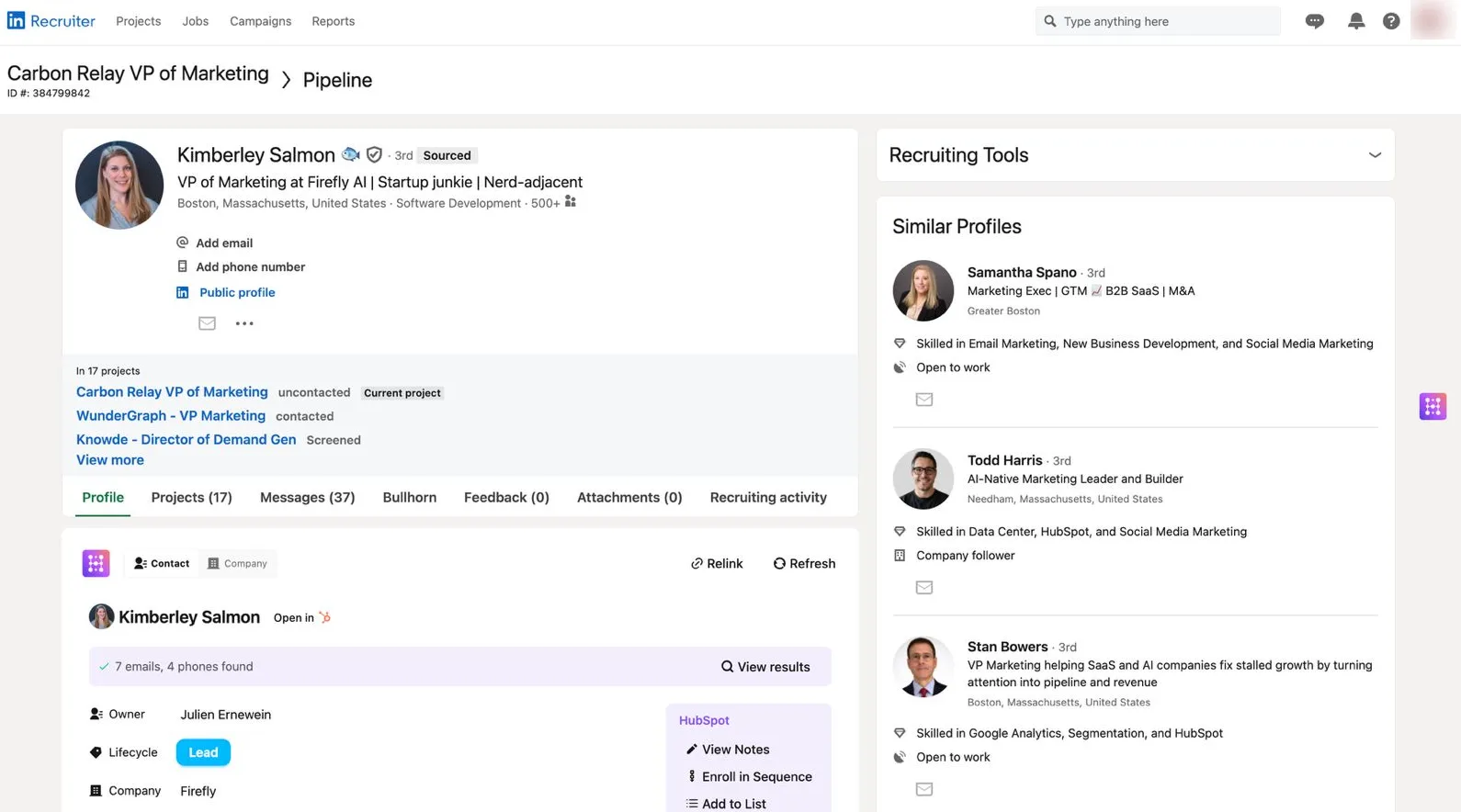
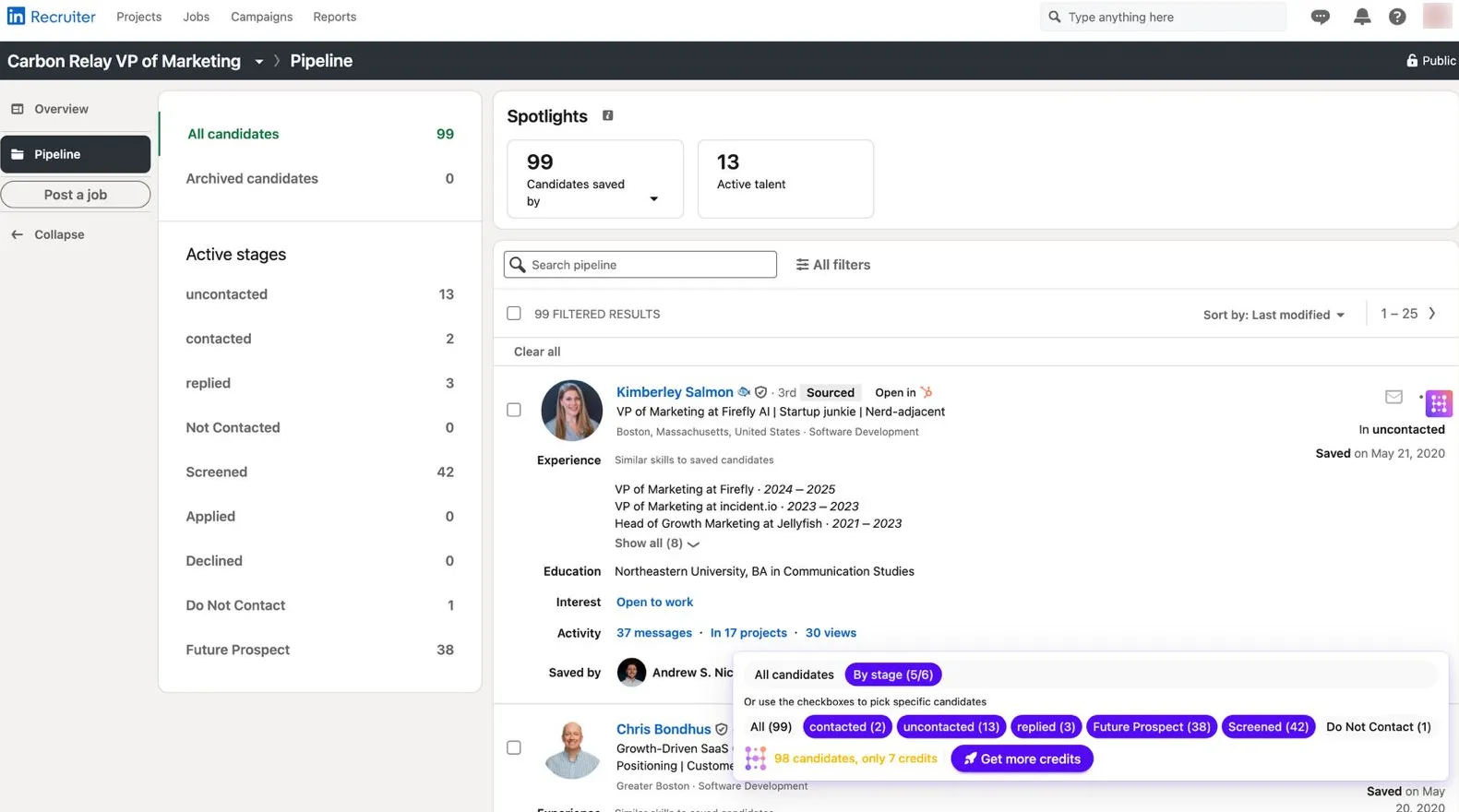
Si vous avez une longue liste de candidats que vous souhaitez synchroniser vers HubSpot, vous pouvez aussi importer l’intégralité de votre pipeline de candidats en quelques clics. Avec l’importateur en masse de Hublead, vous importez tous vos candidats ou filtrez par étape.
Consultez et modifiez les propriétés HubSpot dans LinkedIn
Rien ne vous ralentit plus que de devoir changer d’onglet.
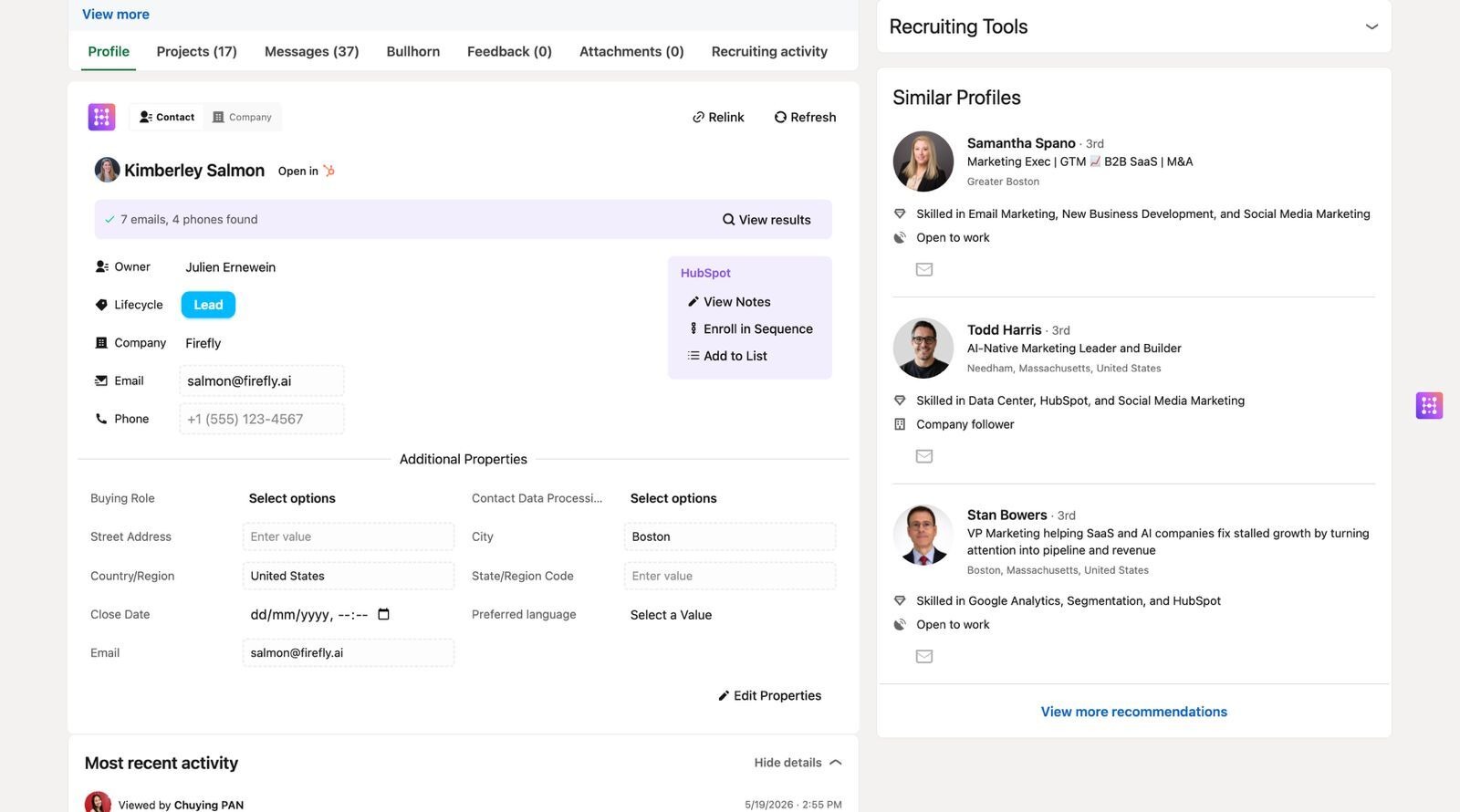
LinkedIn, retour à HubSpot, retour à LinkedIn, et ainsi de suite. Mises bout à bout, ces actions peuvent facilement vous coûter des heures par jour. Avec Hublead, vous consultez et modifiez les propriétés des contacts HubSpot directement dans LinkedIn.
Que vous souhaitiez suivre les informations de contact de base et y accéder depuis un profil de candidat lorsque vous le consultez sur LinkedIn, vérifier son étape de candidature ou même personnaliser votre affichage pour les propriétés de votre choix, vous pouvez le faire avec Hublead.
Essayez Hublead gratuitement pour intégrer LinkedIn à HubSpot
HubSpot est un CRM fantastique que les recruteurs peuvent utiliser pour gérer les candidats et les suivre à travers les étapes. Le seul souci, c’est la synchronisation des données LinkedIn entre les deux plateformes.
Si vous utilisez LinkedIn Recruiter et HubSpot pour gérer vos candidats, alors il n’existe pas de meilleur outil que Hublead pour intégrer les deux.
Hublead vous permet d’importer des profils de candidats, de suivre les statuts et de consulter/modifier les propriétés HubSpot, le tout dans LinkedIn. Le meilleur dans tout ça : vous pouvez essayer Hublead gratuitement. Inscrivez-vous pour un essai gratuit de Hublead et voyez combien de temps vous pouvez gagner cette semaine !
Prêt à corriger ton processus outbound ?
Questions fréquentes
Peut-on intégrer HubSpot et LinkedIn Recruiter ?
Avec Hublead, oui ! Hublead est une Extension Chrome qui intègre HubSpot et LinkedIn de façon fluide, ce qui te permet de synchroniser ton pipeline de candidats et tes DMs LinkedIn Recruiter directement dans HubSpot.
