LinkedHub vs Hublead: Which is Best for Syncing LinkedIn to Your CRM?
Compare LinkedHub and Hublead for LinkedIn to HubSpot. Hublead adds workflow triggers, bulk enrichment from HubSpot lists, deduplication,
On the surface, LinkedHub and Hublead both do one thing very well: syncing LinkedIn prospecting data back to HubSpot. That alone can save you hours of data entry. But only one of these tools offers a deeper integration with HubSpot to pack in more value.
Read on for a full breakdown covering features, pricing, and which tool is more valuable for sales teams in 2026.
LinkedHub vs Hublead: The quick verdict
At a glance, these tools are very similar; scratch below the surface, though, and there’s a world of difference between the two. LinkedHub syncs contact, message, and account data to HubSpot, but that’s it.
Meanwhile, Hublead does all of that plus:
- You can view/edit HubSpot properties on LinkedIn
- You can create tasks from LinkedIn
- You can enroll leads in Sequences from LinkedIn
- You can trigger HubSpot workflows with LinkedIn data
- You can enrich leads with accurate email addresses and phone numbers
Both are sync tools, but only one can power your entire sales workflow without having to log into HubSpot.
Why look for an alternative to LinkedHub?
If all you need to do is sync LinkedIn contact data, both LinkedHub and Hublead are fine options. But if your needs are more complex than that (and let’s face it, which sales teams aren’t?) then you’ll find that LinkedHub limits more than it helps. Users on G2 critique LinkedHub’s limited functionality and duplication issues.
If you need more than to simply sync LinkedIn data to HubSpot, but want to power your outbound process off of LinkedIn, then Hublead is the best choice. Read on to see why sales teams love Hublead.
Why 8,000+ sales teams love Hublead
Update HubSpot without ever leaving LinkedIn
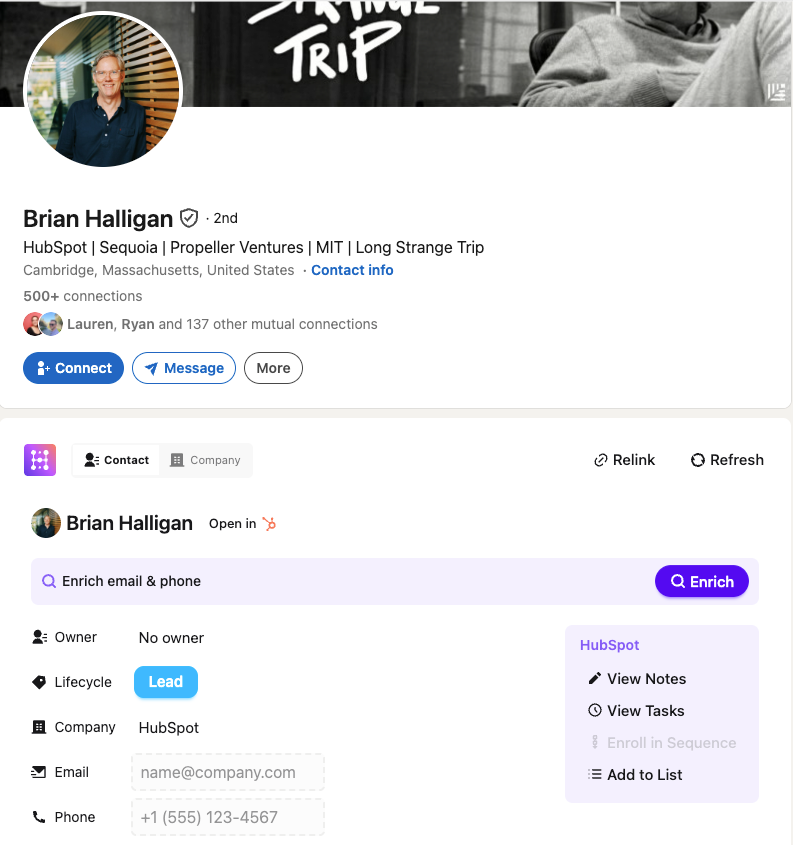
As valuable as HubSpot is, you still need to break out of your prospecting flow to use it. Tasks, notes, and lists are useful, but managing your CRM takes up valuable prospecting time.
Not so with Hublead. Hublead allows you to view and manage HubSpot data straight from LinkedIn. You can view and create tasks, enroll leads in sequences, create notes, and even update properties all without leaving LinkedIn.
Trigger HubSpot workflows from LinkedIn
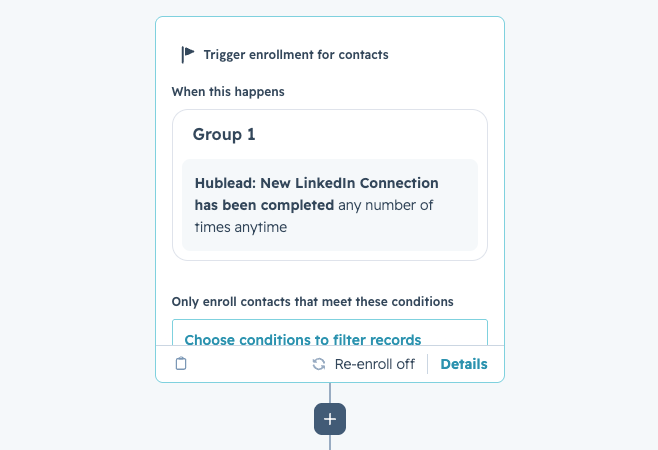
With Hublead, that invite acceptance becomes a workflow trigger inside HubSpot. The moment a prospect accepts your connection request, you can create tasks, enroll the contact in a sequence, update their lifecycle stage, and more without lifting a finger.
That’s the power of a deep integration with HubSpot. Not just syncing data, but making LinkedIn data and events actionable in your CRM.
See how trigger automations work →
Deduplication that actually works for HubSpot
There are tons of sales tools that sync data to HubSpot; the problem is that they create duplicate records, turning your CRM into a ball of yarn with no end in sight.
Hublead's deduplication is built for HubSpot's data model. It matches across LinkedIn URL, email, name, and company before anything gets created. When a rep adds someone on LinkedIn, that record is matched to any existing contact in HubSpot. The same goes for Account records too.
Bulk enrich any HubSpot list
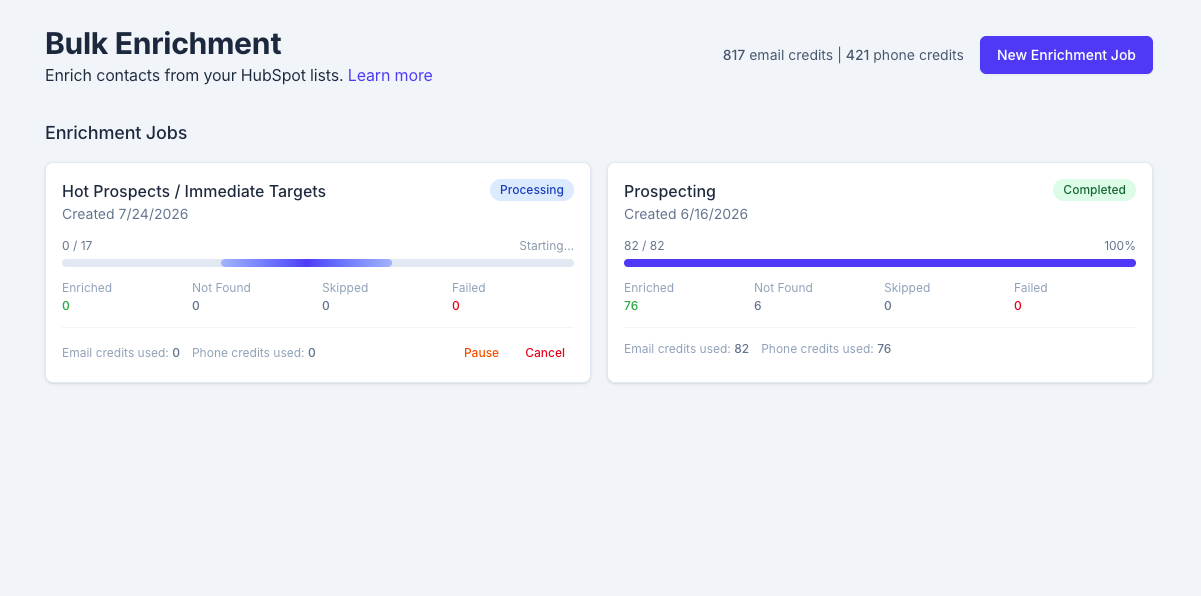
Most enrichment tools work one contact at a time. You visit a LinkedIn profile, click enrich, move to the next one. Do that 200 times, and you've lost half your day.
Hublead lets you bulk enrich any HubSpot list in seconds. Select a HubSpot list, click enrich, and get emails and phone numbers for the entire list in one click. No extra tools or messy exports needed.
Pipeline reporting that answers questions
When LinkedIn activity lives in HubSpot, managers finally get the full picture. Which reps are actually active on LinkedIn? Which conversations turned into pipeline? What's the conversion rate from outreach to booked meeting?
LinkedHub doesn't connect LinkedIn activity to pipeline outcomes inside HubSpot, but Hublead does. You can view all of your reps’ activity, track funnel reports for prospects on LinkedIn, and see how LinkedIn influences your pipeline.

Ready to fix your outbound process?
Hublead vs LinkedHub: A side-by-side comparison
| Category | LinkedHub | Hublead |
|---|---|---|
| One-click LinkedIn → HubSpot sync | ✅ | ✅ |
| Contact + company sync | ✅ | ✅ |
| Conversation capture | ✅ | ✅ |
| Bulk workflow | ✅ (auto-sync approach) | ✅ (bulk enrichment from HubSpot lists) |
| Email + phone enrichment | Available | ✅ |
| Deduplication / clean CRM | ✅ (hygiene features) | ✅ |
| HubSpot workflow triggers from LinkedIn signals | Not the core focus | ✅ |
| Lead scoring powered by LinkedIn signals | Not positioned for this | ✅ |
| LinkedIn-driven pipeline / revenue reporting | Not positioned for this | ✅ |
Pricing: LinkedHub vs Hublead
Hublead offers a flat monthly fee, starting at $32/mo per seat billed yearly, that allows you to sync unlimited contacts and companies to HubSpot and includes 50 credits per seat per month. Credits cover both emails and mobile numbers.
LinkedHub offers a free tier that allows you to sync 10 contacts per month, and scales its pricing based on how many contacts you want to sync. For a sales rep who prospects heavily on LinkedIn, you could pay as much as $30/month just to sync LinkedIn contact data.
Try Hublead and feel the difference
If your priority is “one-click sync” between LinkedIn and HubSpot, both tools can help.
But if you want to run your entire outbound program on LinkedIn while using HubSpot to its fullest capabilities, then Hublead is the right choice.
Ready to fix your outbound process?
Frequently asked questions
How is Hublead different from LinkedHub?
Both sync LinkedIn and HubSpot, but LinkedHub only syncs data, while Hublead offers enrichment, workflow triggers, sequence enrollment, lead scoring, and pipeline reporting.
Can I trigger HubSpot workflows from LinkedIn activity with LinkedHub?
Nope, but Hublead triggers HubSpot workflows and sequences from LinkedIn signals like an accepted invitation, and creates follow-up tasks automatically.
Does Hublead enrich contacts in bulk?
Yes. Pick a HubSpot list, enrich emails and phone numbers in bulk, and deduplicate to keep HubSpot clean.
Should I choose LinkedHub or Hublead?
Choose LinkedHub if you only want to sync records and keep fields clean. Choose Hublead if you want to run outbound as a system inside HubSpot with automation and reporting.