

Wie du LinkedIn-Prospecting-Aktivitäten in HubSpot verfolgst
Erfahre in diesem Guide, wie du all deine Prospecting-Aktivitäten von LinkedIn mit HubSpot synchronisierst.
Für mich steht außer Frage: LinkedIn ist der beste Prospecting-Kanal überhaupt. Nur ein kleines Problem: Wie stellst du sicher, dass all die Stunden, die du mit Recherche, Vernetzung und Nachrichten an Prospects verbringst, auch in deinem CRM landen?
Wenn Sales Manager in HubSpot reinschauen, um Outbound-Aktivitäten wie verschickte E-Mails oder geführte Calls zu checken, taucht deine harte Arbeit auf LinkedIn dort nicht auf – und das ist ein riesiges Problem für Sales Reps, die ihre Quote erreichen wollen.
Du musst aber nicht alles manuell in dein CRM kopieren. In diesem Guide zeige ich dir, wie du deine Prospecting-Aktivitäten mit HubSpot synchronisierst, damit deine ganze Arbeit lückenlos dokumentiert ist.
Warum du HubSpot und LinkedIn synchronisieren solltest
HubSpot trackt, was in HubSpot passiert. LinkedIn passiert woanders – und ohne ein bewusstes System, das beides verbindet, verschwindet diese Aktivität einfach.
Wenn dein LinkedIn-Outreach Antworten generiert, diese Konversationen aber nicht getrackt werden, kannst du der Pipeline keinen Kanal zuordnen, nicht erkennen, welches Messaging funktioniert, und Reps nicht an LinkedIn-Aktivitätszielen messen.
Die gute Nachricht: Das Problem ist lösbar. Lies weiter und entdecke die besten Integrationen und Tools.
Welche LinkedIn-Aktivitäten du in HubSpot tracken solltest
Bevor du irgendein System aufbaust, kläre, welche Aktionen wirklich auf Pipeline-Ergebnisse einzahlen – und welche nur Rauschen sind.
Hier sind die fünf Kategorien, die am häufigsten vorkommen:
- Verschickte und angenommene Kontaktanfragen: Das Volumen ist ein Basismetrik für Aktivität. Die Annahmequote ist aussagekräftiger, weil sie dir verrät, ob das Profil, die Positionierung und die Zielliste deines Reps funktionieren.
- LinkedIn-Nachrichten (DMs): Das ist die aussagekräftigste Aktivität auf der Liste. Die Antwortrate kommt der E-Mail-Antwortrate am nächsten. Wenn du nichts anderes trackst, trackt das.
- InMails: Für Teams mit Sales Navigator funktionieren InMails wie Cold Outreach an Prospects, mit denen du nicht vernetzt bist. Volumen und Antwortrate zählen. Logge sie wie eine Cold E-Mail.
- Profilaufrufe: Du kannst tracken, wann Reps Profile ansehen, aber das korreliert selten mit Ergebnissen und ist leicht zu manipulieren.
- Post-Engagement (Likes, Kommentare): Social-Selling-Aktivität zahlt auf den Markenaufbau ein, ist aber eine Vanity-Metrik für Pipeline-Reporting. Lass sie aus deinen SDR-Dashboards raus.
Die drei, die du wirklich brauchst, sind angenommene Kontaktanfragen, DM-Antwortraten und InMail-Antwortraten. Das sind die Signale, die dir sagen, ob LinkedIn-Prospecting Konversationen generiert.
Theoretisch alles super – aber wie machst du das in HubSpot? Das zeige ich dir gleich.

Bereit, deinen Outbound-Prozess zu optimieren?
Was HubSpots native LinkedIn Integration kann und was nicht
HubSpot hat eine native Integration mit dem LinkedIn Sales Navigator, und obwohl sie für die meisten Teams ganz ordentlich funktioniert, löst sie nur etwa 20 % des Problems.
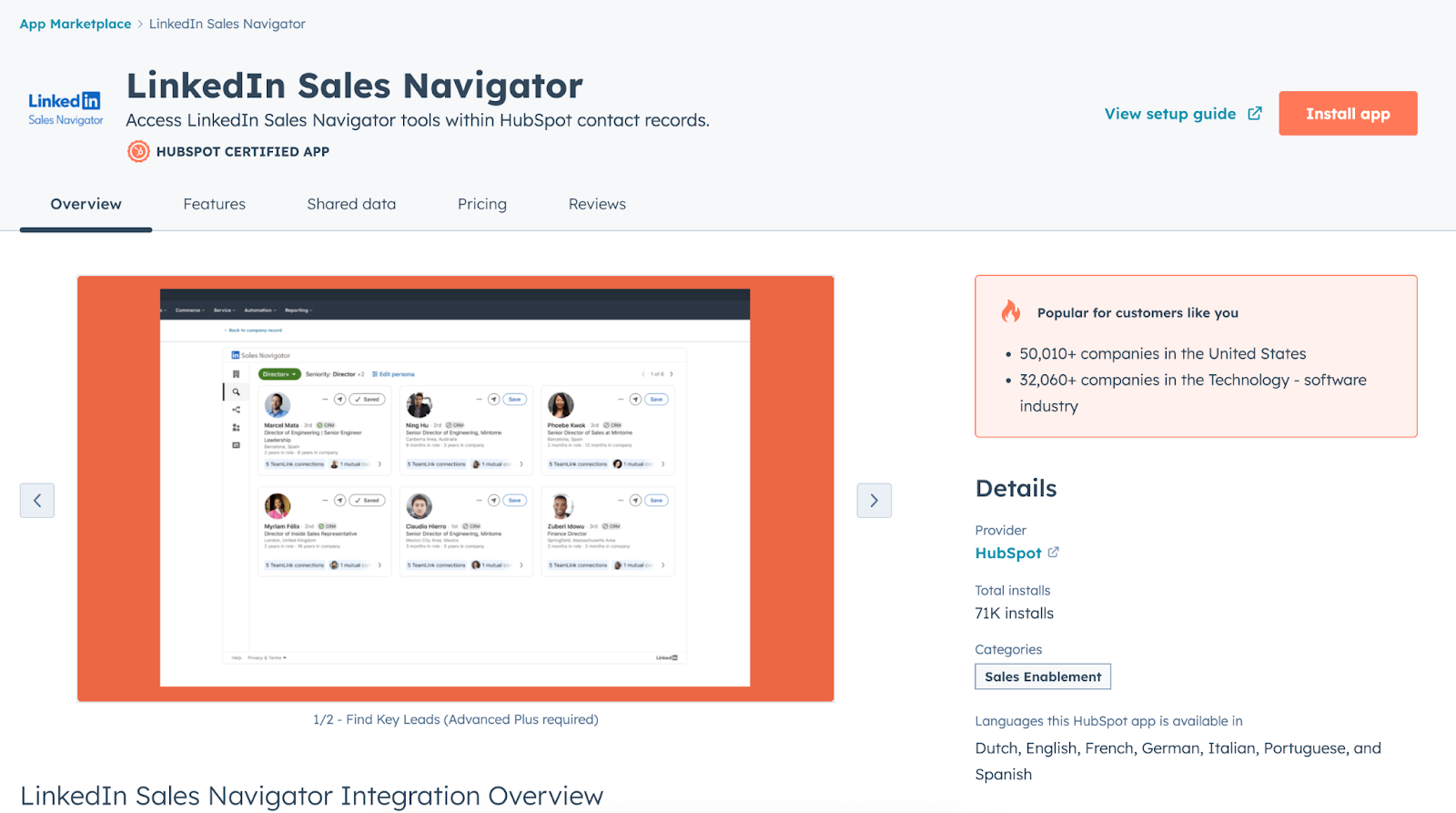
Das bietet dir die native Integration:
- LinkedIn-Profildaten aus HubSpot-Kontaktdatensätzen ansehen: Name, Titel, Unternehmen und gemeinsame Kontakte.
- InMails direkt aus einem HubSpot-Kontaktdatensatz senden, ohne den Tab zu wechseln.
- Die jüngste LinkedIn-Aktivität eines Prospects (Posts, Jobwechsel) in der Kontakt-Timeline sehen.
- Basis-Profildaten (Unternehmen, Rolle) mit HubSpot-Kontakteigenschaften syncen.
Aber das macht die native Integration nicht:
- Sie loggt LinkedIn-Nachrichten oder InMails nicht automatisch als Aktivitäten in HubSpot.
- Sie trackt nicht das Volumen an Vernetzungsanfragen oder Annahmeraten.
- Sie liefert dir keine LinkedIn-Aktivitätsmetriken pro Rep in HubSpot-Reports.
- Sie synct DM-Konversationen nicht in die Kontakt-Timeline.
Die zentrale Einschränkung ist, dass die native Integration für Profil-Sichtbarkeit gebaut ist, nicht für Aktivitäts-Tracking. Sie hilft dir, LinkedIn-Daten anzusehen, ohne HubSpot zu verlassen, schließt aber nicht den Kreis in die andere Richtung: LinkedIn-Aktivität zurück in HubSpot zu bringen, damit du darüber reporten kannst.
Außerdem ist die Integration auf die höchsten Sales-Navigator-Stufen beschränkt, was sie für kleinere Sales Teams unzugänglich macht, die gerade erst eine Outbound-Sales-Motion auf LinkedIn aufbauen.
Zum Glück gibt es Drittanbieter-Tools, die diese Lücken schließen.
Die besten Tools, um LinkedIn-Prospecting-Daten in HubSpot zu syncen
Die native LinkedIn Integration ist ein ordentlicher Start, lässt für Sales Reps aber viel zu wünschen übrig. Um diese Lücken zu schließen, probiere eine der folgenden Drittanbieter-Optionen:
- API-basierte Automatisierungen aufsetzen
- Ein speziell dafür gebautes Tool nutzen
API-basierte Automatisierung (z.B. n8n, Zapier)
Es ist möglich, deine eigene LinkedIn-zu-HubSpot-Automatisierung mit Tools wie n8n zu bauen.
Ein kurzer Streifzug durch Reddit oder die HubSpot Community zeigt kreative Wege, wie Sales Reps das gelöst haben. Der offensichtliche Vorteil dieses Wegs gegenüber der Sales-Navigator-Integration ist, dass du volle Flexibilität hast, alles so aufzusetzen, wie du willst. Der Nachteil: LinkedIns API-Zugang für DMs und InMails ist eingeschränkt, und der Aufbau einer verlässlichen Pipeline erfordert von dir einen erheblichen technischen Aufwand.
Wenn du einen Entwickler zur Hand hast, der das für dich baut, kann das funktionieren. Andernfalls probiere die nächste Option.
Speziell dafür gebaute Chrome Extensions
Genau dieses Problem hatte ich selbst, als ich als Marketing- und GTM-Leader gearbeitet habe – deshalb haben wir Hublead gebaut, eine Chrome Extension, die LinkedIn nahtlos mit HubSpot integriert.
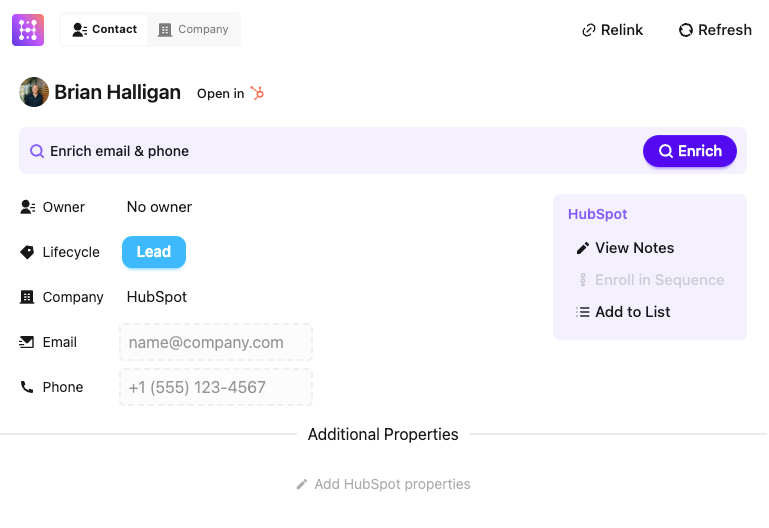
Alles, was du tun musst, ist Hublead zu deinem Chrome-Browser hinzuzufügen und dein HubSpot-Portal zu verbinden, und voilà, du bist startklar.
Hier ein Vorgeschmack auf das, was du mit Hublead machen kannst:
- Prospect-Daten aus HubSpot in LinkedIn ansehen, ohne zu deinem Portal zurückzuwechseln.
- Einen Prospect mit einem Klick von LinkedIn in HubSpot importieren.
- Prospects mit akkuraten E-Mail-Adressen und Telefonnummern anreichern.
- Nachrichtenvorlagen für LinkedIn erstellen und speichern.
- DMs und InMails syncen.
- Bei der Lead-Suche mit dem Sales Navigator bereits gespeicherte Prospects herausfiltern.
- Vernetzungsanfragen und -annahmen in HubSpot tracken.
- Workflows basierend auf Prospect-Aktivität auf LinkedIn auslösen.
Und vieles mehr.
Kein Kopieren und Einfügen mehr. Kein Deduplizieren von Kontakten und Aufräumen von Datensätzen mehr. Du kannst auf LinkedIn prospecten und darauf vertrauen, dass jede Vernetzung, jede DM und jede InMail ihren Weg zurück in HubSpot findet.
Sales Reps sind sich einig, dass Hublead ein Lebensretter ist:
„Hublead ist super einfach zu bedienen. Du arbeitest einfach weiter auf LinkedIn wie gewohnt, kannst aber gleichzeitig Infos in deine CRM teilen!“
So baust du ein LinkedIn-Prospecting-Dashboard in HubSpot
Sobald die LinkedIn-Aktivität mit Hublead oder einer anderen Methode in HubSpot synct, hast du die Bausteine für aussagekräftiges Sales Reporting.
Der Schlüssel ist, es fokussiert zu halten; richte diese vier Reports ein, sobald du LinkedIn-Daten in deine CRM gepiped hast:
- Aktivität pro Rep: LinkedIn-Nachrichten vs. E-Mails vs. Calls. Das zeigt, ob Reps ihre Aktivitätsziele erreichen und wie LinkedIn im Vergleich zu anderen Outreach-Kanälen abschneidet.
- LinkedIn Outreach-zu-Antwort-Verhältnis: Gesendete Nachrichten oder InMails geteilt durch erhaltene Antworten, pro Rep. Ein Rep mit hohem Volumen und niedriger Antwortrate hat ein Messaging-Problem. Ein Rep mit niedrigerem Volumen, aber starken Antwortraten findet die richtigen Leute mit der richtigen Botschaft.
- Vernetzungs-Annahmerate pro Rep: Nützlich, um Probleme im frühen Funnel zu diagnostizieren; wenn die Anfragen eines Reps nicht angenommen werden, ist das ein Targeting- oder Profil-Problem, das Coaching wert ist.
- Aus LinkedIn generierte Pipeline: Das erfordert, Kontakte oder Deals beim Import mit einer LinkedIn-Quelle zu taggen. Wenn du Hubleads Ein-Klick-Kontaktimport nutzt, kannst du die Original-Source-Eigenschaft standardisieren, damit dieser Report akkurat ist.
Schau dir meine liebsten HubSpot Sales Dashboards für weitere Reporting-Beispiele an.
So nutzt du LinkedIn-Prospecting-Daten fürs Lead Scoring
Die meisten Teams scoren Leads anhand von E-Mail-Öffnungen und Seitenaufrufen. Dabei sitzen die stärksten Kaufsignale in ihren LinkedIn-DMs – komplett ungetrackt.
Sobald die LinkedIn-Aktivität als Kontakteigenschaften und Timeline-Events in HubSpot fließt, kannst du sie als Input in HubSpots Lead-Scoring-Modellen nutzen.
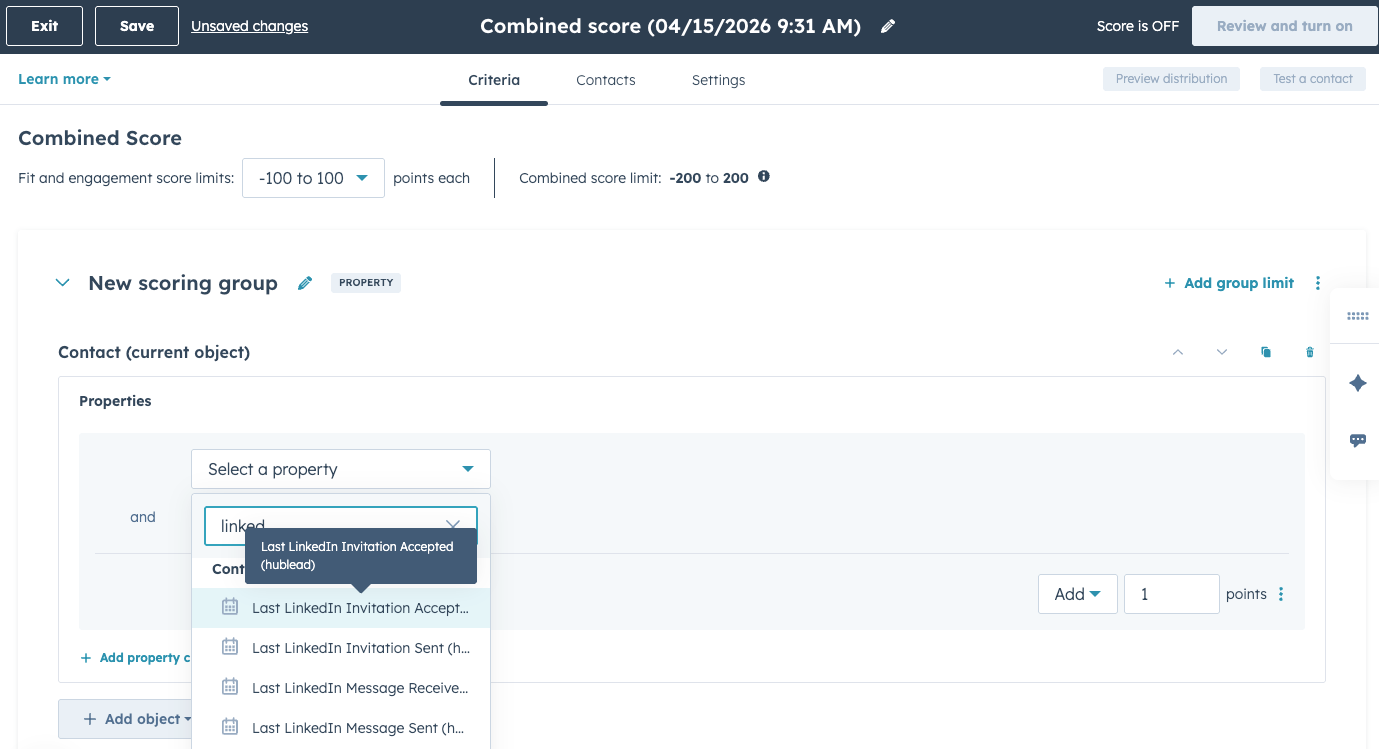
Aus meiner Erfahrung liegen LinkedIn-Engagement-Signale auf einem Spektrum von Kaufabsicht:
- Angenommene Vernetzungsanfrage: Deine Vernetzungsanfrage anzunehmen ist ein solider Start, aber ein moderates Intent-Signal. Jetzt fängt die Arbeit an: sie zum Reden zu bringen.
- Antwort auf eine DM innerhalb von 48 Stunden: Auf deine DMs zu antworten zeigt hohe Kaufabsicht. Sie sind aufmerksam und bereit, sich zu engagieren – das könnte signalisieren, dass das Kauffenster offen ist.
- Antwort auf eine InMail mit einer Rückfrage: Wie oben zeigt das Beantworten einer InMail sehr hohe Kaufabsicht. Diese Person ist interessiert, also markiere sie für sofortiges Follow-up.
Halte das initiale Setup einfach. Versuch nicht, ein Scoring-Modell mit 15 Faktoren zu bauen; das Ziel ist, die LinkedIn-engagierten Kontakte ganz oben auf der Anrufliste eines Reps sichtbar zu machen, damit sie nicht unten in einer Tabelle versauern.
Für eine komplette Anleitung schau dir unseren HubSpot Lead Scoring Guide an.
Teste Hublead kostenlos und sieh, wie viel Zeit es dir diese Woche sparen kann
Deine nativen Optionen, um LinkedIn-Prospecting-Aktivitäten zurück in HubSpot zu syncen, sind vielleicht begrenzt, aber individuelle Integrationen und Drittanbieter-Tools können dabei helfen, dass deine CRM akkurat und aktuell bleibt.
LinkedIn ist heute der #1-Prospecting-Kanal fürs Social Selling, also brauchen deine Reps jeden Vorteil, den sie kriegen können, um LinkedIn als Outbound-Kanal zu optimieren und ihre Effektivität gegenüber dem Team zu zeigen.
Dafür gibt es kein besseres Tool als Hublead. Mit Hublead kannst du jede Vernetzungsanfrage, jede DM und jede InMail direkt zu HubSpot syncen und sogar Kontakte mit akkuraten E-Mail-Adressen und Telefonnummern anreichern, um dein Outreach zu befeuern. Sales Reps sparen dank Hublead mehr als 2 Stunden pro Woche. Teste Hublead hier kostenlos, um deinen Prospecting-Workflow zu boosten.
Bereit, deinen Outbound-Prozess zu optimieren?
Häufig gestellte Fragen
Hat HubSpot eine LinkedIn Integration?
Es gibt keine direkte LinkedIn-zu-HubSpot-Integration, aber Tools machen es einfach, Daten von LinkedIn in deine HubSpot-CRM-Datenbank zu kopieren – das spart Zeit und Frust.
Wie importiere ich LinkedIn-Kontakte in HubSpot?
Du kannst LinkedIn-Kontakte in HubSpot importieren, indem du deine LinkedIn-Kontakte als CSV-Datei exportierst oder eine Chrome Extension wie Hublead nutzt, mit der du deine LinkedIn-Kontakte direkt importierst und deine HubSpot-Kontaktliste automatisch aktualisierst.
Kann ich anpassen, welche Daten zwischen LinkedIn und HubSpot gesynct werden?
Ja, du kannst die zwischen LinkedIn und HubSpot gesyncten Daten anpassen, indem du Felder mappst. Du kannst wählen, welche LinkedIn-Felder welchen HubSpot-Feldern zugeordnet werden, und so steuern, welche Daten gesynct werden.
Wie integriere ich LinkedIn mit HubSpot?
Installiere die Hublead Chrome Extension. Geh auf LinkedIn und fang an, Kontakte mit einem einzigen Klick über den Hublead-Button zu importieren. Synce LinkedIn-Nachrichten zu HubSpot, und Hublead synchronisiert neue Nachrichten automatisch. Hubleads KI-gestützter Algorithmus hilft dabei, E-Mails & Telefonnummern zu finden, und prüft in Echtzeit, ob ein LinkedIn-Kontakt bereits in HubSpot existiert, um Dubletten zu vermeiden.