

So speicherst du Leads von LinkedIn in HubSpot
Erfahre, wie du Leads, die du auf LinkedIn prospektierst, schnell und einfach in HubSpot speicherst.
Nichts unterbricht meinen Prospecting-Flow mehr, als einen separaten Tab öffnen und Daten in ein CRM eintippen zu müssen.
LinkedIn ist die beste Prospecting-Datenbank der Welt, kombiniert mit einer der besten Messaging-Plattformen für Vertriebler. Wäre es nur direkt in HubSpot eingebaut. Wenn du intensiv auf LinkedIn prospektierst, führt kein Weg daran vorbei. Du musst dafür sorgen, dass jede Einladung, DM und InMail in HubSpot kopiert wird – sonst sieht dein Manager sie nie.
Gibt es einen einfacheren Weg? In diesem Guide zeige ich dir den besten Weg, Leads von LinkedIn mit HubSpot zu synchronisieren, damit alle deine Interessenten und Touches in deinem CRM landen.
HubSpots native Tools, um Leads mit LinkedIn zu synchronisieren
Zunächst gibt es ein paar „native“ Möglichkeiten, das über HubSpots unterstützte Integrationen mit LinkedIn zu tun. Die drei Optionen sind:
- HubSpots LinkedIn-Integration
- HubSpots Sales-Navigator-Integration
- LinkedIn-Lead-Formulare
Gehen wir jede einzeln durch, inklusive Vor- und Nachteile.
HubSpot LinkedIn CRM Sync
HubSpots LinkedIn CRM Sync ist eine bidirektionale Integration mit LinkedIn Sales Navigator und LinkedIn Ads. Für Vertriebler kannst du damit Kontakte, Accounts und Opportunities sowie Kontaktanfragen und InMails synchronisieren.
Es gibt nur ein kleines Problem: Es erfordert Sales Navigator Advanced Plus und funktioniert weder mit anderen Sales-Navigator-Stufen noch mit dem regulären LinkedIn.
Selbst wenn du Sales Navigator Advanced Plus hast, hat die Integration 2,7 Sterne und zahlreiche negative Bewertungen, die erwähnen, dass Daten zwischen LinkedIn und HubSpot oft verloren gehen – was den Sinn der Integration zunichtemacht.
Vorteile von LinkedIn CRM Sync
- Es ist die offizielle Integration zwischen LinkedIn und HubSpot, also weißt du, dass sie einigermaßen unterstützt wird.
Nachteile von LinkedIn CRM Sync
- Es funktioniert nur mit Sales Navigator Advanced Plus.
- Es ist schlecht bewertet und fehleranfällig und zwingt Reps oft dazu, Daten manuell einzugeben.
HubSpots LinkedIn-Sales-Navigator-Integration
Etwas verwirrend bietet HubSpot eine separate LinkedIn-Sales-Navigator-Integration an, die einige der gleichen Dinge tut wie die CRM-Sync-Integration.
Wie die CRM-Sync-Integration erlaubt dir die HubSpot-Sales-Navigator-Integration, Kontaktanfragen und InMails zu synchronisieren, synchronisiert aber keine anderen Daten. Wie die CRM-Sync-Integration erfordert auch diese ein Advanced-Plus-Sales-Navigator-Abo und ist mit nur 2 Sternen schlecht bewertet.
Vorteile der HubSpot-Sales-Navigator-Integration
- Es ist die offizielle Integration zwischen LinkedIn Sales Navigator und HubSpot, also weißt du, dass sie einigermaßen unterstützt wird.
Nachteile der HubSpot-Sales-Navigator-Integration
- Es funktioniert nur mit Sales Navigator Advanced Plus.
- Es synchronisiert nur Kontaktanfragen und InMails.
- Es hat schlechtere Bewertungen als die CRM-Sync-Integration.
LinkedIn-Lead-Formulare
Die letzte Möglichkeit, Leads von LinkedIn in HubSpot zu speichern, sind Lead-Formulare auf LinkedIn. Das sind Formulare, mit denen du auf LinkedIn Leads sammeln und die Formular-Einsendungen zurück an HubSpot synchronisieren kannst.
Und anders als die übrigen LinkedIn-Integrationen funktionieren diese ziemlich gut! Das offensichtliche Problem hier ist natürlich, dass das großartig für Inbound, aber nutzlos für Outbound ist. Wenn du aktiv Leads außerhalb deines CRM prospektierst, um sie in deinen Cold-Funnel zu bringen, ist ein Lead-Gen-Formular kaum von Nutzen.
Vorteile von Lead-Formularen
- Wie die anderen ist es eine der offiziell unterstützten Integrationen.
Nachteile von Lead-Formularen
- Es funktioniert großartig für Marketing-Teams, aber nicht für den Vertrieb. Die Lead-Gen-Formular-Integration ist keine Lösung fürs Prospecting.
Die HubSpot-Integrationen mit LinkedIn mögen „offiziell“ sein, aber sie lassen für Vertriebler, die ihre Prospecting-Aktivitäten zurück nach HubSpot synchronisieren wollen, viel zu wünschen übrig. Zum Glück gibt es Drittanbieter-Tools, die du nutzen kannst – die behandeln wir als Nächstes.

Bereit, deinen Outbound-Prozess zu optimieren?
Der beste Weg, Leads von LinkedIn für Sales-Teams mit HubSpot zu synchronisieren
Die Vertriebler von heute müssen praktisch überall gleichzeitig sein.
Das bedeutet aktives Prospecting auf LinkedIn, DMs, E-Mails, Cold Calls – und dabei einen Weg zu finden, organisiert zu bleiben und aus dem Rauschen herauszustechen.
Du brauchst Tools, die dir Arbeit abnehmen, dich nicht ausbremsen oder im Weg stehen. Wenn du die beste Drittanbieter-Integration willst, um deine gesamte Prospecting-Aktivität (Leads, DMs, InMails und Einladungen) mit HubSpot zu synchronisieren – unabhängig von deiner HubSpot-Stufe oder deinem LinkedIn-Abo – empfehlen wir Hublead.
Hublead ist ein Produkt, das wir gebaut haben, um LinkedIn- und HubSpot-Daten zu synchronisieren, nach Leads zu suchen und Leads direkt in LinkedIn anzureichern. Das bedeutet viel mehr Zeit fürs Finden, Vernetzen und Anschreiben von Interessenten und viel weniger Zeit für die Verwaltung deines CRM.
Folge einfach diesen Schritten, um Stunden aus deiner Woche zu sparen:
- Füge Hublead zu Chrome hinzu
- Importiere Leads von LinkedIn
- Importiere Leads aus Sales Navigator
Hublead zu Chrome hinzufügen
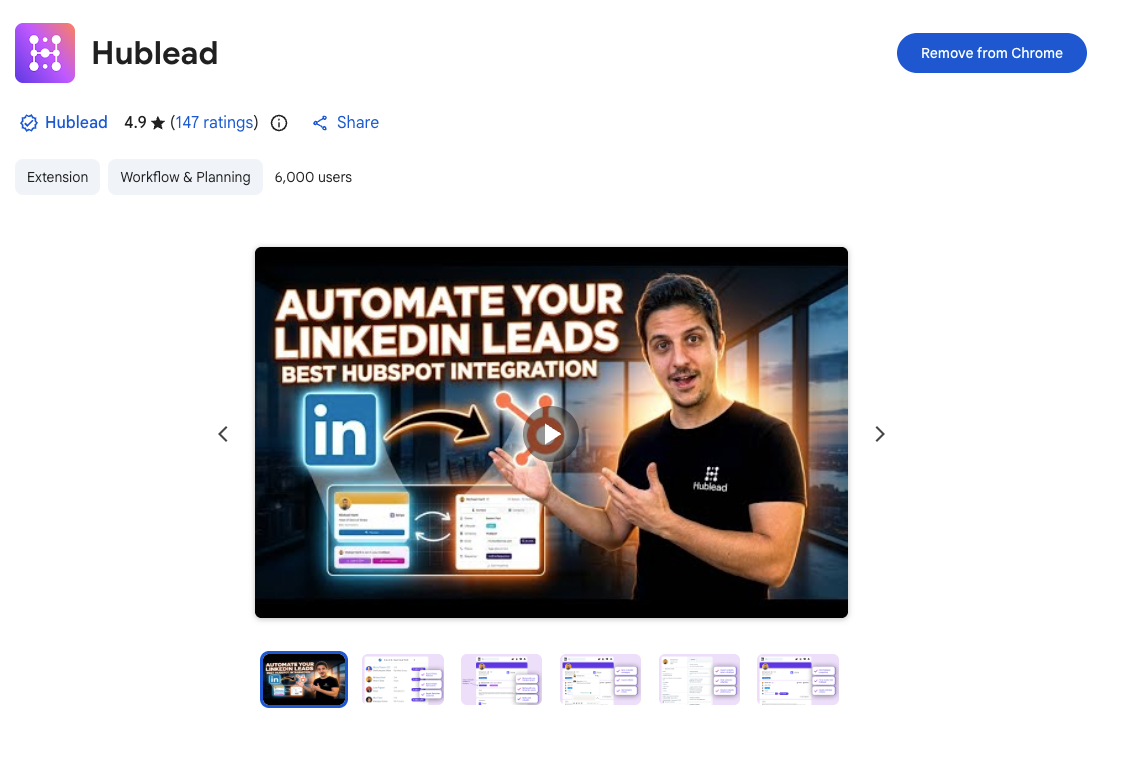
Geh zum Chrome Store, um Hublead zu installieren. Du kannst Hublead kostenlos testen, um zu sehen, wie es zu deinem Prospecting-Flow passt, bevor du ein kostenpflichtiges Abo abschließt (das schon ab 32 $/Monat startet).
Leads von LinkedIn importieren
Wenn Hublead installiert und mit deinem Portal verbunden ist, geh zu einem beliebigen Profil auf LinkedIn, das du in deinem CRM speichern möchtest. Wenn der Kontakt noch nicht mit HubSpot synchronisiert wurde, siehst du im neuen Hublead-Bereich seines Profils einen CTA, um einen neuen Kontakt zu erstellen:
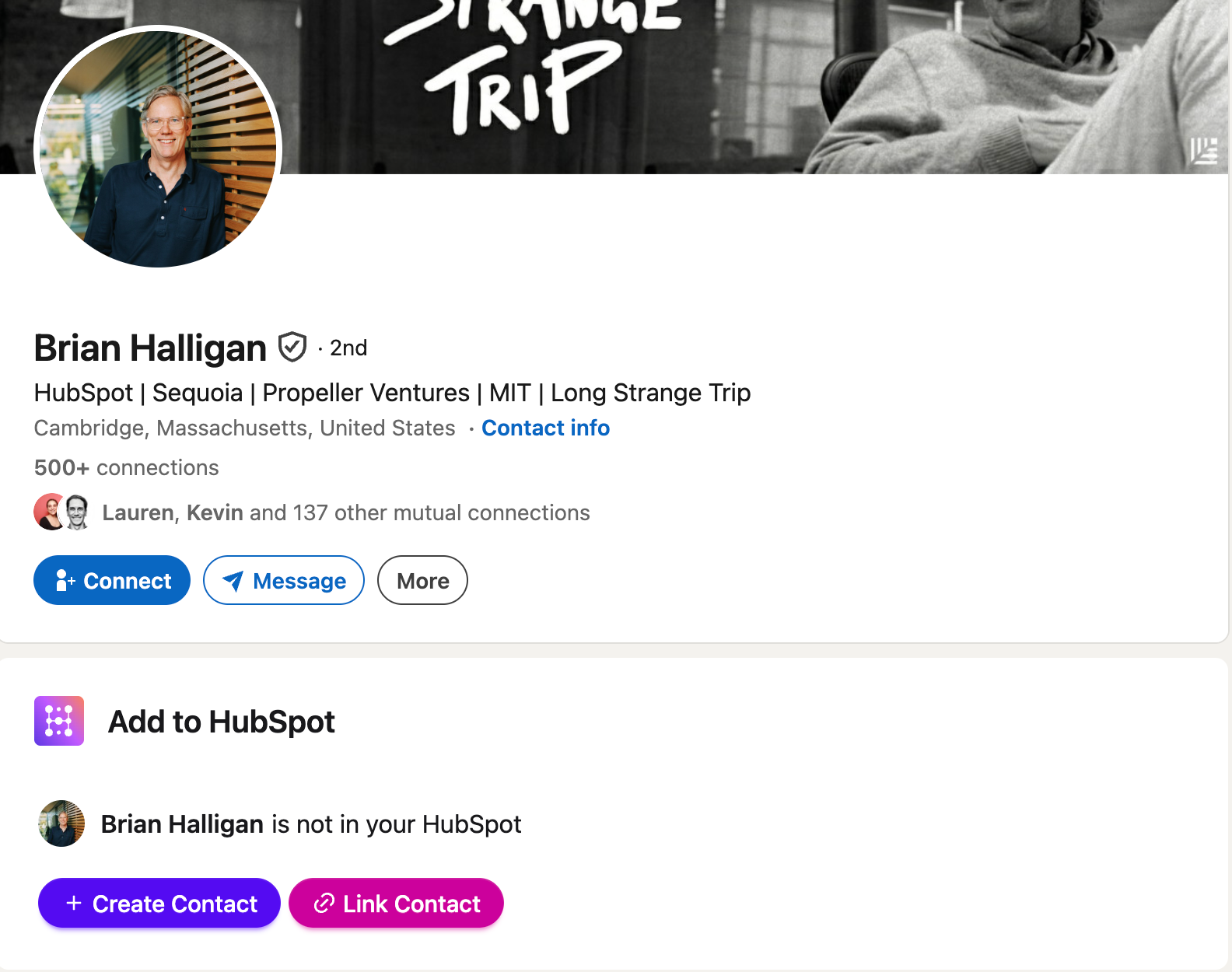
Klick darauf, und Hublead erstellt automatisch einen Kontakt in deinem HubSpot-Portal und verknüpft ihn mit seinem LinkedIn-Profil.

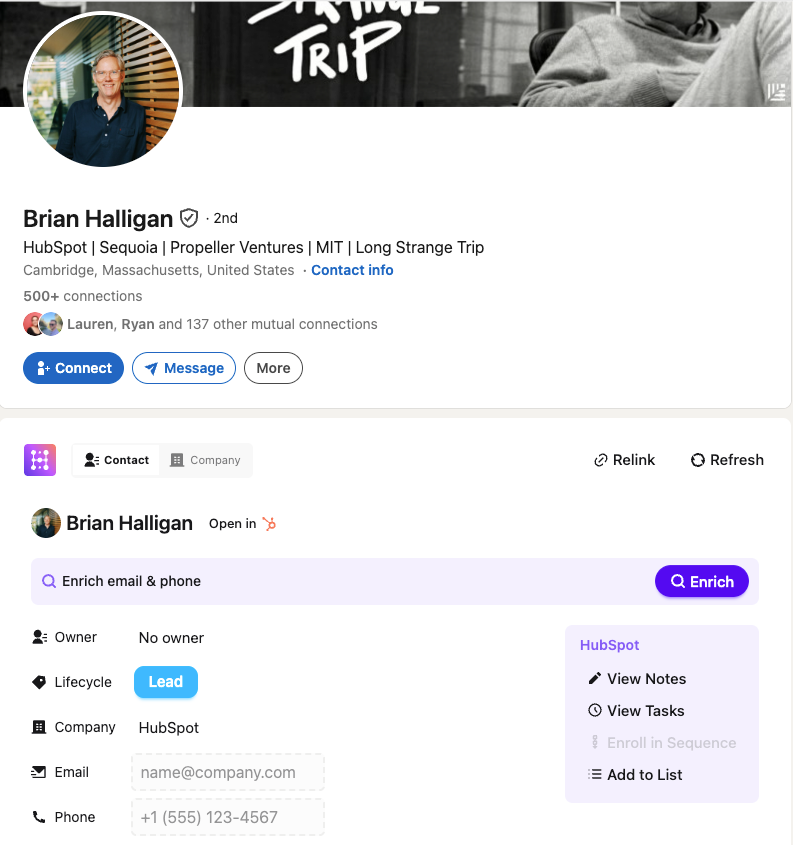
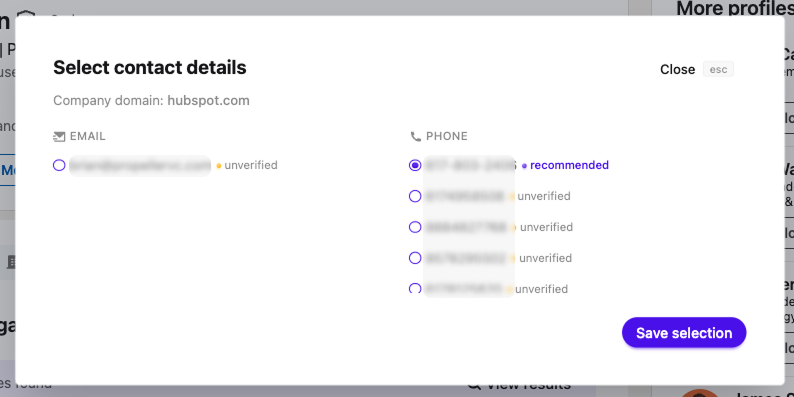
Und wenn du eine E-Mail-Adresse oder Telefonnummer für deinen Interessenten brauchst (was du solltest, denn du willst ihn über mehrere Kanäle erreichen), kann Hublead das auch finden. Klick einfach auf den „Anreichern“-Button für genaue Kontaktdaten.
Leads aus Sales Navigator importieren
Mit Sales Navigator ist es genauso einfach.
Geh zum Profil eines beliebigen Leads in Sales Navigator, und du siehst dieselben Aufforderungen, neue Kontakte zu erstellen und mit deinem Portal zu synchronisieren. Hublead verknüpft entweder sein LinkedIn-Profil mit einem bestehenden Kontakt oder erstellt einen neuen für dich.
Du kannst Leads auch in Sales Navigator anreichern, sodass du neue Interessenten in Sekunden filtern und speichern und sofort über mehrere Kanäle mit ihnen in Kontakt treten kannst.
Wie du Leads suchst und in großen Mengen speicherst
Das ist alles schön und gut, wenn du einzeln prospektierst und Leads speicherst – aber was ist mit großen Mengen?
Viele Sales-Teams nutzen Lead-Gen-Tools wie Apollo und Clay, um Leads zu filtern und in HubSpot zu importieren. Aber wie die LinkedIn-Integrationen haben auch diese Integrationen gemischte Bewertungen.
Auch hier kann Hublead dir helfen. Wir haben die Lead-Suche in der Web-App zu Hublead hinzugefügt, mit der du nach deinem ICP filtern kannst – inklusive Rolle, Standort, Branche und mehr – deine Kontaktliste anreichern und sie direkt in HubSpot speichern kannst.
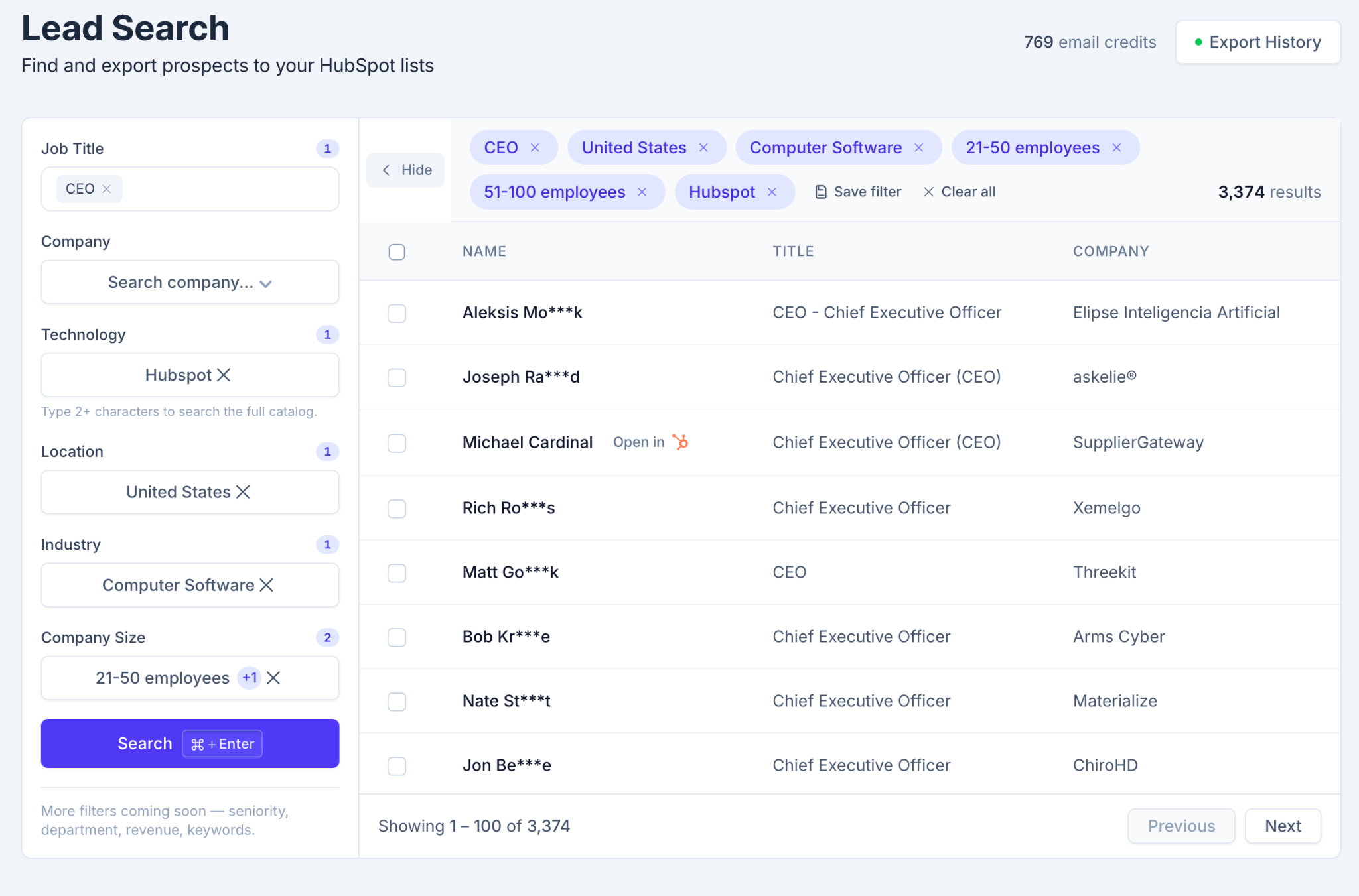
In Sekunden könntest du Hunderte von Interessenten in deiner Pipeline haben, was dir noch mehr Zeit gibt, dich auf die Ansprache und das Weiterbewegen im Funnel zu konzentrieren.
Synchronisiere deine Leads noch heute, teste Hublead kostenlos
LinkedIn ist heute eines der stärksten Prospecting-Tools für Vertriebler, aber wenn deine harte Arbeit auf LinkedIn nicht in HubSpot auftaucht, ist es, als wäre sie nie passiert.
Du kannst aber keine wertvollen Prospecting-Minuten opfern, um anzuhalten und Daten in dein CRM zu kopieren – und genau hier kann Hublead helfen.
Wir haben Hublead gebaut, um jeden Touchpoint von LinkedIn zurück nach HubSpot zu synchronisieren, einfacher als je zuvor. Jede Einladung, DM oder InMail, die du sendest, wird zurück zu jedem HubSpot-Kontaktdatensatz synchronisiert und gibt dir und deinem Team Einblick in jeden Touchpoint auf LinkedIn.
Teste Hublead kostenlos und sieh, wie viel Zeit du sparen kannst.
Bereit, deinen Outbound-Prozess zu optimieren?
Häufig gestellte Fragen
Wie kann ich HubSpot mit LinkedIn synchronisieren?
Hublead ist der beste Weg, Leads und DMs von LinkedIn mit HubSpot zu synchronisieren. Hublead funktioniert mit jeder HubSpot-Stufe sowie mit der kostenlosen Version von LinkedIn und jeder Sales-Navigator-Stufe.
Ich habe kein Sales Navigator Advanced Plus. Kann ich es mit HubSpot synchronisieren?
Kein Problem mit Hublead! Anders als die von HubSpot unterstützten Integrationen funktioniert Hublead mit jeder Sales-Navigator-Stufe und der kostenlosen Version von LinkedIn.
Was ist der beste E-Mail-Finder für LinkedIn?
Hublead kann E-Mail-Adressen und Telefonnummern für jeden Lead auf LinkedIn mit 95 % Genauigkeit finden. Du kannst Kontakte direkt auf LinkedIn anreichern oder eine ganze HubSpot-Liste aus der Hublead-App anreichern.
