
Create one clean workflow in LinkedIn
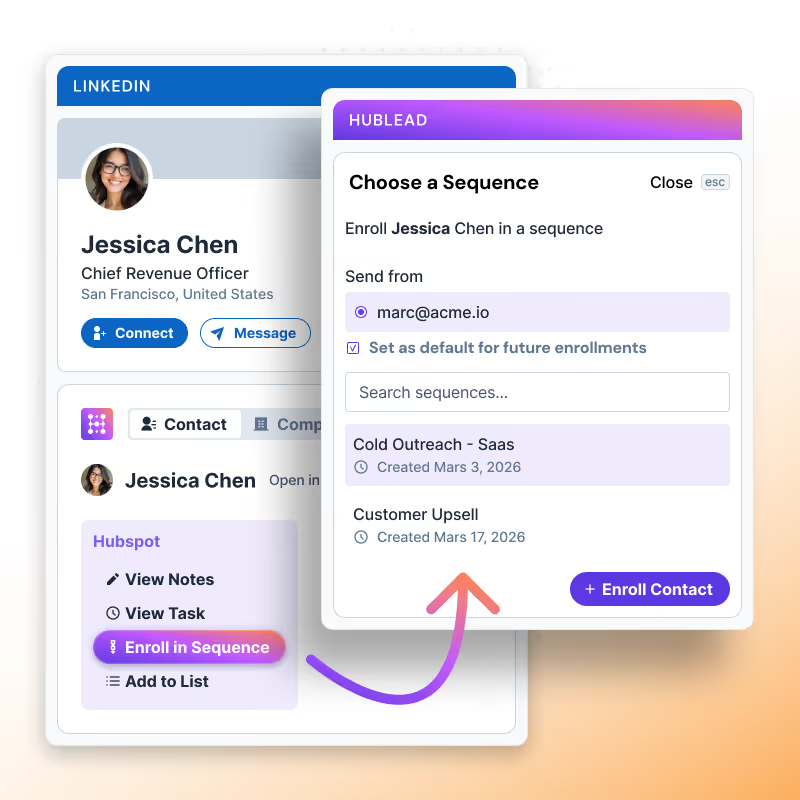
Let reps sell from one unified workspace inside LinkedIn. No tool-switching, no interruptions.
Try Hublead for Free
Loved by 8,000+ Users













HubSpot LinkedIn Chrome Extension
Hublead is perfect for sales reams looking to prospect faster on LinkedIn
Hublead is the perfect tool for sales teams looking for better data enrichment in their CRM:
Manage HubSpot from LinkedIn
Add, edit, or link contacts and companies to HubSpot in a few clicks, without ever opening HubSpot.

Perform HubSpot actions directly inside LinkedIn
Find verified emails and phone numbers, update CRM data, enroll contacts into sequences, and enrich companies with technologies in just a few clicks.
Align outbound process
Add, edit, or link contacts and companies to HubSpot in a few clicks, without ever opening HubSpot.
Prospect faster on LinkedIn and Sales Navigator with Hublead.
Manage HubSpot from LinkedIn or Sales Navigator
Add, edit, or link contacts and companies to HubSpot in a few clicks, without ever opening HubSpot.
Learn more
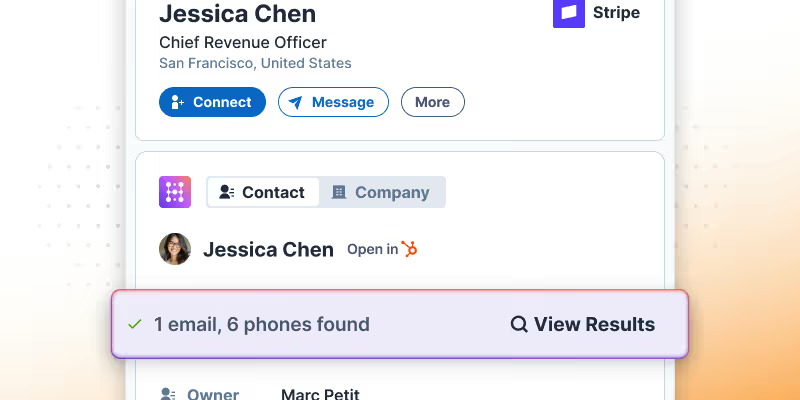
Perform HubSpot actions directly inside LinkedIn
Find verified emails and phone numbers, update CRM data, enroll contacts into sequences, and enrich companies with technologies in just a few clicks.
Learn more

Align your outbound process
Use real templates and messaging patterns to improve consistency and performance.
Learn more
Lead search built for HubSpot
Hublead was built for sales reps who want to spend more time prospecting and less time managing different tools.
Keep your CRM clean
Keep all prospect in HubSpot for complete context
75%
more meetings booked
Enrich leads in seconds
Enrich individual contacts or an entire list in seconds
95%
accurate and up-to-date information
Track LinkedIn activities
Track message response times and follow-up effectiveness
2+
hours saved every week
HubSpot LinkedIn Chrome Extension
Frequently Asked Questions
See HubSpot data on LinkedIn, no need to switch tabs every time you're landing on a prospect.
What does Hublead do inside LinkedIn?
Hublead creates one clean workspace in LinkedIn so reps can prospect, update HubSpot, and enrich contacts without switching tools.
Can Hublead import contacts from LinkedIn or Sales Navigator?
Yes, one click imports contacts into HubSpot and prevents duplicates so reps stay organized.
Does Hublead sync LinkedIn messages and invitations?
Yes, you can sync conversations and invitations to HubSpot and keep a full outbound history for every contact.
How does Hublead help sales reps save time?
Reps avoid tool switching and manual copy pasting. Everything needed for outreach, follow up, and enrichment lives in LinkedIn.
Can managers track what reps do on LinkedIn?
Yes, Hublead updates key LinkedIn activity properties in HubSpot so managers can coach, measure performance, and keep data clean.
Does Hublead improve HubSpot reporting?
Yes, you get real LinkedIn engagement data in HubSpot so your lists, scoring, dashboards, and automation are more reliable.
Can I edit HubSpot properties for contacts or companies from LinkedIn?
Yes, Hublead lets you update any contact or company property from LinkedIn. You can edit fields, update lifecycle stages, add notes, change owners, and keep HubSpot organized without leaving your workflow.
Can I create and use template messages in LinkedIn?
Yes, Hublead lets you use template messages inside LinkedIn so reps can follow up faster and stay consistent. You can insert predefined messages, personalize them on the spot, and keep outreach structured without switching tools.