

How to Optimize Your LinkedIn Profile for Sales
You don’t need to be a guru to turn LinkedIn into a sales channel. Here’s your complete guide for optimizing your LinkedIn profile to sell.
Let’s get this one right out of the way: I’m not going to teach you how to be a LinkedIn guru.
But I will teach you how to use your LinkedIn profile effectively to make a strong first impression on prospects and turn that into meetings on your calendar.
Most sales reps treat their LinkedIn profile like a résumé. They’ll include a list of job titles and buzzwords, along with a headshot from 2019, and wonder why prospects ignore their connection requests or never reply to outreach. The problem isn't LinkedIn. It’s that you’re not using your profile as a sales page.
This guide breaks down exactly how to rebuild every section of your LinkedIn profile so it works as a prospecting tool: attracting the right buyers, establishing instant credibility, and making it easy for people to say yes to a conversation.
Why most sales profiles fail (and what buyers actually look for)
When Tim Cook stepped down from Apple, the LinkedIn profile for the new CEO made the rounds:
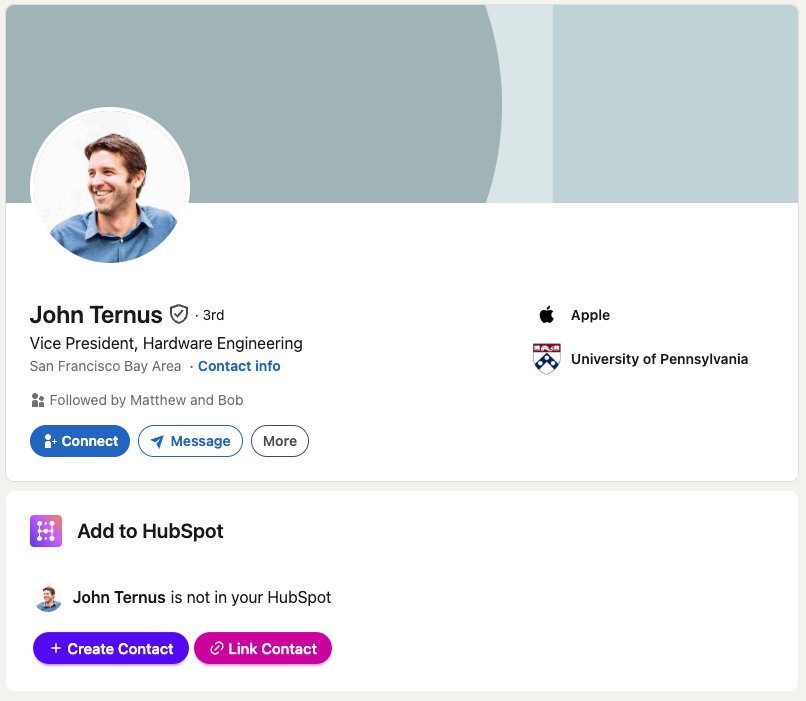
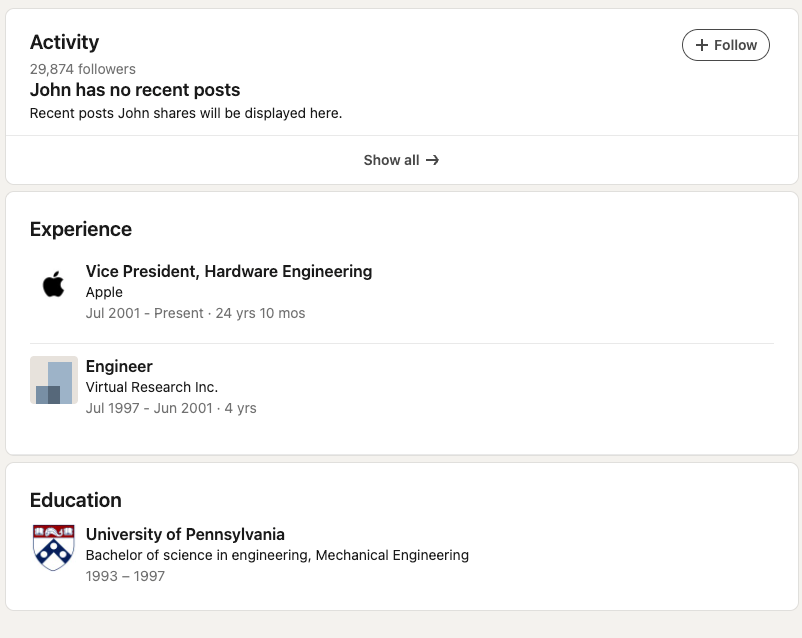
Barely updated. No posts. Zero detail.
This is not you. The new CEO of Apple isn’t working for a company with little to no brand recognition while trying to start conversations with complete strangers. If John Ternus called someone at random and said, “Hi there, I’m John, the new CEO of Apple,” chances are 99% of people would drop what they’re doing to take that call.
You are a different story. You need to build credibility, recognition, and social proof to earn a conversation.
When prospects land on your profile, they're doing reverse due diligence. Before they accept a connection, reply to outreach, or book a meeting, they want to answer three questions, in this order:
- Does this person look legitimate?
- Do they work with people like me?
- Is there a reason to keep reading?
The rest of this guide walks through each profile element and shows you how to flip it from résumé mode to sales mode.

Ready to fix your outbound process?
The key ingredients of an optimized LinkedIn profile
The following are the core pieces to optimize for your LinkedIn profile:
- A profile photo
- A banner image
- A headline
- An about section
I’ll walk you through each piece next.
Optimize your profile photo
The standard advice is "use a professional headshot." That's half right.
A professional headshot for an executive bio and a profile photo for a salesperson aren't the same thing. You're not trying to look like the cover of GQ. You're trying to look like someone a stranger would be willing to talk to.
I recommend the following:
- Use a clear photo where your face takes up at least 60% of the frame.
- Use a photo with natural lighting or soft indoor light. Harsh light casts shadows that can ruin your first impression.
- A real smile. If you have trouble smiling for the camera, ask the person taking the photo to tell a joke or make you laugh; it’ll come off more natural in the photo.
- Shoulders visible and head centered.
- Ideally stationary, but if you want to think outside the box, do so in a way that will interest or attract your prospects.
Skip the suit-and-tie headshot from a conference booth. Your buyers are human, and they buy from people who seem human.
Optimize your LinkedIn banner
LinkedIn banners are criminally underused real estate.
Only a select number of prospects will read your entire profile, but every prospect will see your banner. At the same time, most reps leave the default blue gradient up, which is a wasted billboard.
I recommend the following formats:
- A one-line value proposition. "I help Series B SaaS companies cut CAC by 30% with better outbound." Prospects can read it in two seconds, decide if it applies to them, and scroll.
- A stat that demonstrates outcomes. "$42M in pipeline sourced for mid-market HubSpot customers." Harder to execute but much stickier than generic messaging.
- A clean graphic with your ICP's pain point. "Tired of your LinkedIn and HubSpot living in separate universes?" Works best when your personal brand is tightly aligned with a specific problem.
This, combined with the photo, establishes who you are and how you help prospects. The next pieces will complete that story.
Optimize your headline to speak to buyers, not your boss
After the banner, your headline is the single highest-leverage text element on your profile. It appears under your name in search results, in every connection request, next to every comment you leave, and in every DM. It's the only line of copy that follows you around LinkedIn.
"Account Executive at Acme Corp" tells a prospect exactly one thing: that you're going to try to sell them something.
Instead of telling buyers what your company calls you, tell them what you do for people like them. Try the following formulas:
- [Who you help] + [Outcome you deliver]
- [Problem you solve] + [How you solve it]
Both force you to lead with the buyer's world, not yours. Using keywords helps for appearing in LinkedIn search, but don’t stuff keywords just for the sake of it. Otherwise, it’ll come off as too salesy or unnatural, turning prospects off.
For example, I could put “CEO of Hublead” as my headline, or “I help sales reps save 2+ hours every week prospecting on LinkedIn,” or “I help sales reps prospect seamlessly between LinkedIn and HubSpot.”
Now, which one tells you more about who I serve and what value I provide?
Turn your about section into a sales page
Next to the headline, the “About” section is another swing-and-a-miss for sales reps. Your prospects do not care about your job responsibilities. They care about themselves and are interested in the people who can solve their problems.
The best way to write your “About” section is to write it as a sales page that includes the following pieces:
- Open with the problem your buyers face. Name the specific pain your ICP is dealing with.
- Explain how you help, with proof. Name the types of companies you work with, the outcomes they get, and one or two specifics that make it real.
- End with a low-friction CTA. It could be booking a meeting, downloading a resource, or DMing you.
Here’s an example of how I might write this for Hublead:
LinkedIn is the #1 prospecting channel, but if none of your hard work makes it into HubSpot, then everything you do is invisible to your team.
I co-founded Hublead, a Chrome extension that syncs LinkedIn and HubSpot, giving you a complete record of every connection request, DM, and InMail in your CRM. Over 8,000 sales reps use Hublead to save time and prospect more on LinkedIn.
Try Hublead for free and see how much time you can save this week.
Remember: LinkedIn truncates your About section after roughly two lines on desktop and three on mobile, with a "See more" prompt. If those opening lines don't hook the reader, nothing below them will be read.
Tips for writing sales copy in your profile
The above should put you in good shape. At the very least, you’re not hurting your chances of getting a prospect’s attention.
Bear the following tips in mind when writing profile copy, though, if you want to really stand out:
- Write in first person
- Use keywords naturally
- Skip personal hobbies (unless relevant)
Write in first person
Did you notice something about the sample “About” section above?
I wrote in the first person. Write from your POV, not from an outsider’s perspective, to draw readers in and make them feel like they are talking directly to you. Third-person often sounds too stilted and formal and will put buyers off.
When in doubt, write like you're talking to one prospect at a coffee shop.
Use keywords naturally
Weave in the industry terms, ICP job titles, and problem phrases your buyers would search for… but as part of real sentences, not as a keyword list at the bottom.
If you help "VPs of Customer Success at B2B SaaS companies with renewal forecasting," that exact phrase can live naturally inside your opening paragraph. But don’t jam phrases in just to include them.
Skip the personal hobbies
Personal hobbies may help signal you are a cultural fit when you're looking for a job, but they rarely make a difference when selling.
Hobbies may signal to a recruiter that you’d fit with the team, but they don’t help a buyer decide whether to take your call. The one caveat here is if your hobbies matter to your ICP. Then they can be worth referencing because they’ll attract your ideal buyer and give them a better glimpse into your life.
Again, it only matters if it matters to your buyer. If it doesn’t matter to your buyer, then it’s just noise.
Advanced LinkedIn optimization strategies
If you want to really kick things up a notch and capture the interest of prospects digging deeper into your profile, then optimize the following sections next:
- Experience
- Featured
- Skills
Share your experience
I may sound like a broken record here, but remember that your experience is only relevant if it’s relevant to your buyer.
Buyers don’t care if you made the President’s Club or exceeded quota. That matters to a hiring manager, but not prospects, and it screams “I’m here to sell you something.”
Rewrite each role around the outcomes your customers got. For example, describe the impact you drove for accounts, the benefit they got from your product/service, and the results you were able to generate for customers.
Set up featured content
The Featured section sits directly below your About section, and is the one place on your profile where you fully control what a prospect sees next after deciding you're interesting. Use it wisely!
This is your chance to draw people in further and educate them about your value and what next steps they can take. I recommend including:
- A case study or customer win. One-pager PDFs, links to customer stories on your company blog, or short video testimonials. Proof is the currency of sales profiles.
- A calendar booking link or intro video. Make it easy for a warm prospect to take the next step without having to message you first.
- If you've written something that resonated with your ICP, pin it. It signals thought leadership and gives prospects an easy next click.
- A relevant industry resource. An original report or helpful guide that genuinely helps your buyer. This works particularly well when your company produces high-quality research that your competitors don't.
List your skills
Pick skills that reflect what your buyers would type into a LinkedIn search.
If you sell into finance teams at mid-market SaaS, that probably includes "revenue operations," "financial forecasting," "SaaS metrics," and the specific tools and categories your customers use. Mix in 3-5 sales-specific skills so the section still reflects your role, but weight the list toward buyer-facing terminology.
Endorsements and skill assessments add a layer of social proof but aren't worth obsessing over. Get your top few skills endorsed by a handful of current colleagues and customers and move on.
LinkedIn sales habits that will pay off
By following this guide, you’ll end up with a profile optimized for selling. Nice job!
While other reps struggle to get traction with buyers who look them up on LinkedIn, you’ll arm your prospects with everything they need to decide whether or not to book a call with you. You just need to overcome one small problem: being visible.
Follow the habits below to improve your chances of being regularly seen by your ICP:
- Post 2-3x per week
- Comment before pitching
- Pipe LinkedIn activity into your CRM
Post 2-3 times per week
You don't have to be a LinkedIn influencer, but you do have to show up in your prospects' feeds often enough that your name is familiar when you slide into their DMs.
Two or three posts a week are enough to stay visible without becoming a content machine.
These don’t need to be elaborate. Keep them short, sweet, and on-target with what your ICP cares about. Short observations or hot takes can work well, but it doesn't hurt to pay attention to what your competitors do or what your prospects engage with.
LinkedIn's algorithm rewards consistent posting from people whose content generates engagement, and "engagement" at the sales-rep level usually means comments from people in your actual ICP.
Comment on prospects' posts before you pitch them
If you're about to send a connection request or InMail to someone, spend 60 seconds on their recent activity first.
It pays to leave a thoughtful comment on something they posted in the last week. Make it authentic, though, there’s nothing that screams “sales” like bland comments that add nothing of value. Connection acceptance and reply rates both increase significantly when prospects recognize you.
Get your LinkedIn activity into your CRM
In case it’s not clear, this is a ton of work.
Is all of it making it to your CRM for your team and manager to see? If you’re like most sales reps, no. You’re probably going to have to copy and paste most of it over.
But with a tool like Hublead to sync all of your LinkedIn prospecting activity to HubSpot, you don’t have to be like most sales reps.
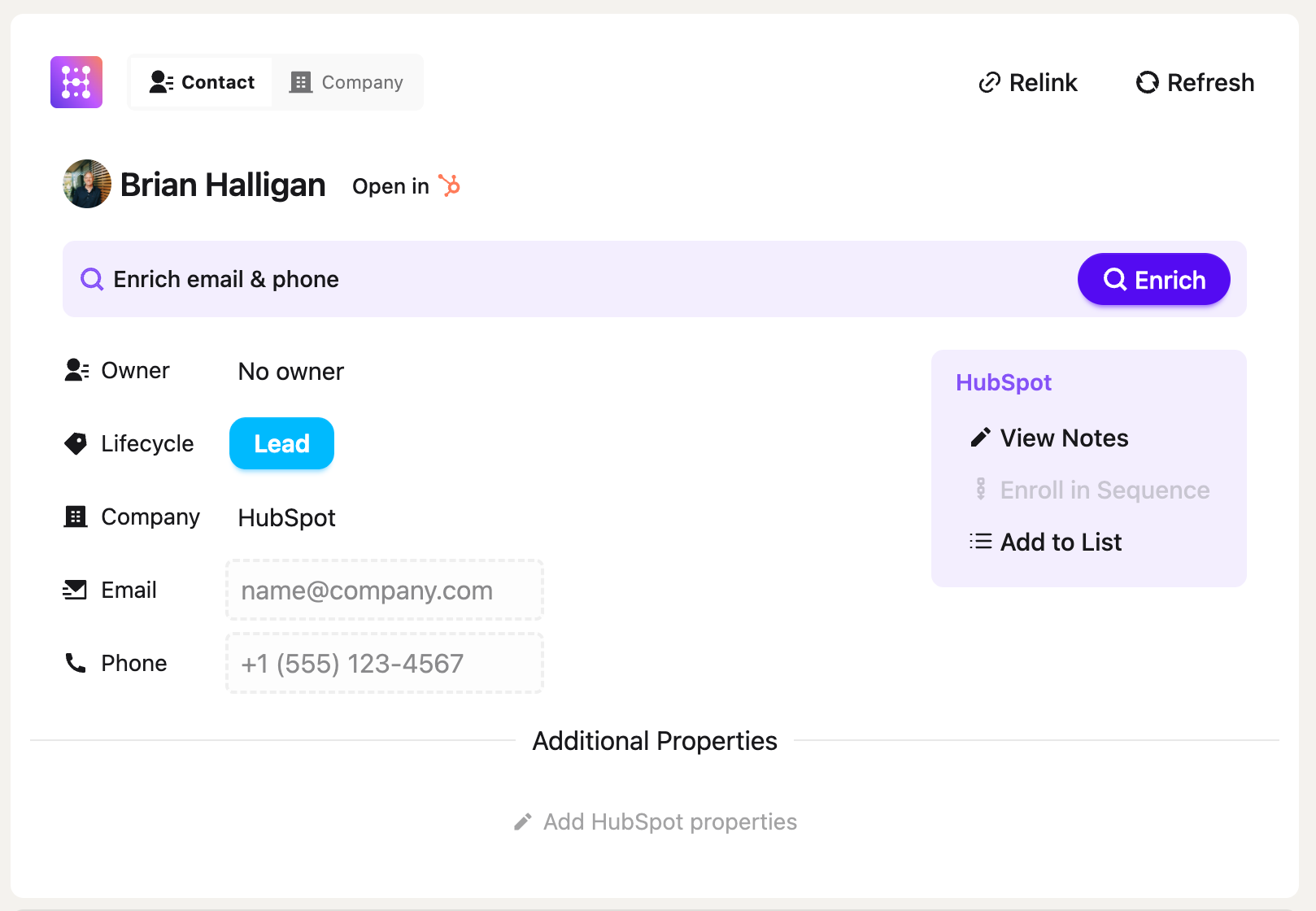
Hublead was built to save time and automate LinkedIn prospecting for busy sales reps. You can import contacts to HubSpot in one click from a LinkedIn profile, sync DMs and InMails automatically, and enrich records with verified email and phone data, all without leaving LinkedIn.
Turn LinkedIn into a sales channel with Hublead
You don’t need to be a guru to consistently build a pipeline from LinkedIn; you just need an optimized profile and a little consistency.
LinkedIn is the #1 prospecting channel for social selling today, so you’ll need every advantage you can get to optimize LinkedIn as an outbound channel and demonstrate your effectiveness to your team.
For that, there’s no better tool than Hublead.
Hublead allows you to sync every connection request, DM, and InMail straight to HubSpot and can even enrich contacts with accurate email addresses and phone numbers to fuel your outreach. Try Hublead for free here and see how much time you can save this week.
Ready to fix your outbound process?
Frequently asked questions
How often should I update my LinkedIn profile?
Do a full rewrite once, then touch it up every quarter. Test out the headlines and about sections based on shifts for your ICP, and touch up the featured content section every so often as you have new insights to share.
Does my company's LinkedIn page affect the visibility of my personal profile?
When prospects click through from your profile to your company page, a weak or empty company page can undermine the credibility you just built. An active company page with consistent posting, clear positioning, and real employees also means your posts get more internal engagement, which helps the algorithm surface them to more people.
How do I know if my LinkedIn profile optimization is working?
Pay attention to profile views, search appearances, and connection acceptance rate. This will tell you how often prospects engage with your profile and how effective it is at building trust and credibility.
Should I make my LinkedIn profile public or restrict visibility?
Always public. Private profiles are hidden unless someone is connected with you, which will kill your sales efforts. Check your settings under Visibility → Profile viewing options and make sure your full profile is visible to non-connections.
.png)
.avif)