Apollo vs Hublead: Which is best for lead search and CRM enrichment
Compare Apollo and Hublead. Hublead focuses on HubSpot or Salesforce automation, bulk enrichment from either CRM's lists, deduplication, and pipeline reporting.
Apollo is a leading lead search and outbound automation tool, and Hublead is one of the best LinkedIn lead search and CRM sync tools for HubSpot and Salesforce.
How do you choose between the two? Or should you combine them? We’ll answer those questions in depth so you can select the best tool for your sales stack.
Where Apollo excels
Think of Apollo as a sort of Swiss Army knife for sales teams. Apollo offers almost everything a sales team needs for a sophisticated outbound campaign: lead search, enrichment, website visitor tracking, sequencing, and intent signals.
But Apollo also offers traditional CRM features like deal and pipeline management, lead management, and call recording. If you already use HubSpot or Salesforce as a source of truth for your sales team, how much value do these extra features really add?
If Apollo could reliably sync and deduplicate data in your CRM, then these additional features would be extremely valuable. As we’ll share next, though, Apollo’s CRM sync leaves a bit to be desired.
Why look for an alternative to Apollo
It’s hard to argue with Apollo’s 4.7-star rating on G2 from over 9,000 reviewers. It’s an excellent outbound automation tool, but your experience on Apollo will depend on how you use it.
For example, for lead search and enrichment, it’s hard to beat for the price. But if you use HubSpot’s or Salesforce’s pipeline management tools and need to sync data from Apollo to your CRM, data may slip through the cracks.
As good as Apollo is as a standalone tool, the official Apollo integration for HubSpot has only 2.6 stars, with many users citing issues syncing contacts, creating duplicate contacts, and resorting to manual data entry.
Apollo is an excellent lead search and enrichment tool, but you’ll need some help syncing data to your CRM. Fortunately, you have a great option: Hublead.
Why 8,000+ sales teams trust Hublead to sync LinkedIn to HubSpot and Salesforce
Hublead excels where Apollo falls short. Hublead integrates seamlessly with both HubSpot and Salesforce, letting you search for leads, enrich them, and sync them to your CRM in just a few clicks.
Hublead is a Chrome extension that allows you to sync leads from LinkedIn and Sales Navigator to your CRM. You can also use Hublead’s lead search feature to find leads, just like you can with Apollo.
That means no tab switching or manual copy-and-paste: you can import contacts, sync messages, and even sync connection requests all without leaving LinkedIn. Apollo is a fantastic outbound automation tool, but if you prospect heavily on LinkedIn and need to sync that data back to your CRM, that’s where Hublead can help.
Deduplication that actually works for your CRM
It’s one thing to sync leads to your CRM and another to sync leads without having to do any cleanup after.
Hublead's deduplication is built for HubSpot and Salesforce. It matches across LinkedIn URL, email, name, and company before creating a new record. When a rep adds someone on LinkedIn, it matches that record to any existing contact in HubSpot or Salesforce. The same goes for Account records too.
Bulk enrich any CRM list
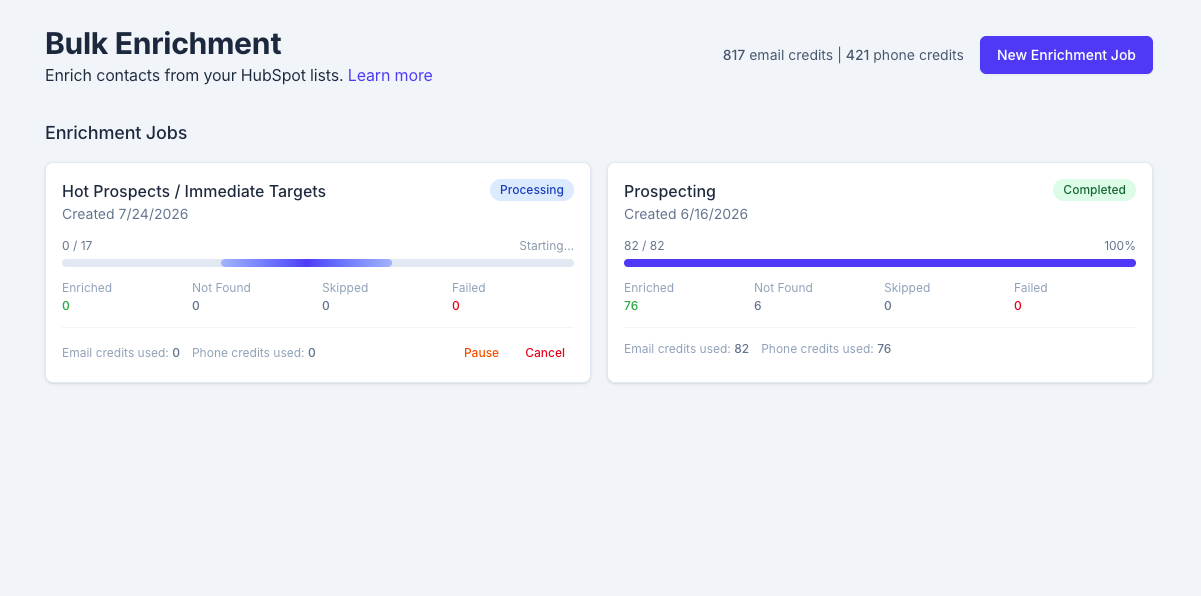
If you’re going to run outbound at scale inside HubSpot or Salesforce, you need accurate data, lots of it.
Hublead lets you bulk enrich any HubSpot and Salesforce list in seconds. Select a list, click enrich, and get emails and phone numbers for the entire list in one click: no extra tools or messy exports needed.
Keep your CRM up-to-date without leaving LinkedIn
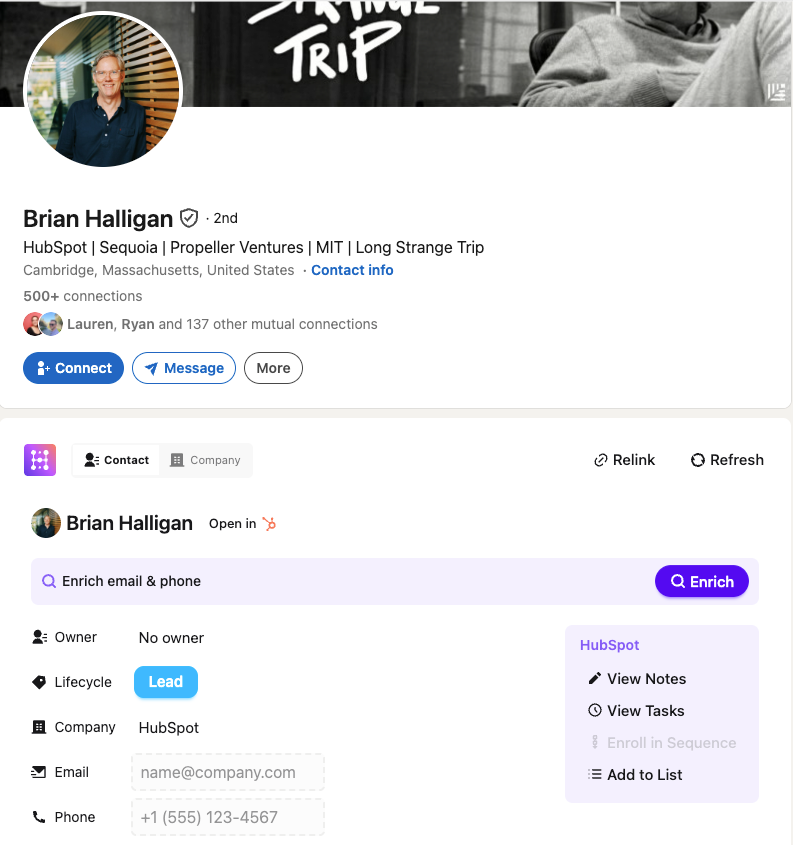
Tired of switching between LinkedIn, your lead search tool, and your CRM eight times a day?
Hublead fixes that. You can view and create tasks, enroll leads in sequences, create notes, and even update properties all without leaving LinkedIn.
Trigger HubSpot or Salesforce workflows from LinkedIn
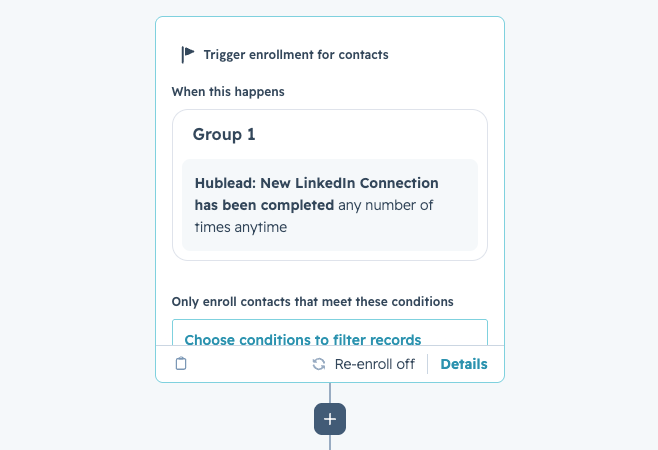
Match HubSpot’s or Salesforce’s automation power with LinkedIn thanks to the triggers Hublead syncs.
The moment a prospect accepts your connection request, you can create tasks, enroll the contact in a sequence, update their lifecycle stage, and more without lifting a finger.
Apollo offers a ton of automation power, but Hublead + your CRM rivals it.
See how trigger automations work →
Pipeline reporting that answers questions
Thanks to syncing every lead and touchpoint from LinkedIn to your CRM, you’ll be able to know exactly how LinkedIn works as a channel, which reps are most active, and which reps are most effective.
And because Hublead’s CRM sync works seamlessly with HubSpot and Salesforce, you won’t have to clean up your data or reconcile different exports.

Ready to fix your outbound process?
Hublead vs Apollo side-by-side
| Category | Apollo | Hublead |
|---|---|---|
| Lead search | ✅ | ✅ |
| LinkedIn + Sales Navigator Integration | Not the core focus | ✅ |
| Outbound automation | ✅ | No, but you can trigger CRM automations and enroll contacts into sequences |
| CRM workflow triggers from LinkedIn signals | Not the core focus | ✅ |
| Bulk enrichment for CRM lists | ✅ | ✅ |
| Pipeline reporting inside your CRM | Not the core focus | ✅ |
| HubSpot and Salesforce integrations | ✅ | ✅ |
| Starting price | $49/user per month | $32/user per month |
Hublead vs Apollo pricing
Apollo’s pricing is generous considering what you get. You can try Apollo for free (with limited searches and enrichment), and for $49/user per month get access to lead search, enrichment, sequencing, and CRM sync. Apollo also offers two add-ons, each for $119/month: an inbound add-on to track website visitors and a dialer add-on for calling.
Hublead offers a free trial and starts at $32/user per month. This lets you sync and enrich leads from LinkedIn to your CRM, plus connection requests, messages, and LinkedIn triggers.
Hublead’s lead search feature is only available in its $112/user per month plan, but don’t forget that Hublead also works with LinkedIn Sales Navigator, giving you access to LinkedIn’s lead search and CRM sync in Hublead’s lowest tier.
Hublead vs Apollo: How to choose between them
The decision between Hublead and Apollo won’t be based on features alone. It should come down to which tool best fits your use case.
Here’s a quick breakdown to help you make the right decision for your team:
| Use case | Which tool is best? | Why? |
|---|---|---|
| I need to save time prospecting on LinkedIn and logging data to my CRM | Hublead | Hublead was built for this! Hublead syncs all your LinkedIn and Sales Navigator activity to your CRM, freeing you up for more prospecting time. |
| I want to know how LinkedIn is influencing my pipeline | Hublead | Hublead's CRM sync is the best way to see how LinkedIn is impacting your pipeline. |
| I want to know which of my reps is most active on LinkedIn | Hublead | By syncing all the activities your reps take on LinkedIn, you can see who is most active. |
| I want to know which of my reps is most successful on LinkedIn | Hublead | Hublead syncs messages and connection requests, allowing you to see which reps are most successful at starting conversations with prospects. |
| I want to automate outreach at scale | Apollo | This is what Apollo was built for: outbound automation and sophisticated workflows. |
| I want to be able to filter for my ICP with a very specific set of filters | Apollo | Apollo allows you to drill down into specifics like location, technology used, revenue, company size, and more. |
| I want to be able to automate deal movement based on triggers | Apollo | Apollo offers deal stage management, allowing you to track and manage your pipeline. |
| I want to build a multichannel outreach strategy with LinkedIn and email | Both | By leveraging HubSpot's or Salesforce's built-in automation with Hublead triggers, you can automate outbound across channels. Apollo offers this too natively. |
| I want to enrich the leads in my CRM | Both | Both tools offer lead enrichment, but only Hublead lets you enrich an entire list of contacts directly in your CRM. |
Try Hublead for free today
If you’re looking for a tool that saves you time and equips you to run an entire outbound motion on LinkedIn while syncing every touchpoint to HubSpot or Salesforce, there is no better tool than Hublead.
Sign up for Hublead today for free to begin syncing LinkedIn/Sales Navigator data with HubSpot or Salesforce. Setup takes under five minutes, and you can try it for free and decide later whether to keep using it.
Ready to fix your outbound process?
Frequently asked questions
Does Apollo sync with HubSpot and Salesforce?
Apollo has native sync integrations with both HubSpot and Salesforce, allowing you to sync lead and account records.
Which CRMs does Hublead sync to?
Hublead offers lead and account sync, plus lead enrichment, for both HubSpot and Salesforce.
Does Hublead offer lead search like Apollo?
Hublead offers lead search through its dedicated lead search feature in the Hublead web app. You can filter for your ICP based on geography, industry, company size, and more.
Should I use both Apollo and Hublead?
Often yes. Apollo can run outbound execution, and Hublead standardizes HubSpot or Salesforce workflows, bulk enrichment, and reporting from the LinkedIn motion.
Does Hublead replace Apollo sequences?
No. Hublead focuses on HubSpot or Salesforce operations and automation driven by LinkedIn signals.