Why Hublead is the best LinkPort alternative
Hublead is a superior alternative to LinkPort due to its better connection with HubSpot or Salesforce and more reliable tool with no bugs.
Klenty discontinued LinkPort in 2026, but if you still need to sync LinkedIn data to your CRM, you’re in luck. There’s an even more powerful alternative to LinkPort that allows you to sync contacts to your CRM, enrich them, and run your entire outbound motion on LinkedIn.
That tool is Hublead. Read on for a full breakdown covering features and pricing.
LinkPort vs Hublead: The quick verdict
LinkPort and Hublead both do one thing very well: they sync lead and contact data from LinkedIn to your CRM. Scratch below the surface, though, and there’s a big difference between the two.
LinkPort was a free tool created by Klenty as an entry-level offer for their sales suite. Think of it as a lead magnet, not a fully featured tool. LinkPort worked for HubSpot, Zoho, Pipedrive, and Salesforce, while Hublead works with HubSpot and Salesforce.
Hublead is a standalone product that offers LinkedIn syncing and enrichment (like LinkPort) and also the following:
- You can view/edit HubSpot or Salesforce properties on LinkedIn
- You can create tasks from LinkedIn
- You can enroll leads in Sequences from LinkedIn
- You can trigger HubSpot or Salesforce workflows with LinkedIn data
- You can enrich leads with accurate email addresses and phone numbers
- You can use it with LinkedIn Free, Premium, and Sales Navigator
Both are sync tools, but only one can power your entire sales workflow without having to log into your CRM.
Why 8,000+ sales teams love Hublead
LinkPort may be discontinued, but there are plenty of excellent alternatives to try.
Hublead cuts data entry from your workflow, keeps your HubSpot or Salesforce CRM up-to-date, and so much more. It’s not hard to see why over 8,000 sales teams trust Hublead to sync their data to HubSpot or Salesforce.
Update HubSpot or Salesforce without ever leaving LinkedIn
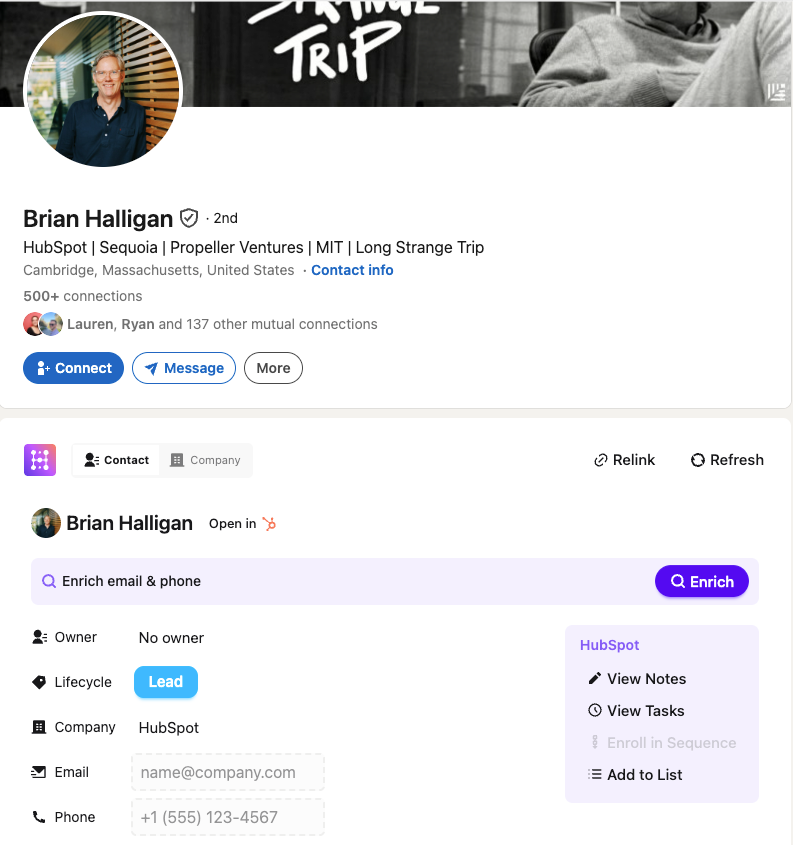
As valuable as your CRM is, you still need to break out of your prospecting flow to use it. Tasks, notes, and lists are useful, but managing your CRM takes up valuable prospecting time.
Not so with Hublead. Hublead allows you to view and manage CRM data straight from LinkedIn. You can view and create tasks, enroll leads in sequences, create notes, and even update properties all without leaving LinkedIn.
Trigger HubSpot or Salesforce workflows from LinkedIn
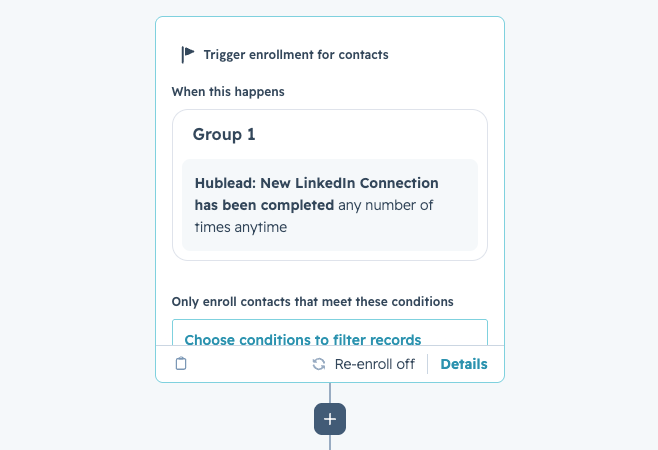
With Hublead, that invite acceptance becomes a workflow trigger inside HubSpot or Salesforce. The moment a prospect accepts your connection request, you can create tasks, enroll the contact in a sequence, update their lifecycle stage, and more without lifting a finger.
That’s the power of a deep integration with HubSpot or Salesforce. Not just syncing data, but making LinkedIn data and events actionable in your CRM.
See how trigger automations work →
Deduplication that actually works for your CRM
Tons of sales tools sync data to HubSpot or Salesforce; the problem is that they create duplicate records, turning your CRM into a ball of yarn with no end in sight.
Hublead's deduplication is built for HubSpot and Salesforce. It matches across LinkedIn URL, email, name, and company before anything gets created. When a rep adds someone on LinkedIn, that record is matched to any existing contact in HubSpot or Salesforce. The same goes for Account records too.
Bulk enrich any HubSpot or Salesforce list
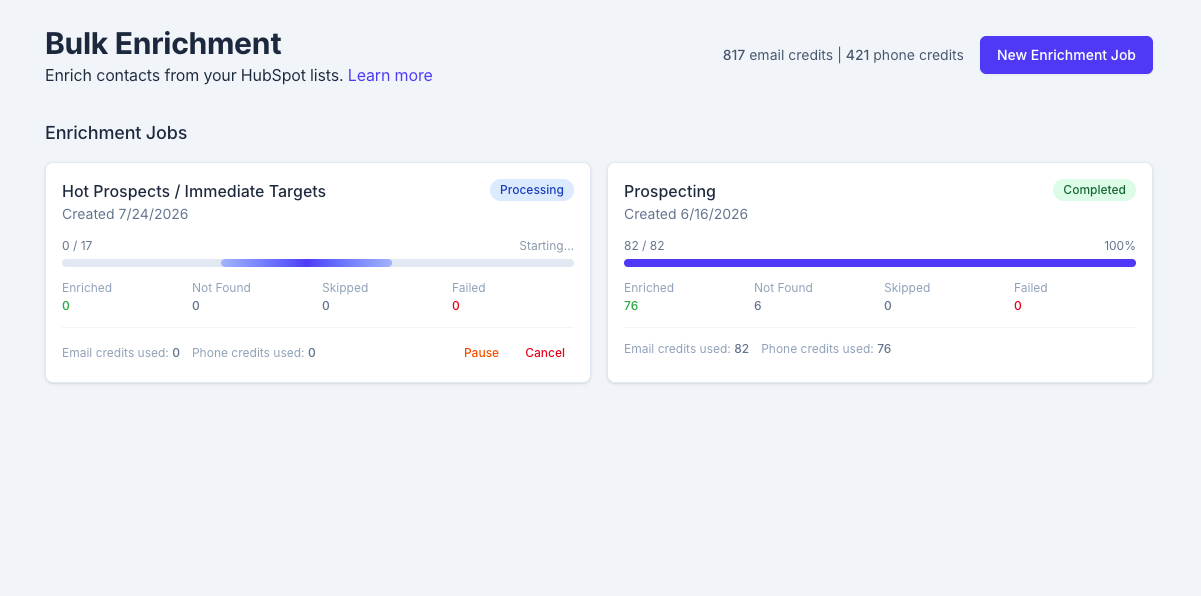
Most enrichment tools work one contact at a time. You visit a LinkedIn profile, click enrich, move to the next one. Do that 200 times, and you've lost half your day.
Hublead lets you bulk enrich any HubSpot or Salesforce list in seconds. Select a HubSpot or Salesforce list, click enrich, and get emails and phone numbers for the entire list in one click: no extra tools or messy exports needed.
Pipeline reporting that answers questions
When LinkedIn activity lives in HubSpot or Salesforce, managers finally get the full picture. Which reps are actually active on LinkedIn? Which conversations turned into pipeline? What's the conversion rate from outreach to booked meeting?
LinkPort didn’t connect LinkedIn activity to pipeline outcomes inside HubSpot or Salesforce, but Hublead does. You can view all of your reps’ activity, track funnel reports for prospects on LinkedIn, and see how LinkedIn influences your pipeline.

Ready to fix your outbound process?
Hublead vs LinkPort: A side-by-side comparison
| Features | LinkPort | Hublead |
|---|---|---|
| Integrate HubSpot with LinkedIn | ✅ | ✅ |
| Integrate HubSpot with LinkedIn Sales Navigator | ❌ | ✅ |
| Integrate HubSpot with LinkedIn Recruiter | ❌ | ✅ |
| Import Contact | ✅ | ✅ |
| Sync Messages | ❌ | ✅ |
| Auto-Sync Messages | ❌ | ✅ |
| Find LinkedIn Email addresses | ❌ | ✅ |
| Find Phone numbers | ❌ | ✅ |
| Embed HubSpot in LinkedIn | ❌ | ✅ |
| Customized CRM Fields | ❌ | ✅ |
| Easy Integration | ❌ | ✅ |
| Apollo Integration | ❌ | ✅ |
| Rocket Reach Integration | ❌ | ✅ |
| Lusha Integration | ❌ | ✅ |
| Kaspr Integration | ❌ | ✅ |
| Salesforce Integration | ✅ | ✅ |
| Zoho Integration | ✅ | ❌ |
| Pipedrive Integration | ✅ | ❌ |
| Free support | ❌ | ✅ |
| Pricing | Free | 💰 |
Pricing: LinkPort vs Hublead
Hublead offers a flat monthly fee, starting at $32/mo per seat billed yearly, that allows you to sync unlimited contacts and companies to HubSpot or Salesforce and includes 50 credits per seat per month. Credits cover both emails and mobile numbers.
LinkPort was completely free with a limited feature set compared to standalone tools like Hublead. That’s because LinkPort was more of a lead magnet for Klenty than a complete software platform for sales teams, so it’s no surprise that Klenty discontinued the tool.
Try Hublead for Free Today
If you’re looking for a tool that saves you time and equips you to run an entire outbound motion on LinkedIn, there is no better tool than Hublead.
And you can try it for free. Sign up for Hublead today to begin syncing LinkedIn data with HubSpot or Salesforce and see how powerful it can be to have Hublead in your tech stack.
Join the community of 8,000 Hublead users who have elevated their sales strategies with our cutting-edge LinkedIn integration for HubSpot and Salesforce.

Ready to fix your outbound process?
Frequently asked questions
Is LinkPort still active?
No. Klenty discontinued LinkPort in 2026; it is no longer available on Klenty’s website or the Chrome Web Store.
How is Hublead different from LinkPort?
Both import LinkedIn contacts to your CRM. LinkPort works with HubSpot, Salesforce, Zoho, and Pipedrive; Hublead supports HubSpot and Salesforce and adds LinkedIn message sync, email and phone enrichment, and Sales Navigator support.
Does Hublead work with Sales Navigator?
Yes. Hublead works with LinkedIn free, Premium, and Sales Navigator. LinkPort doesn't integrate with Sales Navigator.
Which CRMs does Hublead support?
HubSpot and Salesforce, by design, which lets it integrate more deeply. LinkPort also covers Zoho and Pipedrive, which Hublead doesn't, but with a shallower HubSpot integration.
Is there a free version of Hublead?
Yes. Hublead has a free version so you can test the LinkedIn-to-CRM integration before committing.