

The best Salesforce LinkedIn integrations for sales reps (2026)
Tired of copying LinkedIn leads into Salesforce by hand? We review the best integrations for syncing leads, DMs, and contact data without the busywork.
Tired of copying and pasting every lead or account into Salesforce from LinkedIn?
We don’t blame you. Time is a sales rep’s most valuable resource, and it's better spent reaching out to prospects than switching tabs and managing a CRM. The good news for time-strapped sales reps is that Salesforce has an “official” LinkedIn connector for Sales Navigator.
Does that mean that you can trust that all of your data and prospecting activities will be seamlessly synced back to Salesforce without you needing to lift a finger? Not even remotely.
The official Salesforce integration for LinkedIn only works with LinkedIn Sales Navigator Advanced Plus. If you use any other tier of Sales Navigator or even LinkedIn Free, you need another solution.
Don’t worry, you're not out of luck. Read on for the best third-party tools that can sync and enrich leads, sync DMs, and much more.
Wait, Salesforce doesn’t offer a true LinkedIn integration for sales?
Not exactly. There are two native ways that Salesforce can integrate with LinkedIn.
They are:
- Embedded profile widget in Salesforce
- CRM Sync (for Advanced Plus)
The embedded profile widget is a window into LinkedIn from a lead/contact, account, or opportunity record in Salesforce. Useful if you’re spending a lot of time in Salesforce, but useless if you prefer to prospect on LinkedIn.
The official CRM sync integration is a two-way sync between Salesforce and Sales Navigator. It auto-saves your pipeline (open Opportunities, your Accounts and Contacts) into Salesforce, giving you a complete record of your prospecting activities in your CRM.
Great, right? There’s a catch.
The CRM sync integration is only available for Sales Navigator Advanced Plus subscriptions, which will cost $1,600/seat per year. That’s a significant investment for something as simple as syncing leads so you don’t have to type their information yourself.
For those using any other tier of Sales Navigator or LinkedIn Free, the third-party tools we’ll share next will be your best options.

Ready to fix your outbound process?
The best third-party Salesforce LinkedIn integration tools
Salesforce doesn’t offer a native way to easily integrate with LinkedIn, but the third-party tools below do. Browse through each one for an honest review.
Hublead
First on our list is Hublead, a Chrome extension and web app designed to sync and enrich leads from LinkedIn to Salesforce.
Of the tools here, Hublead is probably the best suited for prospects who spend most of their time on LinkedIn but want a clean record in Salesforce. Hublead allows you to import contacts/leads and accounts with one click directly from LinkedIn, edit CRM objects on LinkedIn, and sync DMs and InMails.
But that’s not all. Hublead also enriches leads as you save them, or in bulk from the Hublead web app.
In seconds, you can import, enrich, and sync leads back to your CRM without leaving LinkedIn. It’s not hard to see why Hublead has 4.8 stars on G2:
“I love how Hublead saves me time by eliminating the need to copy and paste profiles into my CRM. It's an affordable tool considering everything it provides. I appreciate its ease of use and find the direct integration with my CRM super valuable, especially since I can import prospects directly from LinkedIn profiles.”
Hublead is best for sales reps and SDRs doing outbound prospecting on LinkedIn who need Salesforce to accurately reflect their work and want to save valuable hours each week. You can try Hublead for free here.
Surfe
Surfe (formerly Leadjet) is a Chrome extension in the same category as Hublead. Like Hublead, it adds a Salesforce sidebar to LinkedIn profiles and lets you sync contacts and CRM data between the two platforms.
Like Hublead, Surfe covers contact import, CRM field editing from LinkedIn, and enrichment. One difference between Surfe and Hublead is that Surfe works with Pipedrive as well as HubSpot and Salesforce (Hublead only works with HubSpot and Salesforce). Accordingly, pricing tends to be higher at the team level, particularly for features that match Hublead’s enrichment capabilities. Surfe’s enrichment credits cap out at 12,000/year compared to Hublead’s generous 24,000/month.
Wiza
Unlike Surfe and Hublead, Wiza wasn’t built specifically for syncing LinkedIn to Salesforce, but it does offer some features that support it.
Like Hublead, you can install Wiza in Chrome to see a new section on every profile on LinkedIn. Wiza also offers some enrichment capabilities to pull in job and contact information. You then sync these leads to Wiza, and have to log into Wiza to sync them to Salesforce from Wiza.
Compare that to Hublead, which offers a direct sync as you use LinkedIn. No need to open another tab for another tool.
Which Salesforce LinkedIn integration is right for you?
Between the three tools we shared above and the native CRM sync, which is the best choice for your sales team? Here’s a quick comparison to help you make that decision:
If you’re looking for a complete tool that does the following:
- Syncs every lead
- Enriches prospects with accurate information
- Syncs DMs and InMails
- Allows you to create message templates
- Works with LinkedIn Free, as well as Sales Navigator
Then there is no better choice than Hublead.
Your CRM is only useful if it reflects where you’re actually working. If you’re spending hours on LinkedIn every week and none of that activity is showing up in Salesforce, you’re working blind. Your manager is reviewing outbound numbers that do not reflect your best work.
Hublead fixes that. Install the Chrome extension, and your LinkedIn contacts, messages, and outreach activity start syncing to Salesforce automatically. Try Hublead for free and see how much time you’ll save this week.
How thousands of sales reps save 8+ hours every week with Hublead
Sales reps save over eight hours every week thanks to Hublead. How? Because with Hublead, you can keep your CRM up to date, import contacts, and even trigger automations all from LinkedIn.
See how Hublead eliminates busywork and data entry below.
Import and enrich leads with one click
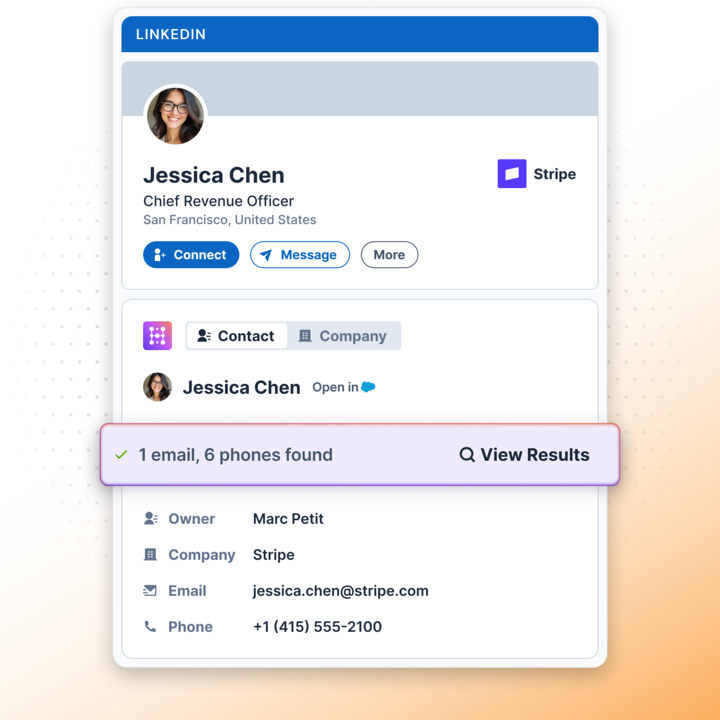
Hublead does more than sync LinkedIn messages: you can import LinkedIn profiles directly into Salesforce as well. With Hublead's data enrichment capabilities, you can also find email addresses and phone numbers, giving your CRM up-to-date data for every prospect.
Sync DMs and InMails
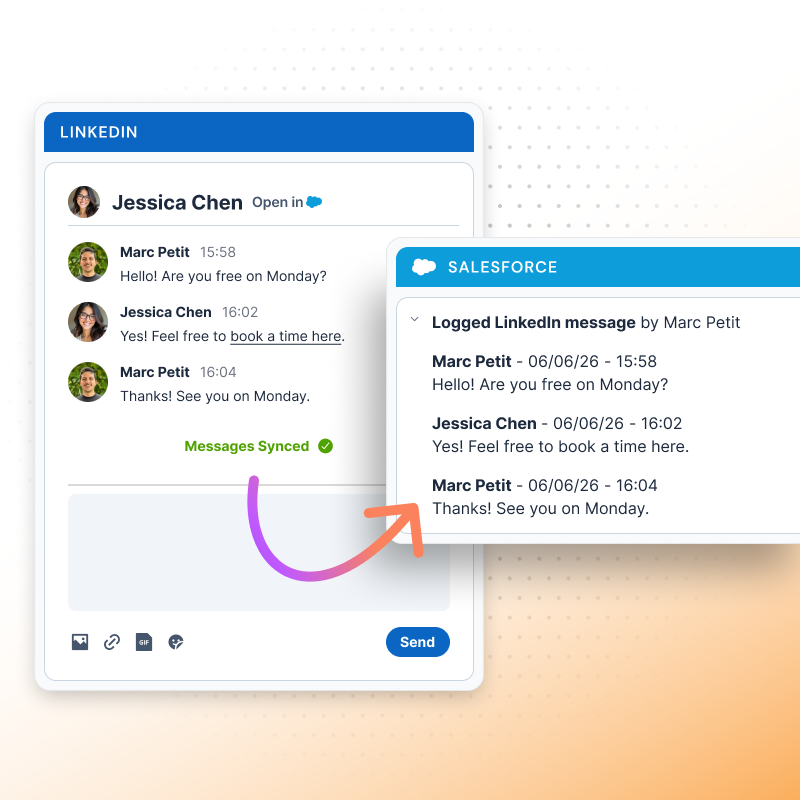
Every sales team should be using multiple channels in their prospecting play; the problem is that most CRMs only log emails and calls. Hublead fixes that. Hublead syncs DMs and InMails (manually for the lowest tier, automatically for higher tiers), giving you a perfect record of every touchpoint you have with a prospect.
Edit Salesforce data in LinkedIn
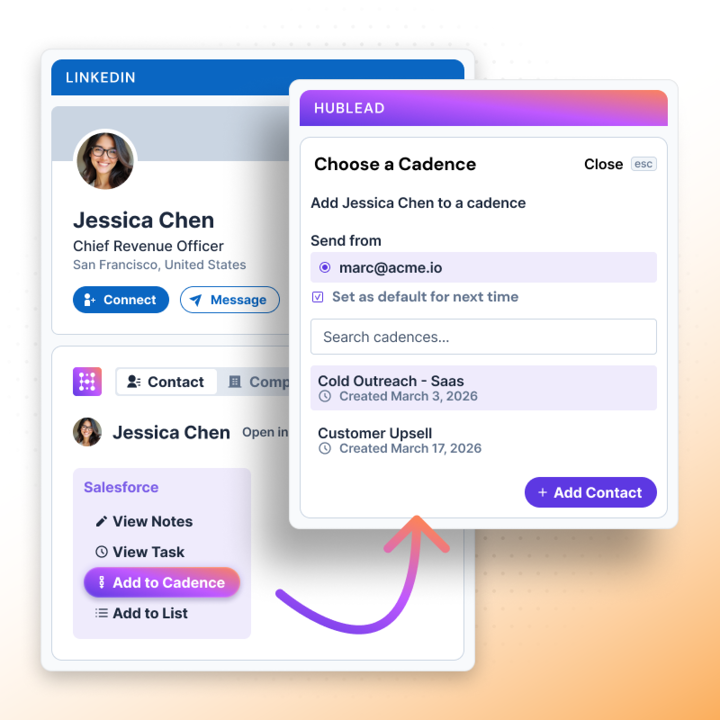
Hublead turns LinkedIn into your CRM. You can edit contact properties, create notes and tasks in Salesforce, and even enroll a lead in a Salesforce cadence without leaving your prospect’s profile. Manage leads on the fly all without leaving LinkedIn!
Bulk enrich a list of leads
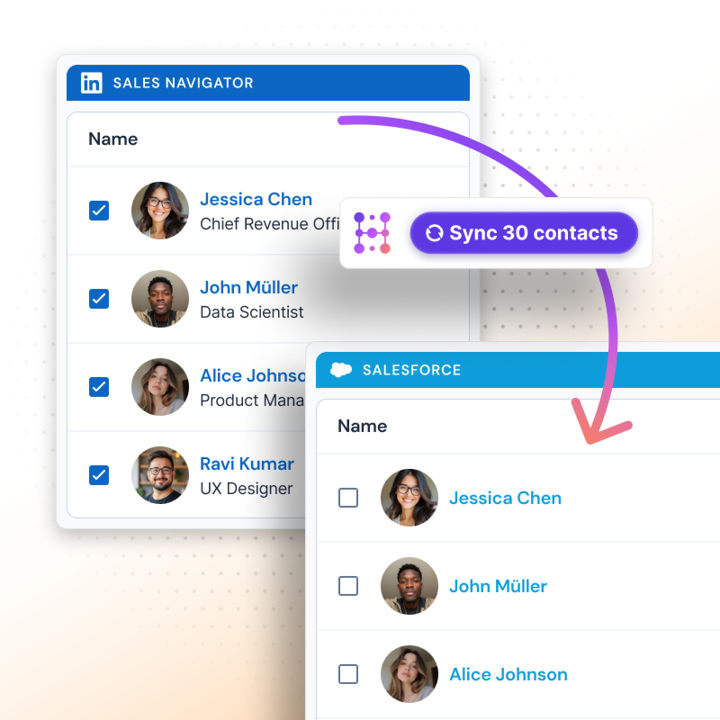
You can enrich leads one by one if you want, but you can save even more time by enriching an entire list of leads in the Hublead web app. Prospect on LinkedIn, import leads, save them to your list, then enrich every lead with one click.
And the best part is Hublead does this for every tier of LinkedIn and Sales Navigator. No extra subscriptions needed or gated access. Just add Hublead to Chrome, and you are all set to sync.
Try Hublead for free and see how much time you can save
Your CRM is only as effective as the data inside it.
The problem is that a sales rep’s job is to prospect, not manage their CRM. If you don’t sync your activities back to your CRM, though, you won’t get credit for all your hard work, and your team won’t have full visibility into LinkedIn as an outbound channel.
If you’re spending hours every week manually entering data into your CRM, it’s time to try Hublead. Hublead imports leads from LinkedIn to Salesforce, deduplicates them if records already exist, and syncs DMs and InMails straight to the contact record.
Hublead does the hard work so that you can focus on prospecting. Try Hublead for free with no commitment and save 8+ hours this week.
Ready to fix your outbound process?
Frequently asked questions
Does Salesforce have a native LinkedIn integration?
Yes, the official CRM sync integration integrates with LinkedIn Sales Navigator. It requires Sales Navigator Advanced Plus, though, which is $1600.
Can I sync LinkedIn DMs and InMails to Salesforce?
With the right tools! Chrome extensions like Hublead sync DMs and InMails to the Salesforce activity feed automatically whenever you send or receive a message on LinkedIn.
Do I need LinkedIn Premium or Sales Navigator to use Hublead?
Nope. Hublead works with every tier of LinkedIn, even free.
What’s the difference between Hublead and the native Salesforce LinkedIn integration?
The native integration pulls Sales Navigator data into Salesforce and only works for Advanced Plus. Hublead works with every tier of LinkedIn and adds a panel onto every contact/account profile to view Salesforce data right on LinkedIn.
Does Hublead offer a free trial?
Yep! Try Hublead for free to see how much time it saves you, then upgrade to continue accessing the tool.