Surfe vs Hublead: CRM-Sync 2026
Comparing Surfe and Hublead for LinkedIn-to-CRM sync? See the full breakdown: features, pricing, message sync, workflows, and which tool fits your team.
Surfe and Hublead both sync LinkedIn data back to HubSpot or Salesforce, but which is best for today’s sales teams? Find out in the breakdown below. We’ll cover features, pricing, message sync, and workflows to help you determine which tool fits your team.
Surfe vs Hublead: The quick verdict
At a glance, both Surfe and Hublead do one thing very well: they both sync LinkedIn and your CRM, giving you full pipeline visibility without having to switch back and forth between both platforms.
The key difference comes down to specialization.
Surfe supports multiple CRMs, including HubSpot, Pipedrive, Copper, and many others, while Hublead works with HubSpot and Salesforce. Hublead is a specialist tool that offers a much deeper integration between LinkedIn and your CRM.
In practical terms, that means a ton more value hidden behind a similar list of features. Value like triggering HubSpot or Salesforce workflows and sequences from LinkedIn activity and full pipeline reporting. If your sales team operates out of HubSpot or Salesforce, there is no better tool than Hublead.
Why look for an alternative to Surfe?
For a while, Surfe and Hublead were both fantastic tools to sync LinkedIn and your CRM.
Until Surfe decided to remove support for syncing messages, LinkedIn list exports, and human support (it’s just a bot now). Surfe is trying to cover the entire sales stack with enrichment, lead search, market signals, and API enrichment.
Those broad features can be great if they land. Otherwise they risk offering breadth without depth. And today’s sales teams need a tool with depth to cut through the noise and be heard by their prospects.
Why sales teams trust Hublead to sync HubSpot, Salesforce, and LinkedIn
Sync every message and invitation in seconds

This is a big one.
Surfe removed LinkedIn message sync and invitation tracking from its feature set. Templates too. These were core features, and without message sync, your CRM is blind to the most important part of LinkedIn outreach: the actual conversations.
Hublead still syncs everything. That means every connection request, message, and InMail is logged to the HubSpot or Salesforce contact timeline for you and your team to see.
Trigger HubSpot or Salesforce workflows from LinkedIn
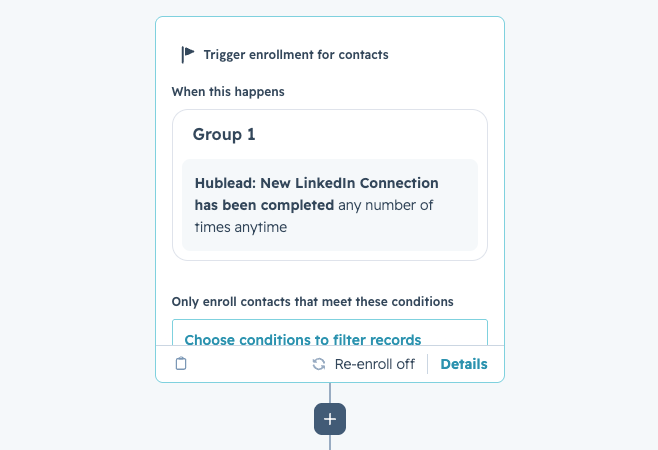
With Hublead, that invite acceptance becomes a workflow trigger inside HubSpot or Salesforce. The moment a prospect accepts your connection request, you can create tasks, enroll the contact in a sequence, update their lifecycle stage, and more without lifting a finger.
That’s the power of a deep integration with your CRM. Not just syncing data, but making LinkedIn data and events actionable in your CRM.
See how trigger automations work →
Bulk enrich any CRM list
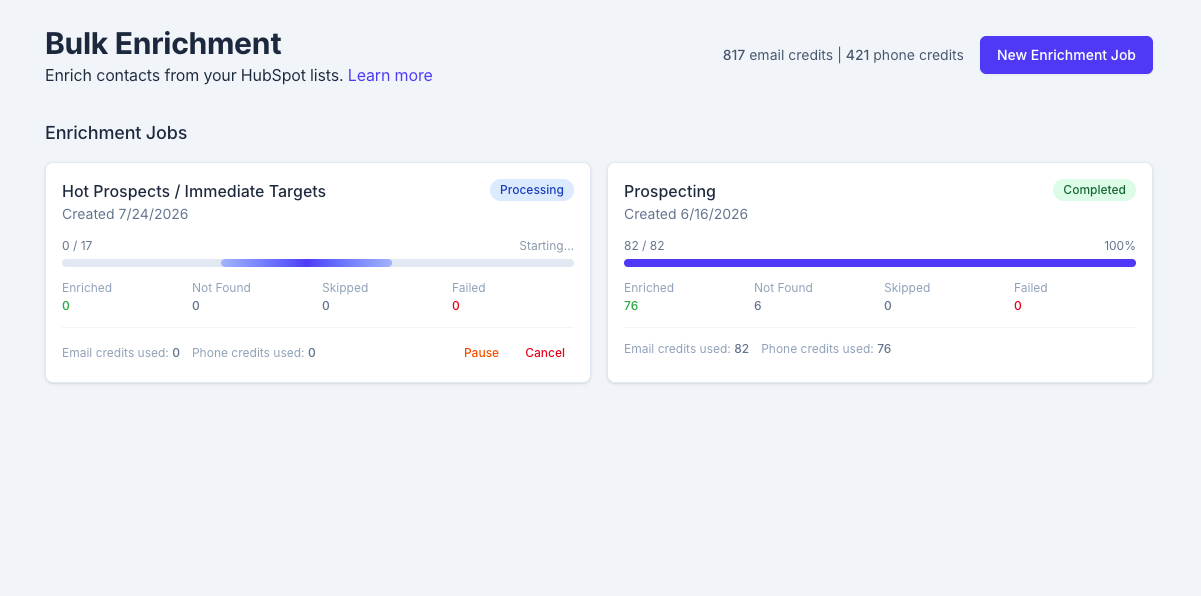
Most enrichment tools work one contact at a time. You visit a LinkedIn profile, click enrich, move to the next one. Do that 200 times, and you've lost half your day.
Hublead lets you bulk enrich any HubSpot or Salesforce list in seconds. Select a list, click enrich, and get emails and phone numbers for the entire list in one click. No extra tools or messy exports needed.
Deduplication that actually works for your CRM
There are tons of sales tools that sync data to HubSpot; the problem is that they create duplicate records, turning your CRM into a ball of yarn with no end in sight.
Hublead's deduplication is built for HubSpot's and Salesforce's data model. It matches across LinkedIn URL, email, name, and company before anything gets created. When a rep adds someone on LinkedIn, that record is matched to any existing contact in HubSpot or Salesforce. The same goes for Account records too.
Pipeline reporting tied to LinkedIn activity
When LinkedIn activity lives in your CRM, managers finally get the full picture. Which reps are actually active on LinkedIn? Which conversations turned into pipeline? What's the conversion rate from outreach to booked meeting?
Surfe doesn't connect LinkedIn activity to pipeline outcomes inside your CRM, but Hublead does. You can view all of your reps’ activity, track funnel reports for prospects on LinkedIn, and see how LinkedIn influences your pipeline.

Ready to fix your outbound process?
Hublead vs Surfe: A Side-by-Side Comparison
Pricing: Surfe vs Hublead
Surfe starts at $39/month per user on their Essential plan. The free tier gives you one CRM sync per day and 20 email lookups for the entire year. That’s enough to test, but not to scale.
Hublead starts at $32/month per user. This includes full LinkedIn sync, enrichment, and workflow triggers. There are also no credit limits on core sync features.
Both platforms are comparable in price, with Hublead starting slightly lower. When you consider all the extra value Hublead packs in: workflow and sequence triggers, bulk enrichment, message sync, it’s an incredible value when compared to Surfe.
You can try Hublead for free to see for yourself.
Try Hublead
If HubSpot or Salesforce is your CRM and LinkedIn is where you prospect, then there is no better tool than Hublead. Set Hublead up in five minutes, and see how much time it saves your sales team this week.
Ready to fix your outbound process?
Frequently asked questions
How is Hublead different from Surfe?
Both tools sync LinkedIn contacts to your CRM. Surfe supports four CRMs with a broad but shallow integration. Hublead does HubSpot and Salesforce, but goes much deeper. Workflow triggers from LinkedIn events, bulk enrichment from HubSpot or Salesforce lists, deduplication, pipeline reporting. If HubSpot or Salesforce is your CRM, Hublead is the specialist.
Does Surfe still sync LinkedIn messages to HubSpot?
No. Surfe removed message sync, invitation tracking, and templates. But Hublead syncs all LinkedIn messages, invitations, and profile visits to the HubSpot or Salesforce contact timeline.
Is it easy to switch from Surfe to Hublead?
Under 5 minutes. Install the extension, connect HubSpot or Salesforce, start browsing LinkedIn. You don’t have to migrate data, map fields, or take any other configuration steps.
Is Hublead cheaper than Surfe?
Hublead starts at $32/month vs Surfe at $39/month. And Hublead includes features at that price that Surfe either charges more for or doesn't offer at all, like workflow triggers, bulk enrichment, and message sync.
Does Hublead work with Sales Navigator?
Yes. Hublead works with LinkedIn Free, LinkedIn Premium, and Sales Navigator. Hublead also works with every tier of HubSpot or Salesforce.