
HubSpot Workflow Best Practices: Tipps für den Erfolg
Möchtest du die besten HubSpot Workflow-Praktiken meistern? Dieser Leitfaden führt dich durch die Einrichtung, Optimierung und das Vermeiden häufiger Fallstricke in HubSpot Workflows.
Das Beherrschen von HubSpot Workflows kann dein Marketing, deinen Vertrieb und deinen Service revolutionieren.
Dieser Leitfaden hilft dir, HubSpot Workflows einzurichten, zu optimieren und häufige Fallstricke zu vermeiden, damit deine Automatisierungsmaßnahmen effektiv und effizient sind.
Was sind HubSpot Workflows?
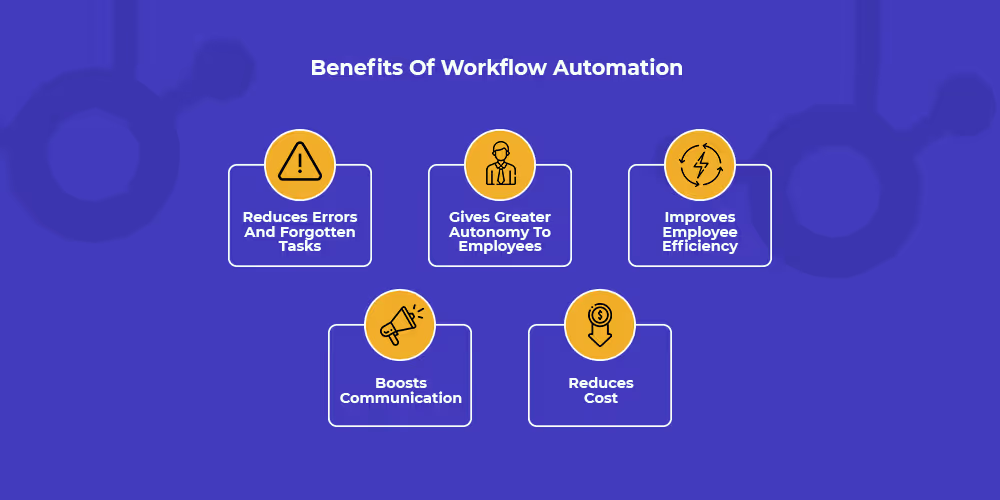
HubSpot Workflows automatisieren Routineaufgaben und ermöglichen so maßgeschneiderte und zeitgerechte Kommunikation. Sie können Aktionen basierend auf dem Nutzerverhalten auslösen.
Beispielsweise kann ein Workflow eine Reihe von E-Mails an einen neuen Lead senden, Kontakte anhand ihres Verhaltens in Mitgliederlisten einteilen oder Teammitglieder benachrichtigen, wenn bestimmte Aktionen durchgeführt werden. Durch den Einsatz von Workflows können Unternehmen ihre Abläufe optimieren und die Kundenbindung verbessern.
Tipp: Beginne mit einem einfachen Workflow, um Klarheit und einfache Verwaltung zu gewährleisten, da übermäßig komplexe Workflows schwer zu verstehen sein können.
Hier ist ein praktisches und einfaches Beispiel eines Nurturing-Workflows in HubSpot:

Dies ist ein einfacher Workflow, der eine verzögerte, individuelle Follow-up-E-Mail an alle sendet, die einen SEO-Leitfaden herunterladen.
Hier ist ein umfassendes Video, das alles Wichtige über HubSpot Workflows abdeckt, von der Erstellung bis zur Analyse:
Wie funktionieren Workflows?
Workflows nutzen Trigger und Aktionen. Ein Trigger ist ein Ereignis, das den Workflow auslöst, wie eine Formularübermittlung oder eine Änderung von Eigenschaftswerten. Der Workflow führt dann eine Reihe von vordefinierten Aktionen aus, wie das Senden einer E-Mail oder das Erstellen einer Aufgabe.
Gut zu wissen: Vertriebsteams nutzen Sequenzen für personalisierte Einzelgespräche per E-Mail, während Marketingteams Workflows für breite Marketing-Automatisierungsaufgaben nutzen, wie Massen-E-Mails und Lead-Management.
Workflows schaffen eine nahtlose und personalisierte Erfahrung für deine Kontakte und verbessern deine Marketing- und Vertriebsmaßnahmen durch Echtzeit-Reaktionen und die Pflege von Leads auf ihrer Käuferreise.
Tipp: Du kannst die Personalisierung noch weiter vertiefen, indem du HubSpot Smart Content in deinen Marketing-E-Mails, Landing Pages, Website-Seiten oder sogar CTAs verwendest.
Du kannst Workflows auch bei benutzerdefinierten Ereignissen oder Timeline-Ereignissen auslösen, wie dem Ergebnis einer LinkedIn-Verbindung, dank unserer HubSpot-LinkedIn-Integration.
Arten von HubSpot Workflows



Bereit, deinen Outbound-Prozess zu optimieren?
Kontaktbasierte Workflows
Kontaktbasierte Workflows verwalten die Kundenkommunikation und führen sie vom ersten Kontakt bis hin zu treuen Kunden. Diese Nurturing-Workflows werden durch Aktionen wie Änderungen von Eigenschaftswerten, Formularübermittlungen oder Lead Scoring ausgelöst und senden personalisierte Marketing-E-Mails, um Kontakte durch ihre Customer Journey zu begleiten.
Hier ist ein Beispiel eines kontaktbasierten Workflows:

Hier ist ein Beispiel eines HubSpot-E-Mail-Workflows, den du umsetzen kannst:
Dealbasierte Workflows
Dealbasierte Workflows automatisieren Vertriebsprozesse und stellen sicher, dass jeder Schritt – von der Aktualisierung der Deal-Phasen bis zur Benachrichtigung der Vertriebsmitarbeiter – präzise ausgeführt wird. Sie sorgen dafür, dass Deals reibungslos durch die Sales-Pipeline fließen und jede Chance ihr volles Potenzial entfaltet.
Ticketbasierte Workflows
Ticketbasierte Workflows verwalten Kundensupport-Tickets und stellen sicher, dass jedes ohne Verzögerung priorisiert, zugewiesen und aktualisiert wird. Diese Workflows sorgen für einen reibungslosen Helpdesk-Betrieb und hohe Kundenzufriedenheit.
Hier ist ein Beispiel eines ticketbasierten Workflows:

Workflow Best Practices
Organisation der Workflows ist entscheidend
Ein sauberes und gut organisiertes HubSpot-Portal ist entscheidend für den Erfolg deiner Workflows. Unorganisierte Workflows können zu Verwirrung, Ineffizienz und Fehlern führen, die sich negativ auf deine Geschäftsprozesse auswirken können.
Im Folgenden findest du eine Liste der Best Practices, die du implementieren kannst, um deine Workflows organisiert zu halten.
1. Sauberes Portal = Glückliches Portal
Der erste Schritt zu erfolgreichen Workflows ist ein sauberes und organisiertes HubSpot-Portal. Ohne eine ordentliche Organisation wird es schwierig, Workflows zu verwalten und zu optimieren, was zu potentiellem Chaos führen kann. Ein strukturiertes System von Anfang an kann dir langfristig erheblich Zeit und Ärger ersparen.
Tipps zur Pflege eines sauberen Portals:
- Workflows regelmäßig überprüfen und auditieren.
- Veraltete oder nicht genutzte Workflows archivieren oder löschen.
- Kontakt- und Unternehmensdatensätze aktuell und genau halten.
2. Benennungskonventionen
Die Entwicklung einer klaren und konsistenten Benennungskonvention für deine Workflows ist unbedingt notwendig. Eine gute Benennungskonvention erleichtert das Identifizieren und Suchen von Workflows, besonders wenn deine HubSpot-Instanz wächst.

Beispiele für Benennungskonventionen:
- Verwende Präfixe zur Kategorisierung von Workflows, wie "Content Offer -", "On-Demand Process", "Subscription Types -" oder "Internal Notification -".
- Füge relevante Details in den Namen ein, wie die spezifische Kampagne oder das Ziel.
- Beispiel: "Content Offer - SEO Guide Download - Nurturing Sequence".
Vorteile von Benennungskonventionen:
- Vereinfacht die Suche und Filterung von Workflows.
- Schafft Klarheit über den Zweck und Umfang jedes Workflows.
- Hilft, die Konsistenz im Team aufrechtzuerhalten.
3. Ordnerstruktur

Die Erstellung einer logischen Ordnerstruktur in HubSpot hilft bei der Organisation deiner Workflows. Ordner ermöglichen es dir, ähnliche Workflows zusammenzufassen, was die Verwaltung und Navigation erleichtert.
-May-07-2024-04-25-41-4945-PM.jpeg)
Beispiele für Ordnerstrukturen:
- Nach Geschäftsbereich (z. B. Marketing, Sales, Service).
- Nach Workflow-Typ (z. B. externe Kampagnen, interne Prozesse).
- Nach Phase der Customer Journey (z. B. Awareness, Consideration, Decision).
Tipps für eine effektive Ordnerstruktur:
- Halte es einfach und intuitiv.
- Aktualisiere deine Ordnerstruktur regelmäßig, wenn sich dein Unternehmen weiterentwickelt.
- Stelle sicher, dass alle Teammitglieder mit der Ordnerstruktur vertraut sind.
Hier ist ein Schritt-für-Schritt-Tutorial, das dir beim Erstellen deiner Ordner hilft:
Ziele für Workflows setzen
Jeder Workflow sollte ein klares und messbares Ziel haben. Ohne definierte Ziele ist es schwierig, die Effektivität deiner Workflows zu beurteilen und notwendige Verbesserungen vorzunehmen.

Die Bedeutung von Workflow-Zielen
Ziele für deine Workflows zu haben, ermöglicht dir:
- Erfolg zu messen und Verbesserungspotenziale zu identifizieren.
- Sicherzustellen, dass Workflows mit deinen Unternehmenszielen übereinstimmen.
- Das Erstellen unnötiger oder redundanter Workflows zu vermeiden.
Arten von Workflow-Zielen:
- Lead Nurturing: Die Konversionsrate von Leads zu Kunden erhöhen.
- Interne Prozesse: Die Effizienz interner Abläufe verbessern.
- Kundenbindung: Die Interaktion und Zufriedenheit der Kunden steigern.
Wenn du mehr über das Setzen von Zielen für deinen Workflow erfahren möchtest, lade ich dich ein, meinen Blog-Artikel zu diesem Thema zu lesen: Wie du Ziele für deinen Workflow festlegst.
Verzögerungen effektiv nutzen
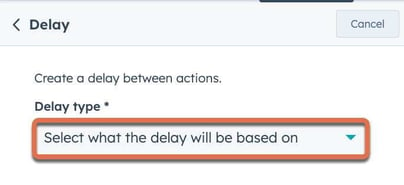
Verzögerungen sind ein wesentlicher Bestandteil von HubSpot Workflows und ermöglichen natürlichere, menschlichere Interaktionen.
Vorteile der Verwendung von Verzögerungen
1. Interaktionen menschlicher gestalten:
- Verzögerungen können automatisierte Kommunikation weniger roboterhaft und persönlicher wirken lassen.
- Beispiel: Füge eine Verzögerung vor dem Senden einer Follow-up-E-Mail ein, um den Eindruck einer durchdachten zeitlichen Abstimmung zu erwecken.

2. Datengenauigkeit sicherstellen:
- Das Hinzufügen von Verzögerungen stellt sicher, dass alle erforderlichen Daten ausgefüllt sind, bevor die nächste Aktion ausgeführt wird.
- Beispiel: E-Mail-Versand verzögern, bis Personalisierungstoken aktualisiert wurden.
Arten von Verzögerungen
1. Zeitbasierte Verzögerungen:
- Feste Intervalle zwischen Workflow-Aktionen (z. B. 3 Tage warten vor der nächsten E-Mail).
- Nützlich zum Erstellen einer Kommunikationsabfolge über einen Zeitraum.

2. Ereignisbasierte Verzögerungen:
- Warten, bis eine bestimmte Aktion erfolgt (z. B. ein Kontakt besucht eine Webseite).
- Hilft beim Erstellen dynamischerer und reaktionsfähigerer Workflows.

Erweiterte Workflow-Praktiken
Bedingte Verzweigung
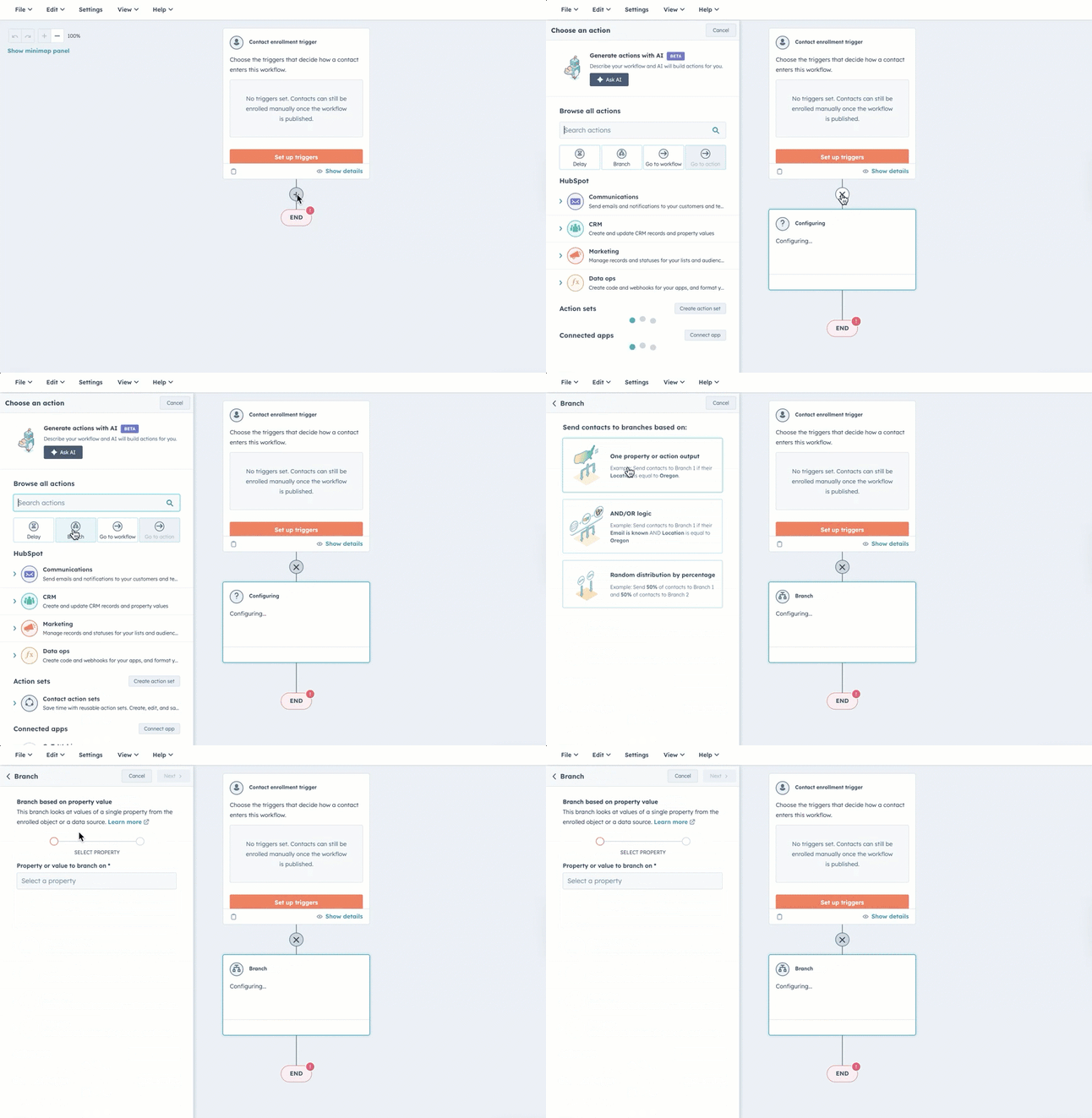
Nutze bedingte Verzweigungen, um personalisiertere und relevantere Workflows zu erstellen. Dabei werden Wenn/Dann-Verzweigungen eingerichtet, die Kontakte basierend auf ihrem Verhalten oder ihren Eigenschaften durch verschiedene Pfade leiten.
Dynamische Inhalte
Integriere dynamische Inhalte in deine Workflow-E-Mails, um Nachrichten basierend auf Kontakteigenschaften oder -verhalten anzupassen. Dynamische Inhalte stellen sicher, dass jeder Empfänger eine personalisierte Nachricht erhält, die seinen spezifischen Bedürfnissen und Interessen entspricht.
Lead Scoring Integration
Integriere Lead Scoring in deine Workflows, um Leads zu priorisieren und zu verwalten. Durch das Zuweisen von Scores basierend auf Aktionen und Verhalten kannst du sicherstellen, dass die engagiertesten Leads das angemessene Maß an Aufmerksamkeit und Pflege erhalten.
Erfahre mehr über das Konzept des Lead Scoring in diesem Video:
Häufige Fallstricke bei der Verwendung von Workflows
Das Vermeiden häufiger Fallstricke ist entscheidend für die Aufrechterhaltung effektiver Workflows und das Erreichen deiner Automatisierungsziele.
Einschreibungsprobleme
1. Wiedereinschreibung:
- Bestimme, ob Wiedereinschreibung für jeden Workflow notwendig ist.

- Beispiel: Wiedereinschreibung für Support-Anfragen aktivieren, um mehrere Tickets desselben Kontakts zu bearbeiten.
2. Einschreibungs-Trigger:
Überprüfe und teste deine Workflow-Einstellungen regelmäßig, um häufige Einschreibungsprobleme zu vermeiden. Stelle sicher, dass deine Workflows Kontakte wie beabsichtigt einschreiben und pflegen, ohne Auffälligkeiten.

Datenqualität
Die Integrität deiner Workflows hängt von der Qualität deiner Daten ab. Stelle sicher, dass die deine Workflows antreibenden Daten genau und aktuell sind, um eine solide Grundlage für effektive Automatisierung zu schaffen.

Überlappende Workflows
Vermeide überlappende Workflows, die Verwirrung stiften und die Effektivität reduzieren. Plane deine Automatisierung sorgfältig und nutze Unterdrückungslisten, um zu verhindern, dass Kontakte in konkurrierenden Workflows stecken bleiben.
Darüber hinaus solltest du das gleichzeitige Bearbeiten desselben Workflows vermeiden, um Konflikte zu verhindern und eine klare Kommunikation sicherzustellen.
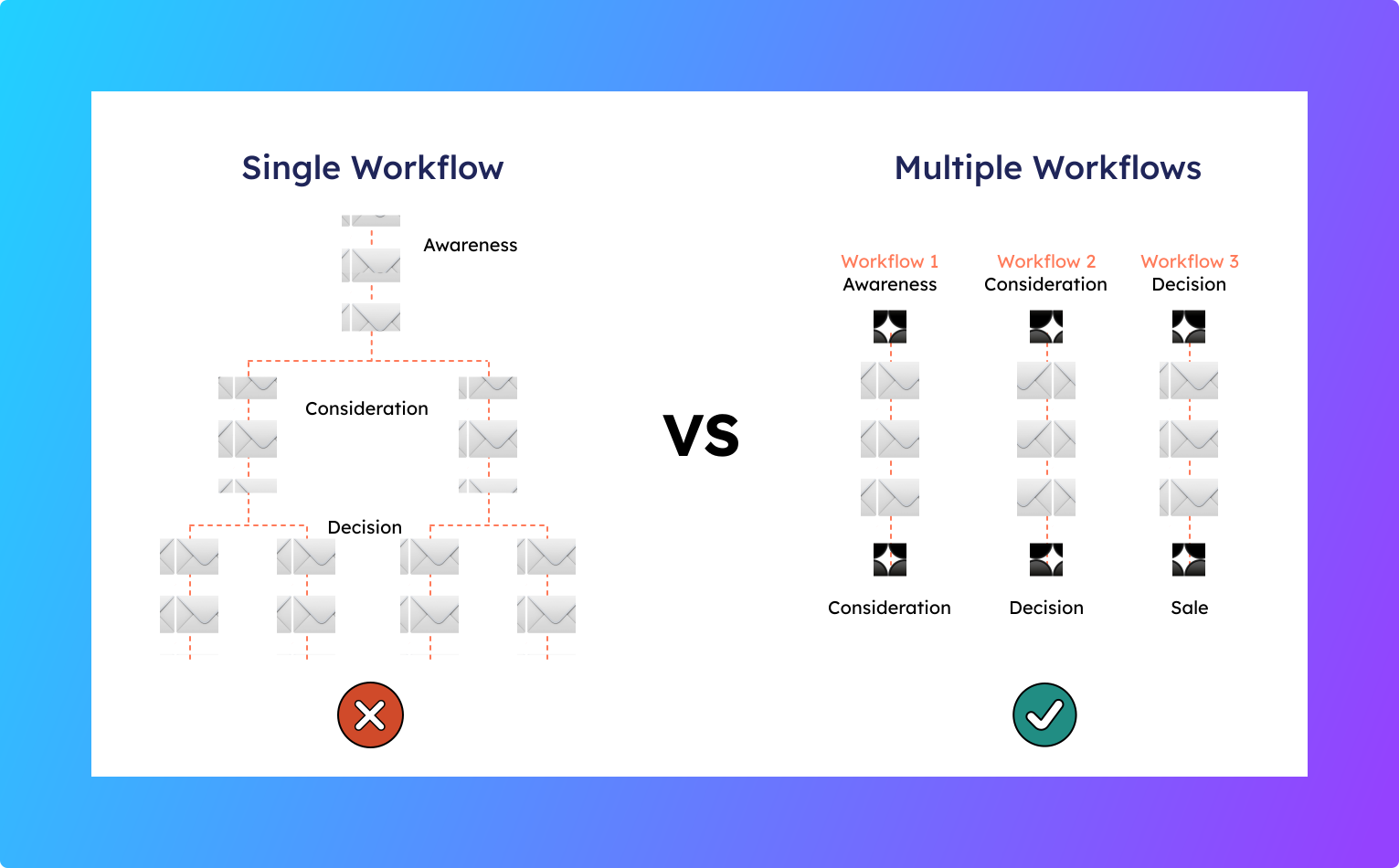
Tipp: Es ist besser, mehrere gut organisierte Workflows zu haben als einen einzigen unordentlichen. Dieser Ansatz gewährleistet Klarheit und Effizienz in deinen Automatisierungsprozessen.
Workflow-Beispiele
Praktische Beispiele helfen dabei zu veranschaulichen, wie diese Best Practices effektiv umgesetzt werden können.
Marketing-Workflow-Beispiel: Webinar-Promotion
Erstelle einen ansprechenden Nurturing-Workflow für Webinar-Teilnehmer, um Leads effektiv durch jede Phase des Funnels zu begleiten. Von der ersten Einladung bis zu Follow-ups nach dem Webinar automatisiert HubSpot diesen Prozess nahtlos.
Hier ist ein Beispiel eines solchen Workflows, der das Lead Nurturing für die Veranstaltungsregistrierung durch das Versenden geplanter E-Mails automatisiert:


Vertrieb-Workflow-Beispiel: Lead-Zuweisung
Ein Workflow, der die Lead-Zuweisung effizient verwaltet, kann deinen Vertriebsprozess erheblich verbessern. Durch die Automatisierung der Zuweisung neuer Leads an den geeignetsten Vertriebsmitarbeiter kannst du zeitnahe und effektive Follow-ups sicherstellen.
Erstelle zum Beispiel einen Workflow, der Leads basierend auf ihrer Herkunft zuweist. Wenn dein Unternehmen sowohl in Kanada als auch in den USA tätig ist, kannst du einen Workflow einrichten, der Leads aus Kanada automatisch Adam und Leads aus den USA Jacob zuweist:

Service-Workflow-Beispiel: Ticket-Management
Ein Workflow, der das Ticket-Management effizient handhabt, kann den Kundensupport von gut auf hervorragend heben. Durch die Automatisierung der Ticket-Erstellung, -Weiterleitung und -Besitzrotation kannst du einen reibungslosen und effektiven Service-Betrieb sicherstellen.
Erstelle zum Beispiel einen Workflow basierend auf einem Support-Anfrageformular, der automatisch Ticket-Datensätze im Format "Problemkategorie - Vorname Nachname" generiert:

Interne Kommunikations-Workflow-Beispiel: Benachrichtigungen für Vertriebsteams
Automatisiere Slack-Benachrichtigungen für Vertriebsteams, um sie über neue Leads, Deal-Updates, wichtige Fristen und Kundenanfragen zu informieren. Diese zeitnahen Hinweise halten Vertriebsteams reaktionsschnell und proaktiv.
Hier ist zum Beispiel ein Workflow, der den Versand von Slack-Benachrichtigungen automatisiert:

Wichtigste Erkenntnisse
- HubSpot Workflows automatisieren Routineaufgaben und erleichtern Marketern das Erstellen personalisierter, zeitgerechter Kommunikation.
- Verschiedene Arten von HubSpot Workflows, wie kontaktbasierte, dealbasierte und ticketbasierte, decken verschiedene Unternehmensanforderungen ab, vom Lead Nurturing bis zum Kundensupport.
- Die Implementierung von Best Practices, wie das Setzen klarer Ziele, die Verwendung geeigneter Benennungskonventionen und das Vermeiden von Workflow-Überlappungen, gewährleistet einen effizienten und effektiven Einsatz von HubSpot Workflows.
Bereit, deinen Outbound-Prozess zu optimieren?
Häufig gestellte Fragen
Wann sollte ich Workflows in HubSpot verwenden?
Workflows in HubSpot sollten verwendet werden, um Routineaufgaben zu automatisieren, Nutzerfehler zu reduzieren und deine Marketingaktivitäten zu optimieren. Durch die Automatisierung des E-Mail-Versands und von Lead-Follow-ups helfen Workflows, Tippfehler zu eliminieren und eine konsistente Kommunikation sicherzustellen.
Wie oft sollte ich die Leistung meiner HubSpot Workflows überprüfen?
Du solltest die Leistung deiner HubSpot Workflows regelmäßig überprüfen, indem du wichtige Kennzahlen und Leistungstrends überwachst. Nimm basierend auf den Datenerkenntnissen notwendige Anpassungen vor, um kontinuierliche Verbesserungen und optimale Effizienz sicherzustellen.
Wie bereinige ich Workflows in HubSpot?
Um deine Workflows in HubSpot effektiv zu bereinigen, folge diesen Schritten:
- Regelmäßig auditieren
- Workflows dokumentieren
- Klare Benennungskonventionen verwenden
- Alte Workflows archivieren
- Unnötige Workflows löschen
- Wenn möglich konsolidieren
- Testen und optimieren
Durch die Befolgung dieser Schritte kannst du ein sauberes, effizientes und effektives Workflow-System in HubSpot aufrechterhalten.
Warum funktioniert mein Workflow in HubSpot nicht?
Fehler können entweder durch die Einrichtung des Workflows oder durch Probleme mit den eingeschriebenen Datensätzen verursacht werden. Um Fehler im Zusammenhang mit einem Workflow zu beheben, klicke oben rechts auf Aktionen bearbeiten, um den Workflow-Editor zu öffnen.
Wie organisiere ich meine HubSpot Workflows?
Organisiere deine Workflows mit Ordnern
- Navigiere in deinem HubSpot-Konto zu Automatisierungen > Workflows.
- Klicke oben rechts auf den Tab Ordner.
- Klicke oben links auf Ordner erstellen.
- Gib im Dialogfeld den Ordnernamen ein. Klicke dann auf Speichern.