
HubSpot LinkedIn Sales Navigator integration: how it works + best alternatives
Learn how the HubSpot LinkedIn Sales Navigator integration works, what you need (plans), and the best alternatives to import leads, build lists, and enroll sequences with Hublead.
Whether you’re connecting, DMing, or information-gathering, there are a lot of reasons why you’d want to bring all your prospecting activities from LinkedIn into HubSpot.
But how do you manage it? When it comes to integrating LinkedIn with HubSpot, you have a few options:
- HubSpot’s Native LinkedIn Sales Navigator Integration (the oldest version)
- HubSpot’s LinkedIn CRM Sync (the newest native option)
- Hublead (a third-party solution that works with any HubSpot plan and any LinkedIn plan)
In this article, we’ll walk you through each and compare them to help you decide which works best for your prospecting flow.
It’s worth noting: HubSpot’s native integrations only work with Sales Navigator. Only Hublead integrates both Sales Navigator and LinkedIn.
With that out of the way, let’s learn how these integrations work.
Once LinkedIn activity lands in HubSpot, the next step is turning replies into pipeline. Here’s a practical playbook: Auto-create HubSpot deals from LinkedIn replies.
HubSpot LinkedIn Sales Navigator integration (native app)
HubSpot’s native LinkedIn integration enables you to easily connect LinkedIn Sales Navigator to your CRM, saving you hours of time on manual data entry and allowing you to focus more on building relationships and closing deals.
Let’s walk through how to install this integration, its features, and price.
How to Install the HubSpot Sales Navigator Integration
This integration is on the HubSpot marketplace. Simply head to the HubSpot app marketplace and search for “LinkedIn.” Then select the Sales Navigator integration from the search list.
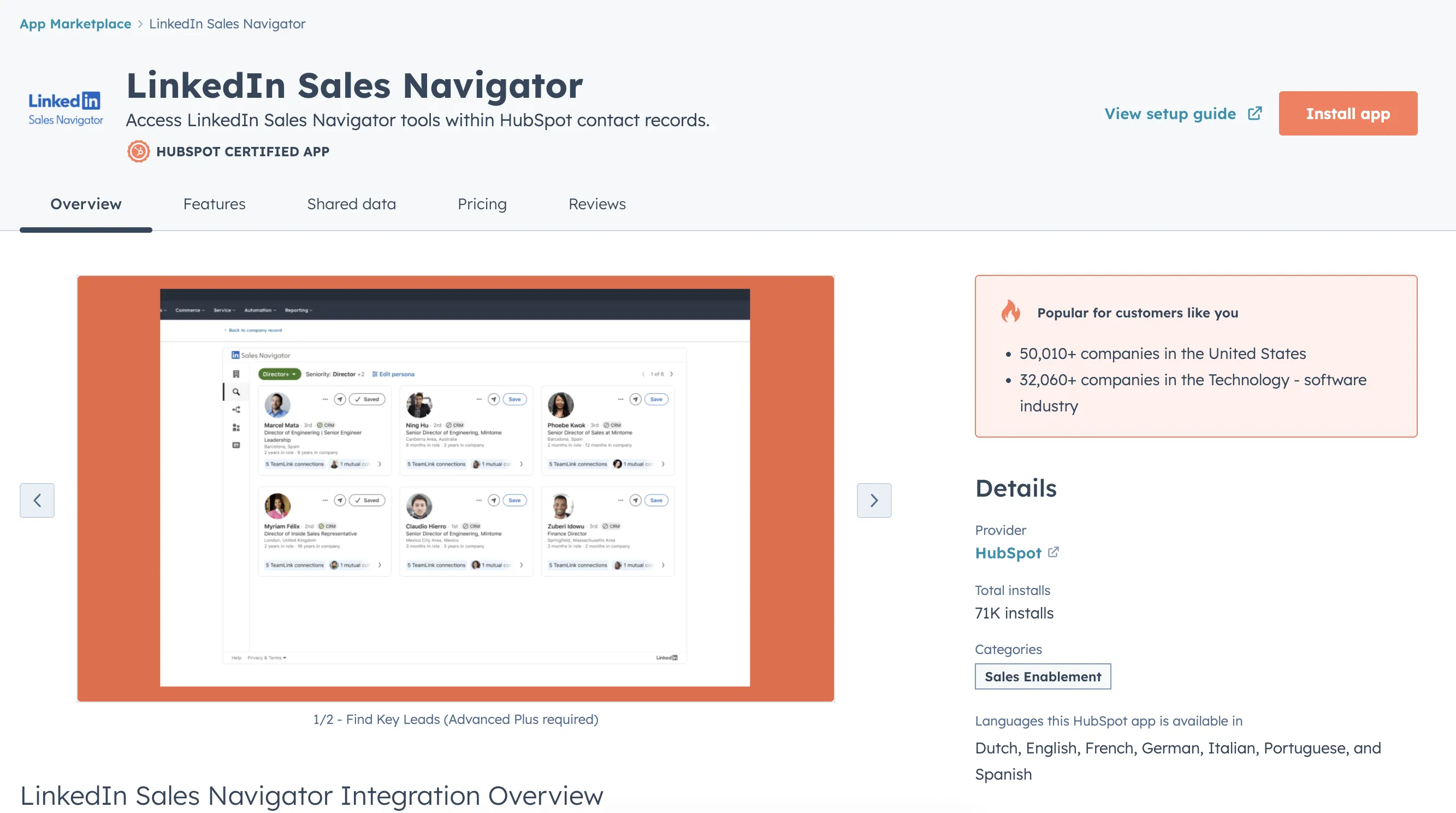
HubSpot LinkedIn Sales Navigator Integration Features
The HubSpot LinkedIn Sales Navigator integration is HubSpot’s original LinkedIn integration. It allows you to:
- Engage new contacts from the contact record
- Gain access to Sales Navigator lead recommendations
- Find related leads from company records
- Check your connection requests with key people
- Account IQ: company news and LinkedIn data
- Build a relationship map
Let’s walk through each feature with screenshots to show you how it works!
Engage Your New Contacts From the HubSpot Contact Record

HubSpot’s Sales Navigator integration allows you to send InMails directly from a HubSpot contact record and instantly find related leads at the same company, enhancing your HubSpot contacts with essential LinkedIn data. Rather than jump between two platforms, all you need to do is compose your messages within HubSpot and send!
Gain Access to Sales Navigator Lead Recommendations

By clicking on "Save as lead", you can also add those new contacts to your Sales Navigator leads list, making personalized outreach smoother and helping sales teams streamline every step of their CRM sync process.
Find Related Leads From Company Records

With this HubSpot Sales Navigator integration, you can also access LinkedIn Sales Navigator information, including recommended leads, and view shared connections without leaving HubSpot. Again, this can save you hours of time by eliminating the need to switch platforms and copy and paste data into HubSpot.
Check Your Connection Requests with Key People

Want to track your connection requests? You can do that as well with the Sales Navigator integration! However, it’s worth noting that this feature is available only to LinkedIn Sales Navigator Advanced Plus users. For Sales Navigator Advanced users, you’ll still get basic lead recommendations but can’t fully customize your buyer persona settings.
Account IQ: Company News and LinkedIn Data
Account IQ merges your company news with real-time LinkedIn data from the LinkedIn Sales Navigator app, saving you from manually searching multiple sources.

This is ideal for Sales Navigator Advanced or Sales Navigator Advanced Plus; Account IQ uses CRM sync to help sales teams qualify leads, prioritize companies, and prepare for more effective HubSpot and LinkedIn sales outreach.
Build a Relationship Map
Want to keep tabs on all your LinkedIn activity in HubSpot? The Relationship Map gives your team a single, centralized space with all sales navigator activities, easier to check LinkedIn information from HubSpot company records.

If you have a Sales Navigator license, you can view LinkedIn insights, manage key buyer information, and coordinate with colleagues in real time-no extra tabs or manual exporting needed.
Requirements (HubSpot plan + Sales Navigator plan)
To use HubSpot's native Sales Navigator integration, you typically need HubSpot Pro or Enterprise plus Sales Navigator Advanced Plus for full features.
Pricing
The HubSpot LinkedIn Sales Navigator integration is not available for every HubSpot or Sales Navigator plan. You will need the following to make use of this integration:
- HubSpot Pro or Enterprise plans
- Sales Navigator Advanced Plus plan
There are other options, though, so don’t worry if you don’t have these plans.

Ready to fix your outbound process?
To measure what LinkedIn actually generates, this playbook gives you a clean attribution model inside HubSpot deals: Track LinkedIn-driven opportunities and revenue in HubSpot deals.
HubSpot LinkedIn CRM Sync (Sales Navigator Advanced Plus)
As said above, the Sales Navigator integration is HubSpot’s original LinkedIn integration. HubSpot later added LinkedIn CRM Sync as a two-way integration that supercharges your LinkedIn Sales Navigator and LinkedIn Ads experience.
The LinkedIn CRM Sync integration helps to keep your data fresh and accurate by automatically logging sales activities and LinkedIn members' data in one place. It can be used by both sales and marketing, too. Here’s how:
- For Sales Teams: Prospect smarter on Sales Navigator while every action-InMails, connections, or messages-flows straight into HubSpot, boosting your sales pipeline.
- For Marketers: Measure and optimize the ROI of your LinkedIn marketing efforts with precise revenue attribution reports in LinkedIn Business Manager.
How to Install HubSpot’s New LinkedIn Integration
First, head to the HubSpot App Marketplace and search “LinkedIn.” Then, select the LinkedIn CRM sync integration and install it into your portal:

Read on for the key features of this integration next.
HubSpot’s LinkedIn CRM Sync Integration Features
The HubSpot LinkedIn CRM sync integration is a two-way integration between HubSpot and LinkedIn that can do the following:
- Log LinkedIn activities
- Sync leads and accounts
- Keep data up to date
- Mesure performance and ROI
Automatically log LinkedIn activities
Goodbye manual activity logging. The HubSpot LinkedIn CRM sync integration allows you to track all your LinkedIn sales activities in HubSpot. Whether you’re sending InMail, attaching Smart Links, making connections, or simply taking notes, automatically log all your LinkedIn Sales Navigator activities on the proper HubSpot timelines.

Sync Leads and Accounts
HubSpot’s LinkedIn CRM Sync integration does more than just log activities. It can also seamlessly sync your HubSpot leads and owned accounts to LinkedIn, tracking alerts and intent signals. Then let LinkedIn uncover promising leads and untapped opportunities based on your usage and closed-won data.
-1.png)
Keep Your Data Up-to-Date
For sales reps, there’s little more important than accurate and up-to-date data. HubSpot’s LinkedIn CRM sync integration matches your contacts and companies to LinkedIn profiles and imports contacts directly into HubSpot, alerting you when HubSpot records are outdated.

Measure and Boost your ROI
Want to track your LinkedIn prospecting performance? You can do that too. Sync your HubSpot data and visualize how LinkedIn is influencing your pipeline, conversion, and revenue metrics through the revenue attribution reports in LinkedIn Business Manager.

HubSpot’s New LinkedIn Integration Pricing
Just like the Sales Navigator integration, this integration is not available for every plan. To use it, you will need the following:
- HubSpot Pro or Enterprise plans
- Sales Navigator Advanced Plus plan
Not using HubSpot Pro/Enterprise or Sales Navigator Advanced Plus? No problem, there’s another option for you - Hublead!
Best HubSpot LinkedIn Sales Navigator integration for lists and sequences (Hublead)
If you aren’t a HubSpot Pro/Enterprise and LinkedIn Sales Navigator Advanced Plus customer, then you won’t be able to use HubSpot’s native integrations. Does that mean you’re doomed to manually copy and paste every message or log connection requests in notes on the contact record?
Not at all!
There are third-party integrations that seamlessly connect LinkedIn and HubSpot, no matter your subscription to either. Read on to see how Hublead can help you save hours each week by connecting LinkedIn with your HubSpot portal.
What is Hublead?
Hublead is a Chrome extension that seamlessly integrates LinkedIn and HubSpot, allowing you to automatically add prospects, log conversations, and enrich contact data in one click on LinkedIn.
No tab switching, no duplicates, just focused on prospecting and closing deals.
What You Can Do With Hublead
As said above, Hublead seamlessly integrates LinkedIn (both regular LinkedIn and Sales Navigator) with HubSpot. More specifically, though, sales reps use Hublead for the following:
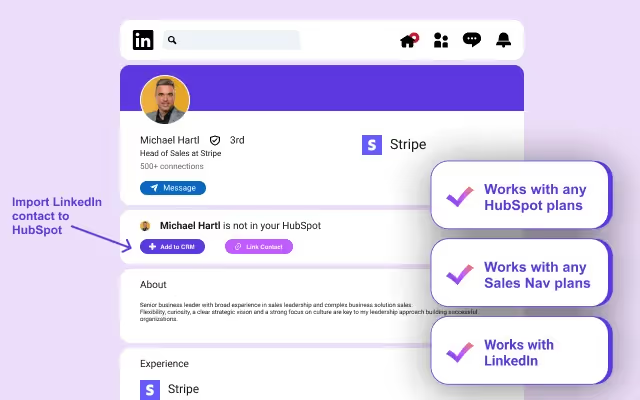
- Import LinkedIn contacts
- Enrich Contacts
- Edit within HubSpot
- Sync conversations
- Track connection requests
- Build HubSpot lists based on LinkedIn data
- Report on performance and ROI
Let’s walk through each of these for a closer look.
Import LinkedIn Contacts
Add new LinkedIn connections to your HubSpot contact records with a single click-no spreadsheets, no manual data entry. Hublead scans LinkedIn profiles by URL, name, or company info, then updates your HubSpot contacts and data instantly.
From Sales Navigator to HubSpot lists and sequences (the workflow)

If your reps work inside Sales Navigator, the goal is simple: get leads into HubSpot in a clean way, so you can segment them in lists and enroll them in sequences without manual copy-paste.
1) Export leads from Sales Navigator (batch by batch)
Sales Navigator exports are typically done in batches (for example, 25 at a time depending on your plan).
2) Import into HubSpot with Hublead
Hublead creates or updates the HubSpot contact, so the lead becomes usable for lists, workflows, and sequences.
3) Build a HubSpot list from those imports
Create an active list using the source filter we recommend in our KB: Original Source Drill Down 2 = 1451878. This reliably isolates contacts imported through Hublead.
4) Enroll contacts into a HubSpot sequence
From that list, enroll contacts into the right sequence. If you have HubSpot Sales Enterprise, you can also automate enrollment with a workflow.
This is the Sales Navigator and HubSpot integration approach that helps teams move from Sales Navigator lead sourcing to HubSpot lists and sequences with a repeatable process.
Want the step-by-step version? Read the playbook: Sales Navigator to HubSpot lists and sequences (via Hublead).
Email Prospecting Tool
Hublead offers data-enrichment capabilities, too. Supercharge lead generation with Hublead’s built-in email finder. Reach out to prospects beyond LinkedIn, right from inside your HubSpot workflows.

Direct HubSpot Editing
Need to edit a HubSpot contact, but you’re in the middle of your LinkedIn flow? You can edit a contact straight from LinkedIn as long as they are synced. Update and manage your HubSpot properties directly while on a LinkedIn profile. There’s no need to switch tabs or juggle multiple windows.

LinkedIn Conversation Sync
Sync LinkedIn messages and InMails right in HubSpot. Hublead allows you to seamlessly log conversations, create tasks, and generate reports for a complete view of each prospect interaction.

Track LinkedIn Invites
Whenever you browse LinkedIn Sales Navigator or regular LinkedIn and click connect, Hublead automatically logs that connection request in your HubSpot contact records.
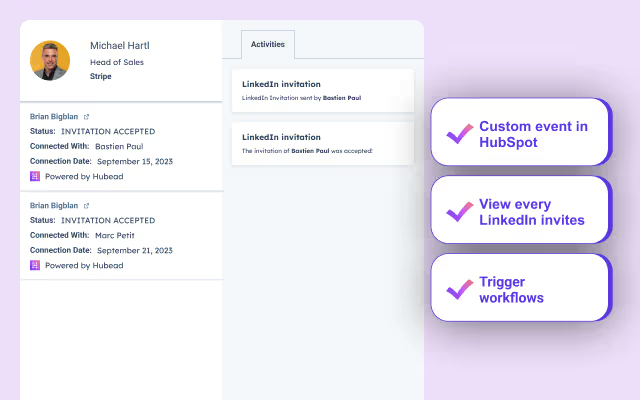
Hublead also routinely checks for newly accepted invitations and syncs data back to HubSpot, giving sales teams real-time visibility into who’s joined their network.
Segment Contacts Based on LinkedIn Data
Hublead does more than give you a two-way sync between HubSpot and LinkedIn; it also levels up your segmentation and targeting within HubSpot. With Hublead, you can pull a list of contacts to see who did not answer your message or who did not accept your invitations, making it easier for your sales team to follow up.
Performance Insights
Gain instant visibility into the success of your outreach and LinkedIn prospecting efforts. Hublead allows you to monitor how your LinkedIn activity drives pipeline growth and use these insights to refine your sales strategy.
Hublead Pricing
Unlike HubSpot’s native LinkedIn integrations, HubLead works with all tiers of HubSpot (Free, Starter, Professional, and Enterprise) and works with Free and Paid LinkedIn (including all Sales Navigator tiers.
Hublead offers a free trial and three tiers ranging from $32/seat to $112/seat. Try Hublead for free and see how much time you save!
HubSpot LinkedIn Sales Navigator integration: Hublead vs native (comparison)
Here's our quick comparison between native and third party integrations:
Hublead vs Native HubSpot integrations
| Criteria | Native integration HubSpot | Hublead Built for HubSpot |
|---|---|---|
| LinkedIn data | Provides insights on contact record | Syncs to HubSpot data |
| Send InMails | Yes | No |
| List building tools | Available | Available |
| Save LinkedIn profiles | Not possible | Yes |
| Contact enrichment | No | Yes (including emails and phone numbers) |
| Company enrichment | Yes | Yes |
| Log LinkedIn invitations | Not possible | Yes (custom event or CRM card) |
| Outreach reporting in HubSpot | Not possible | Invitation acceptance rate and message reply rate |
| HubSpot in LinkedIn | No properties displayed | View and edit HubSpot properties |
| Message syncing | Not synced | Can be synced (semi or automatically) |
| Plan compatibility | Requires Sales Navigator Team plan and HubSpot Sales Pro for some features | Works with any Sales Navigator plan |
| Cost | No extra cost | Depends on the tool and plan |
Hublead vs other Third Party Integrations
Hublead isn’t the only third-party integration that connects LinkedIn to HubSpot:
- LinkMatch makes it easy for users to import LinkedIn Sales Navigator information.
- LinkedHub is limited to importing contacts; you pay according to the number of contacts you want to import per month. And does not support LinkedIn Sales Navigator.
- LinkPort: Import only contacts.
But time and time again, sales reps love Hublead for its time-saving features, data enrichment capabilities, and seamless connection between LinkedIn and HubSpot. Here's a quick comparison table for these tools.
| Criteria | LinkedHub | LinkMatch | LinkPort | Hublead Best |
|---|---|---|---|---|
| Import contact | ✅ | ✅ | ✅ | ✅ |
| Data enrichment | ❌ | ❌ | ❌ | ✅ |
| Sync messages | ✅ | ✅ | ❌ | ✅ |
| HubSpot properties in LinkedIn | ❌ | ✅ | ❌ | ✅ |
| Easy integration | ❌ | ❌ | ❌ | ✅ |
| Pricing | 💰💰 | 💰💰💰 | 💰 | 💰💰 |
Choosing the right hubspot integration depends on your unique needs, especially if you want to:
- Display LinkedIn insights (like company news, shared connections, or related leads) inside your HubSpot CRM
- Send InMails directly from a HubSpot contact
- Manage leads across companies with full sales navigator searches and connection requests
- Track activities for hubspot sales teams, including updating company records and viewing a detailed view of prospects
Whether you’re optimizing sales navigator advanced plus features or just looking to connect hubspot with free LinkedIn, consider how each tool handles CRM settings, sync data processes, and overall user experience. Ultimately, you want a powerful tool that supports effective outreach and scales with your sales pipeline, without forcing you to leave HubSpot at any step.
Ready to fix your outbound process?
Frequently Asked Questions
Does HubSpot have LinkedIn integration?
There is no direct LinkedIn to HubSpot integration, but there are tools available to easily copy data from LinkedIn to your HubSpot CRM database, saving time and frustration. So, while it may not be a seamless integration, there are workarounds to sync data between the two platforms.
How do I import LinkedIn connections to HubSpot?
You can import LinkedIn connections to HubSpot by exporting your LinkedIn connections as a CSV file or by using a Chrome extension like Hublead, which helps you directly import your LinkedIn connections and update your HubSpot contact list automatically.
Can I customise the data that is synced between LinkedIn and HubSpot?
Yes, you can customize the data that is synced between LinkedIn and HubSpot by mapping fields. You can choose which LinkedIn fields are mapped to which HubSpot fields, allowing you to control the data that is synced.
How do I integrate LinkedIn with HubSpot?
Install the Hublead Chrome extension. Navigate to LinkedIn and start importing contacts with a single click using the Hublead button. Sync LinkedIn messages to HubSpot, and Hublead will automatically synchronize new messages. Hublead's AI-powered algorithm can help find emails & phone numbers, and it checks in real-time if a LinkedIn contact already exists in HubSpot to avoid duplicates.
