
HubSpot Segments (Lists): How to Segment Your Contacts
HubSpot lists are now called segments. How to build active and static segments, the filters worth using, and how to keep them clean for outbound.
 Bastien PaulSeptember 22, 20263 min read
The short answer
Create an active list (updates automatically) or a static list (fixed contacts) in CRM > Lists, then segment by source, engagement, demographics such as title and company size, and lifecycle stage. Define a clear goal for each list and keep it clean and up to date.
A highly targeted list is the difference between an email campaign that results in booked calls or orders and one that yields nothing but crickets.
A quick note on terminology: HubSpot now refers to what used to be called lists as segments. You will see both terms in the product, and this guide uses them interchangeably. Segments come in two forms, active (auto-updating) and static (a fixed snapshot), and you can build them from any contact, company, or deal property.
Effective prospecting starts with a good list. So why do so many gurus skip past it when they promise instant results with their messaging campaigns? Probably because list segmentation sounds so basic that it doesn’t need to be covered.
Except it does. The best message in the world will fall flat if it’s sent to the wrong list. In this guide, you’ll learn how to use HubSpot to effectively segment your leads so you can deliver personalized messages that land and convert.
Why you should segment your lists in HubSpot
If you have a list of 1,000 or even 100 contacts, chances are they’re not a single monolith. There are going to be patterns and trends across those contacts that tie them together – things like industry, level of familiarity with your brand, and buying stage – that can dramatically impact the type of messaging they’ll be receptive to.
That, in a nutshell, is why segmentation matters.
When you layer in data such as job title, purchase history, or lifecycle stage, you can precisely target each segment of the sales funnel. There are a few key benefits worth calling out as well:
- Personalized marketing: With HubSpot segmentation, you can deliver content tailored to your audience, boosting engagement in the process.
- Improved campaign performance: Segmented lists help your team to track detailed performance metrics, enabling you to refine your marketing efforts and achieve better ROI.
- Efficient use of resources: By focusing on specific groups most likely to convert, segmentation minimizes waste and ensures that resources are allocated to the most impactful opportunities, maximizing conversions.
- Increased sales: Segmentation can help to drive better sales performance for your business. 80% of companies that use segmentation report increased sales, while 80% of audiences are more likely to do business with brands that personalize their experience through segmentation.
Free guide
Get the HubSpot Outbound Handbook
Run an effective outbound campaign that keeps your pipeline full.
How to create lists in HubSpot
HubSpot’s list segmentation starts with creating the right list type for your goals. There are two types of lists in HubSpot:
- Static lists - these are lists you create and manually add contacts to.
- Active lists - these are lists with set criteria that automatically add contacts as time goes on
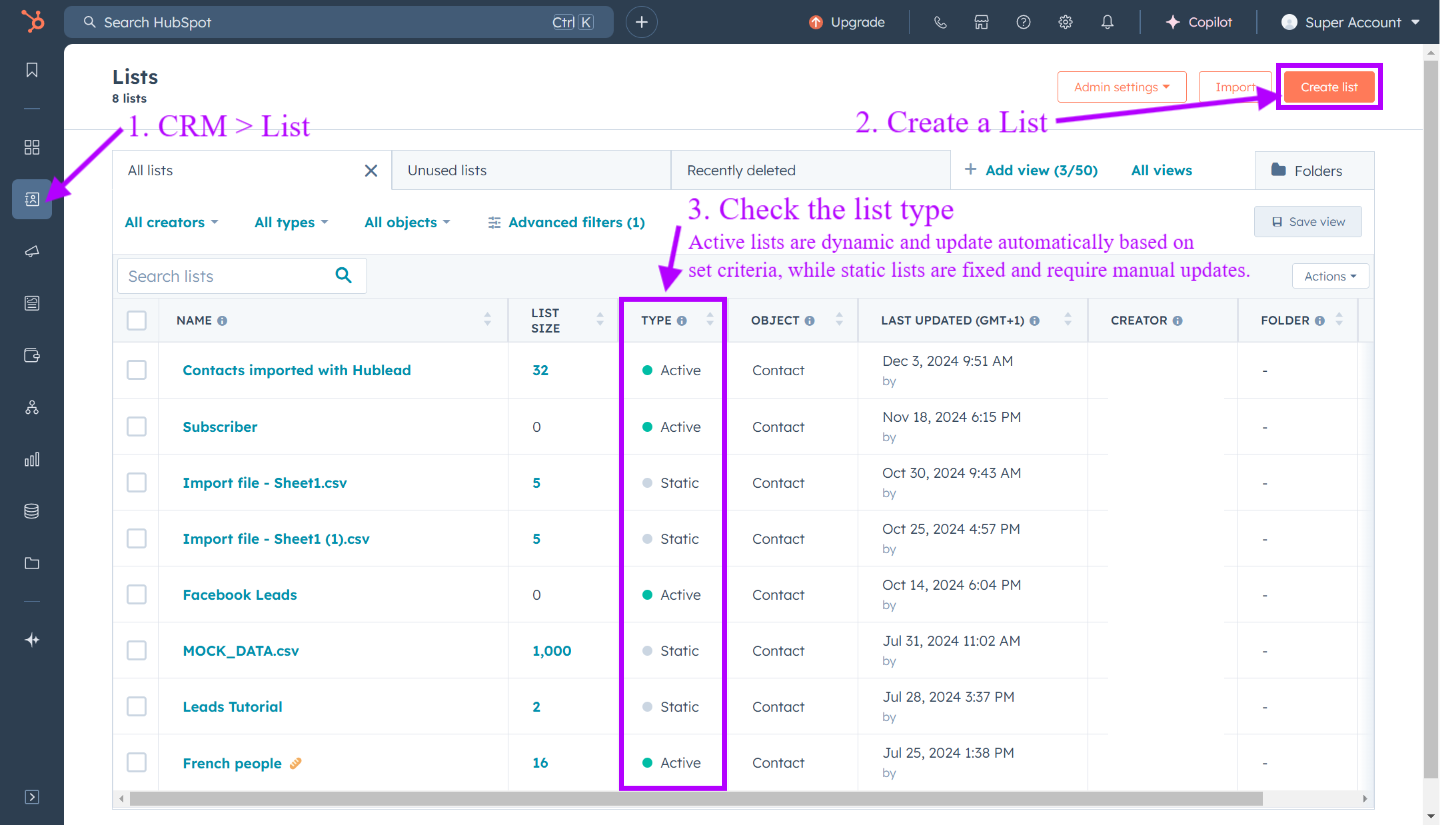
To create a list in HubSpot, follow these steps:
- Access the Lists Tool: Log in to your HubSpot account, go to CRM > Lists, and click Create a List.
- Select your list type (active vs. static): Choose between an active list for dynamic updates or a static list for fixed contacts.
- Define your list criteria: Use the dropdown menu in the left sidebar to define criteria for your list. For instance, you might filter contacts by property values like lifecycle stage, date of last interaction, or company properties. HubSpot allows you to apply multiple criteria to create highly targeted lists.
- Save and optimize: Save your list, and HubSpot will automatically populate it based on your chosen parameters. Continually review your list to ensure it's up to date and relevant.
And voila! Your list is created. But as you learned above, there’s more to an effective list than creating and naming it in HubSpot. You need to segment your contacts appropriately.
Ways to segment your contacts
How you segment your lists will depend on your needs and purposes for the list.
For example, your product team would probably love a list of customers who log in regularly to the product, and your marketing team probably wants a list of contacts who consistently open newsletters.
What does sales need?
Sales needs lists of prospects, broken out by stage and customer type, to move leads from one stage to the next in the sales funnel. As a starting point, you can segment your contacts with the following filters:
- By source: Where are contacts coming from? There’s a big difference between an inbound lead who found you after an extensive Google search and a cold lead you imported from Apollo.
- By level of engagement: Contacts who engage regularly with your count and outreach are a step ahead of those who have not engaged yet. Breaking out contacts by engagement lets you identify your red-hot opportunities.
- By demographic factors: Location, company size, job title, and other basic demographic factors are all good places to start when segmenting your list into manageable chunks for outreach campaigns.
- By lifecycle stage: Similar to engagement, it’s worth segmenting your lists by where contacts sit in the sales funnel.
Treat the above as starting points. You should feel free to tailor your segmentation approach to your ICP, list size, and sales history. Next, I’ll share some best practices you can follow.
List segmentation best practices
Looking to drive greater results from your HubSpot campaigns with list segmentation? Follow these best practice tips and tricks.
- Define clear segmentation goals
- Choose the right list type
- Be smart with your data
- Keep your lists clean
Define clear goals
Everything in sales should start with a crystal-clear objective. Otherwise, you’re just doing work for the sake of doing work, and that rarely pans out in sales.
I recommend starting with your personal, team, and department goals:
- What’s your quota?
- What initiatives is your team running?
- What is the sales strategy this quarter?
And tie your segmentation activities back to it. For example, the strategy might be to re-engage dormant leads, so you should segment on past customers and leads who went cold. Or the strategy could hinge on a new marketing channel, so your segmentation should probably center on contacts sourced from that channel.
Start with your goal, and make sure the contacts you segment support it.
Choose the right type of list
Active lists update automatically, so those are the best, right?
It all depends on your goal for the list and how you want it to maintain a record of leads to work on and reach out to.
Active lists are great for dynamic segmentation based on contact behavior, lifecycle-stage changes, or other tracked properties. I often choose active lists for ongoing campaigns or nurturing.
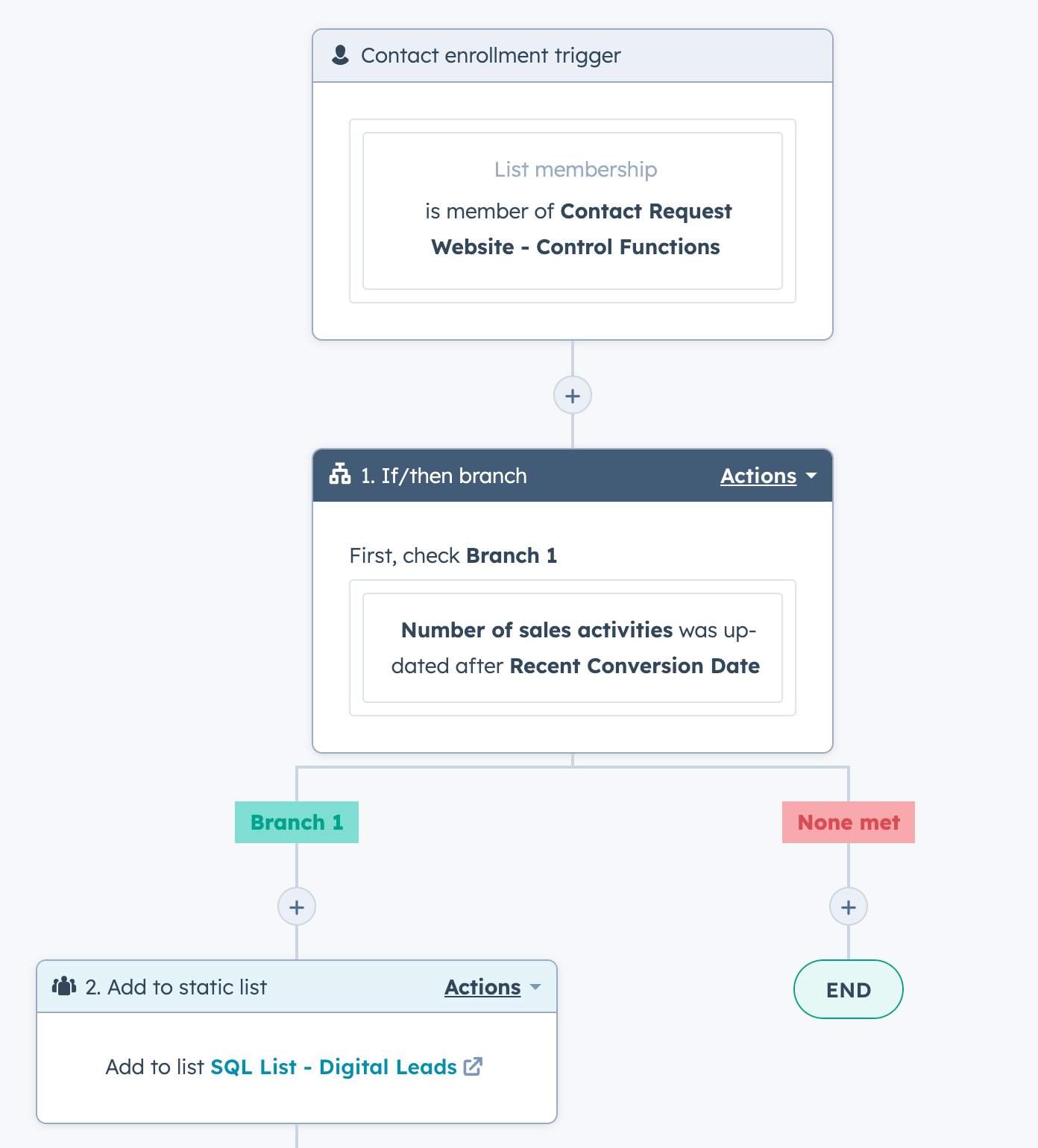
Static lists can be used for one-off campaigns or fixed groups. For example, webinar attendees or a list of prospects you are actively working with. While static lists won’t automatically add contacts on their own, you can use Workflows to add contacts to a list based on their activity in the Workflow or other event-based triggers.
Be smart with your data
You’ll be able to gather a lot of information about your prospects from forms, your CRM, and enrichment tools, so use it wisely.
I recommend starting with demographic, firmographic, and behavioral data to guide your segments. Then drill down a level deeper into job titles, company size, and website activity.
Then, layer in multiple criteria for granular testing. Pull in key signals like accepting a LinkedIn connection request, visiting your pricing page, etc. You can collect a ton of data in HubSpot, so use it strategically to move prospects from one stage to the next in your funnel.
Keep Lists Clean and Up-to-Date
All of this is a waste of time if your lists end up looking like a tangled ball of yarn five months from now. Remember, the point of segmentation is to get strategic and organized.
Take time to regularly review and purge unengaged or unsubscribed contacts to maintain list quality and deliverability. Update or merge duplicate or overlapping lists to prevent redundant messaging. Clean lists are effective lists!
How to manage and optimize your HubSpot lists
About that last tip above, you don’t need to spend hours reviewing your lists to keep them clean. Just take a few moments every month or so to do the following:
- Run routine audits to merge duplicate contacts, remove outdated entries, and adjust criteria to keep lists accurate. This process ensures your lists remain accurate, up-to-date, and relevant for targeted campaigns.
- Use HubSpot’s More dropdown menu to clone or edit lists quickly. This saves time and supports evolving campaign goals.
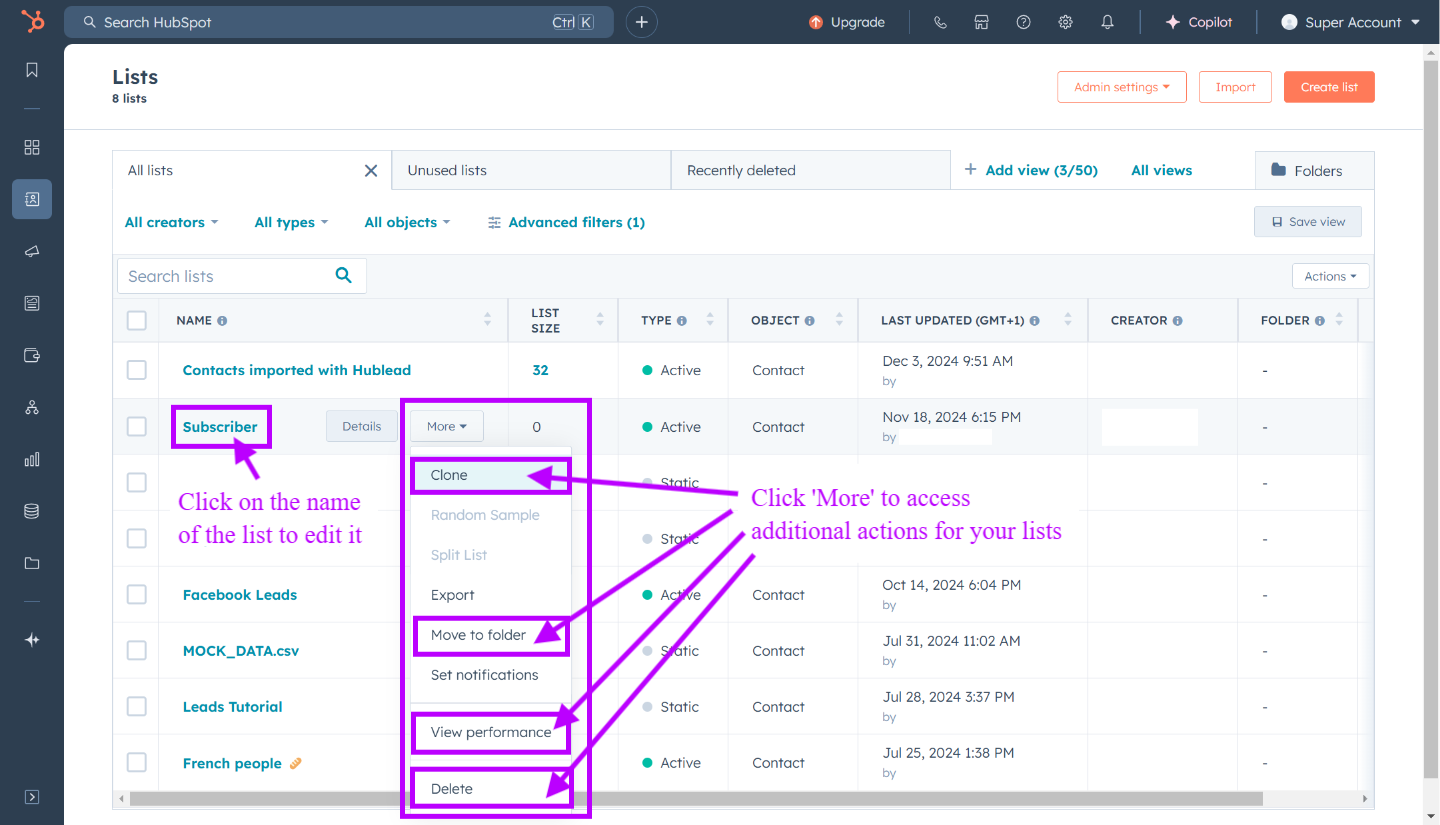
Then, with those clean lists handy, scale your sales and marketing strategy with HubSpot workflows. I like to enroll lists into the following workflows:
- Send follow-up emails: Trigger personalized emails instantly based on user behavior (e.g., form submissions or page views).
- Automate sales tasks: Create tasks, assign owners, or send internal notifications when leads hit key milestones.
- Update contact properties automatically: Adjust lifecycle stages, deal stages, or list membership the moment behavior changes.
For example, you can build a workflow that uses an active list in HubSpot to capture Facebook leads, assign them to sales reps, and send personalized and follow-up emails.
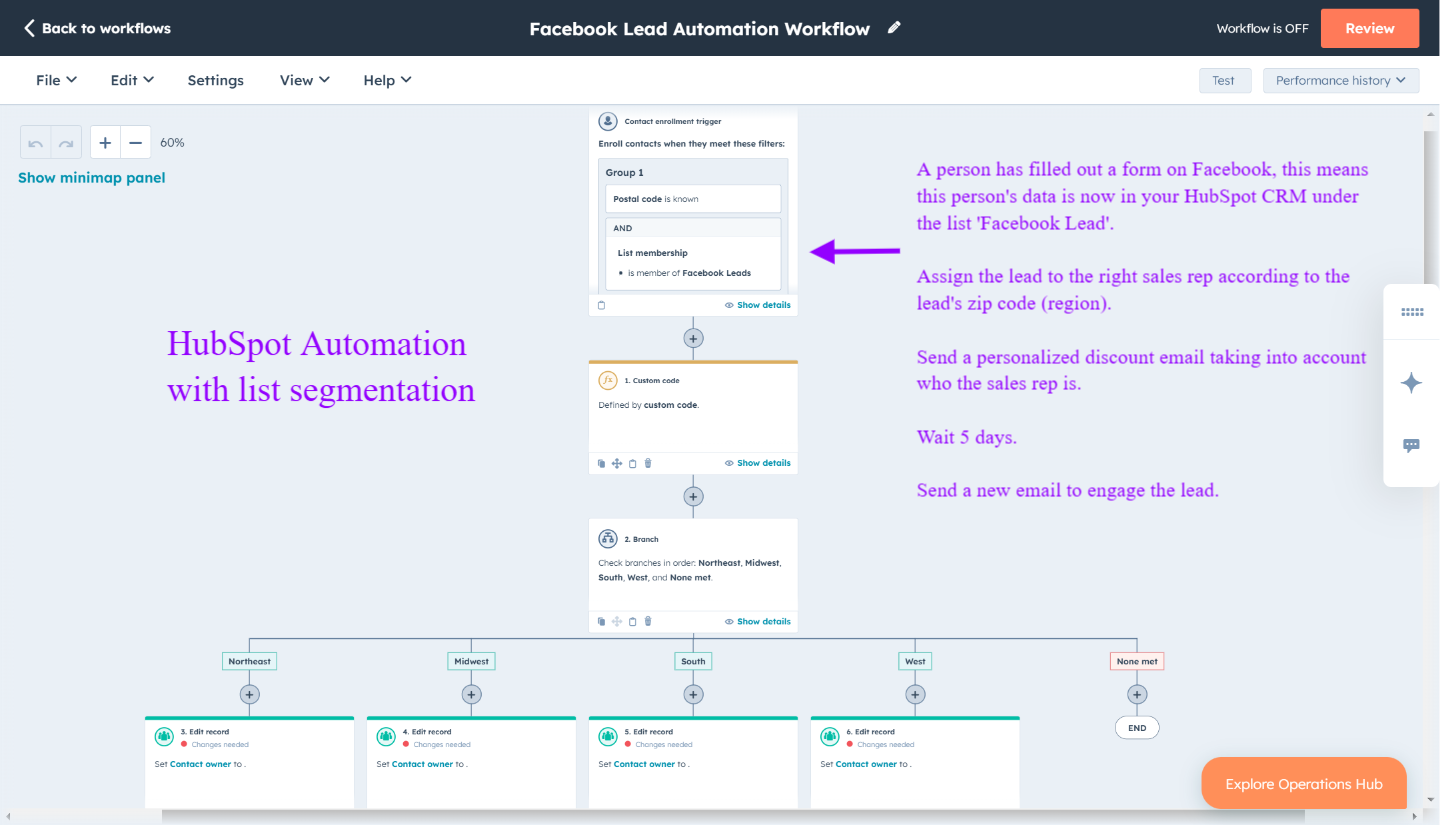
From my experience, this approach keeps campaigns relevant, efficient, and highly personalized.
Don’t forget lead scoring here! By assigning scores based on criteria such as engagement level, demographic fit, and recent activity, you can:
- Automatically segment and route leads to the appropriate sales reps.
- Trigger targeted nurturing campaigns for leads that meet specific score thresholds.
- Adjust lead scores in real time as contacts interact with your content or website.
- Ensure your sales team focuses on the most promising opportunities to improve conversion rates and overall efficiency.
How to capture LinkedIn data in your HubSpot lists
Let’s say you have a list of prospects you are working with. Wouldn’t it be great to track who you’ve sent a connection request to and who accepted it?
With a tool like Hublead, you can. Hublead is a Chrome extension that syncs all of your prospecting activities (connection requests, DMs, and InMails) back to HubSpot. No more tab switching or copying and pasting. Just prospect on LinkedIn and trust that everything will make its way back to HubSpot.
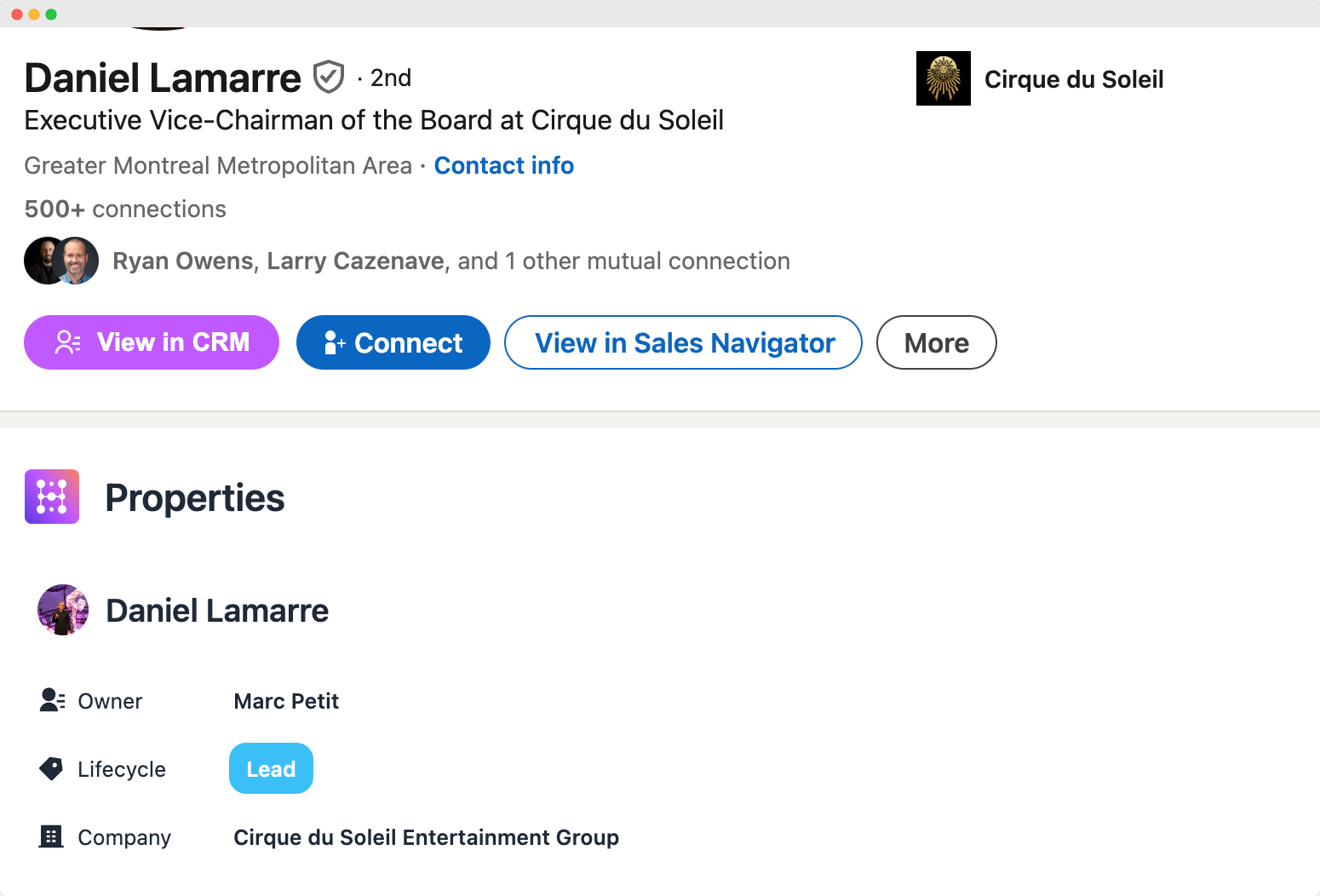
Top sales reps know that they need to incorporate social selling into their outreach. If you want to step up your game, try Hublead for free today!
Level up your sales with the HubSpot Outbound Handbook
Success in outbound is less about a single magical template, striking lightning in a bottle, or having the ultimate AI tool. It’s more about choosing the right targets and staying organized every step of the way.
That’s where good lists come in. Identify your top prospects, choose your channels, and coordinate your touchpoints to get their attention.
If you really want to level up your sales process in HubSpot, download the free HubSpot Outbound Handbook, our guide to building a scalable and effective outbound process in HubSpot. In this guide, we cover:
- The channels to use
- How to get the attention of your prospects
- The tools you should use to speed up sales
And more! Click the button below to get it for free and start scaling your outbound process in HubSpot.
Free guide
Get the HubSpot Outbound Handbook
Run an effective outbound campaign that keeps your pipeline full.
Before you go further
What is list segmentation in HubSpot?
List segmentation in HubSpot involves creating targeted contact lists based on criteria like demographics, behavior, or interactions. It helps personalize marketing efforts and automate workflows for better engagement and conversions.
What are the types of lists in HubSpot?
HubSpot offers two types of lists: active lists, which update dynamically based on criteria, and static lists, which remain fixed until manually modified.
Why is email list segmentation important?
Email list segmentation allows you to send personalized and relevant content to specific audience groups, improving engagement, promoting customer loyalty, and increasing conversion rates.
How does segmentation differ from a standard list?
While a list includes a broad set of contacts, segmentation refines those lists into smaller, highly targeted groups based on specific conditions for more effective communication.
What does HubSpot list segmentation enable?
HubSpot's list segmentation enables businesses to automate email marketing, personalize communications, and manage customer relationships efficiently using dynamic updates and detailed filters.
Keep reading on LinkedIn and HubSpot
 Data & CRM
How to Use HubSpot Lifecycle stage
Maximize your sales and marketing efforts with a deep dive into Lifecycle Stages. Understand and master customer journey to boost conversions in HubSpot.
Data & CRM
How to Use HubSpot Lifecycle stage
Maximize your sales and marketing efforts with a deep dive into Lifecycle Stages. Understand and master customer journey to boost conversions in HubSpot.
 Data & CRM
Master HubSpot Deal Properties
Learn how to manage and customize HubSpot deal properties to track essential deal details and improve your sales process.
Data & CRM
Master HubSpot Deal Properties
Learn how to manage and customize HubSpot deal properties to track essential deal details and improve your sales process.
 Data & CRM
HubSpot Statistics: Customers, Revenue, Market Share
Key HubSpot statistics in one place: number of customers, revenue growth, CRM market share, and the marketing benchmarks teams quote most.
Data & CRM
HubSpot Statistics: Customers, Revenue, Market Share
Key HubSpot statistics in one place: number of customers, revenue growth, CRM market share, and the marketing benchmarks teams quote most.
See your CRM on
every LinkedIn profile.
Install the extension, connect HubSpot or Salesforce, open a profile. You see right away whether the person is in your CRM.
Free to start, no card needed.