HeyReach vs Hublead: Which is Best for Sales Teams in 2026?
HeyReach sends LinkedIn outreach at scale, but its HubSpot sync only logs campaign activity. See what falls through and how Hublead compares.
HeyReach sends LinkedIn outreach at scale, but your CRM sync only logs campaign activity, meaning most of your rep activity falls through the cracks. Can Hublead solve that problem? Read our full breakdown below to compare features and pricing as you choose the right platform for your team.
Where HeyReach excels
HeyReach was built to be a LinkedIn outreach automation tool for sales reps, sales teams, and agencies. HeyReach offers other pro-level features like an MCP and multichannel outreach integrations, but at its core, it is a workflow engine that powers your outbound on LinkedIn.
That means you can automate connections, outbound sequencing, and messages from one workflow. HeyReach also connects to HubSpot and Salesforce natively, with other CRMs available through a third-party connector.
If your job is to fire thousands of connection requests a week across client workspaces, HeyReach is one of the best tools for it. We won’t pretend otherwise. But HeyReach has limits.
Why look for an alternative to HeyReach
HeyReach offers a native integration that can log connection requests, messages, InMails, and replies, but there’s one big caveat.
Your reps will probably spend more time in their own inboxes and LinkedIn accounts than in HeyReach. They’ll get a response from a lead and respond right there on LinkedIn. That’s the key detail that’s missing because HeyReach logs all the data inside its campaigns, but not the activity that happens outside.
And that means all the actual activity your reps take to respond to prospects won’t be recorded inside your CRM.
So your CRM pipeline ends up showing the automated half of LinkedIn and going dark on the human half. When a deal closes and someone asks what touched it, the answer is incomplete.
Fortunately, that’s where Hublead excels.
Why 8,000+ sales teams trust Hublead to sync LinkedIn to HubSpot and Salesforce
Hublead is a Chrome extension that syncs LinkedIn data and triggers to your CRM.
That means no tab switching or manual copy-and-paste – you can import contacts, sync messages, and even sync connection requests. You can also access and edit CRM data on LinkedIn, like contact properties, tasks, and notes. That’s a lot less time fussing with tools and a lot more time selling.
HeyReach is a fantastic outbound automation tool, but if you use HubSpot or Salesforce, you already have two fantastic automation tools built directly into your CRM: sequences and workflows. Hublead lets you use that full automation power on LinkedIn. With Hublead, you can enroll contacts directly into sequences from LinkedIn, or kickstart workflows to run your entire outbound motion on autopilot.
It’s not hard to see why over 8,000 sales teams trust Hublead to sync their data to HubSpot and Salesforce.
Update HubSpot or Salesforce without ever leaving LinkedIn
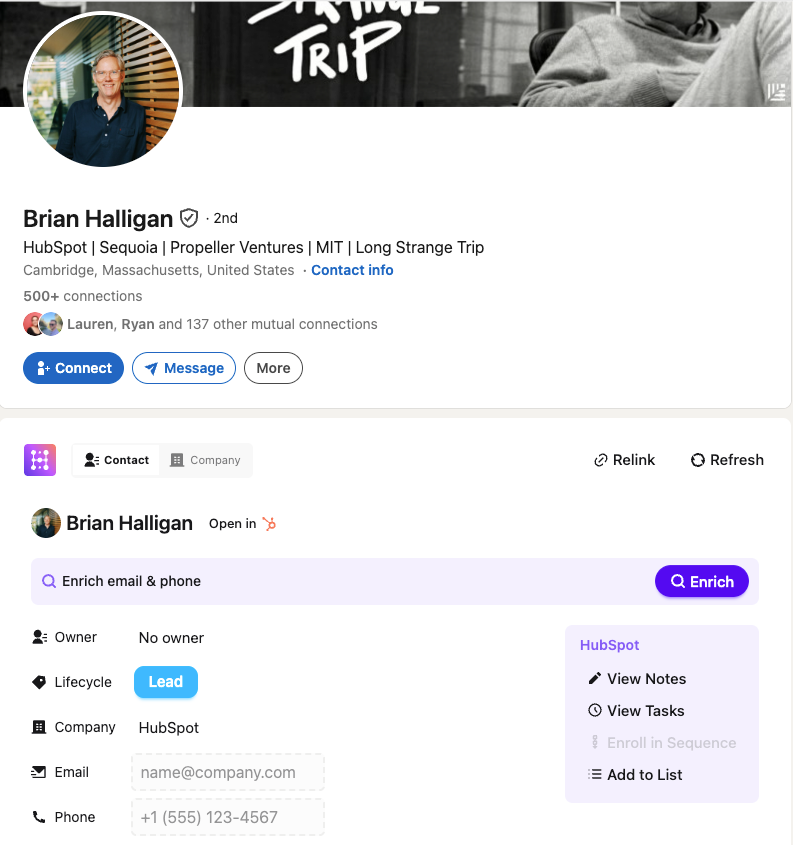
HubSpot or Salesforce is valuable, but logging into your CRM breaks your prospecting flow and takes up valuable time.
Not so with Hublead. Hublead allows you to view and manage your CRM data straight from LinkedIn. You can view and create tasks, enroll leads in sequences, create notes, and even update properties all without leaving LinkedIn.
Trigger your CRM workflows from LinkedIn
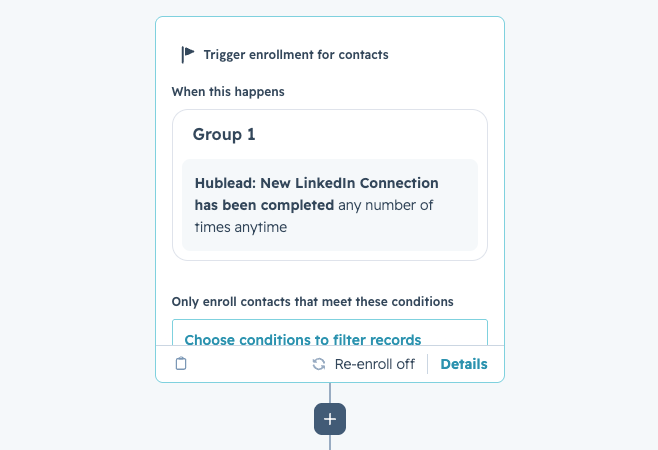
Match your CRM’s automation power with LinkedIn thanks to the triggers Hublead syncs.
The moment a prospect accepts your connection request, you can create tasks, enroll the contact in a sequence, update their lifecycle stage, and more without lifting a finger.
HeyReach offers a ton of automation power, but Hublead + your CRM rivals it.
See how trigger automations work →
Deduplication that actually works for HubSpot and Salesforce
Tons of sales tools sync data to your CRM, but they create duplicate records, turning your CRM into a ball of yarn with no end in sight.
Hublead's deduplication is built for HubSpot and Salesforce's data model. It matches across LinkedIn URL, email, name, and company before creating a new record. When a rep adds someone on LinkedIn, it matches that record to any existing contact in your CRM. The same goes for Account records too.
Bulk enrich any HubSpot or Salesforce list
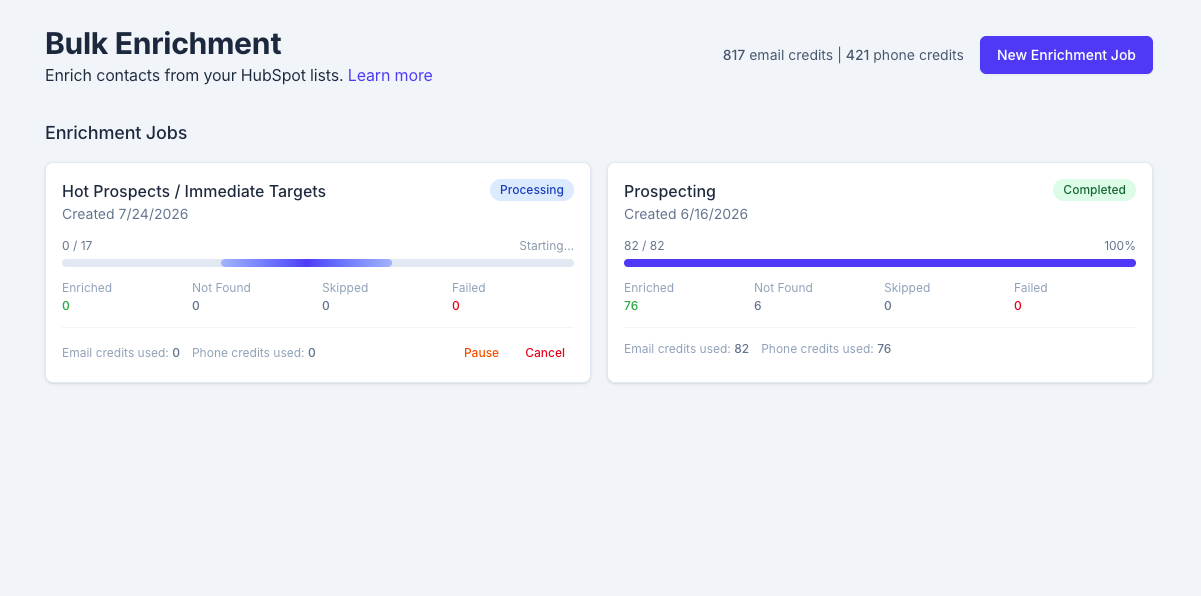
If you’re going to run outbound at scale inside HubSpot or Salesforce, you need accurate data – lots of it.
Hublead lets you bulk enrich any HubSpot or Salesforce list in seconds. Select a list, click enrich, and get emails and phone numbers for the entire list in one click: no extra tools or messy exports needed.
Pipeline reporting that answers questions
HeyReach lets rep activity fall through the cracks, which leaves managers wondering which reps are most active on LinkedIn, which conversations turn to pipeline, and what the conversion rate really is.
Hublead answers those questions and more. You can view all of your reps’ activity, track funnel reports for prospects on LinkedIn, and see how LinkedIn influences your pipeline.

Ready to fix your outbound process?
HeyReach vs Hublead, side by side
Hublead vs HeyReach pricing
HeyReach offers three pricing tiers: individual senders, agencies, and an unlimited plan.
HeyReach’s Growth tier starts at $79/month/user, and the Agency tier starts at a flat $999/month for 25 senders and scales if you need more senders (up to 50). HeyReach’s Unlimited tier is $2,999/month and requires a demo to access.
In comparison, Hublead offers a free trial, and paid plans start at $32/month per user, scaling up to $112/month per user for its most advanced features. Every Hublead tier includes LinkedIn syncing and contact enrichment; higher tiers add Sequence enrollment, LinkedIn message templates, SSO, and more.
These tools do different things: HeyReach is a full LinkedIn automation suite, while Hublead is a CRM connector that enriches leads and leverages HubSpot’s automation capabilities. The question you need to ask is: if you’re using HubSpot and can run automations from LinkedIn triggers, do you really need a separate LinkedIn automation tool that won’t log everything?
Hublead vs HeyReach: How to choose between them
The decision between Hublead and HeyReach won’t be based on a list of features alone. Really, it should come down to which tool is best for which use case. Here’s a quick breakdown to help you make the right decision for your team:
Ready to fix your outbound process?
Frequently asked questions
Does HeyReach's CRM integration log manual LinkedIn messages?
No. HeyReach only logs what happens inside a HeyReach campaign: connection requests, sequence messages, InMails, replies, and enrollments. It doesn't capture messages a rep sends manually from their own LinkedIn inbox or profiles they open themselves. Hublead logs them all, though.
Is Hublead a HeyReach alternative?
HeyReach is a sending engine. Hublead is a logging and enrichment tool for HubSpot and Salesforce. If you came to HeyReach mainly to get LinkedIn activity into your CRM, Hublead replaces that job and does it more completely. If you came to HeyReach to send at scale across many accounts, Hublead does not do that.
How much does HeyReach cost compared to Hublead?
HeyReach Growth runs about $79 per sender per month, dropping near $47 on an annual plan past ten senders. Agency tiers are flat: $999/mo for 25 senders, $1,399/mo for 50. Hublead starts at $32 per user per month.
Can I use HeyReach and Hublead together?
Yes, and some teams do. HeyReach handles automated sending and account rotation. Hublead makes sure the manual LinkedIn work your reps do outside those campaigns still lands in HubSpot or Salesforce.
Does Hublead send LinkedIn sequences or rotate accounts?
No, and that's deliberate. Automated mass sending and account rotation are what raise the risk of LinkedIn restrictions. Hublead stays on the logging, enrichment, and workflow side to keep your accounts safe.
Which is better for an agency: Hublead or HeyReach?
For volume sending across client accounts, HeyReach is built for exactly that. To prove to clients that you can see and report every LinkedIn touch, including manual ones, Hublead fills the gap HeyReach's campaign-only sync leaves open. Many agencies run both.
Which CRMs does Hublead work with?
Hublead originally worked exclusively with HubSpot; however, in 2026, Hublead launched a Salesforce integration that allows you to sync LinkedIn data back to Salesforce.
Does Hublead work with Sales Navigator?
Yes. Hublead works with free LinkedIn, Premium, and Sales Navigator, and logs activity from any of them to HubSpot or Salesforce.