Closely vs Hublead 2026: Honest Comparison
Closely automates LinkedIn and email outreach and syncs to your CRM. Hublead logs LinkedIn activity to HubSpot or Salesforce with no sending. See which fits you in 2026.
One is an autonomous sales agent and LinkedIn enrichment platform. The other tightly integrates LinkedIn outreach and enrichment with HubSpot and Salesforce’s powerful automation features.
Which one is right for your sales team in 2026? We’ll answer those questions and more in this complete breakdown of Closely and Hublead.
What Closely does well
Closely is a LinkedIn automation powerhouse. All you need to do is connect your LinkedIn account, and Closely will fire off connection requests, send follow-up messages, and log replies back to your CRM.
For a sales team that wants to run LinkedIn and email outreach without lifting a finger, Closely offers a lot of automation power to help you do it; it also works with multiple CRMs, including HubSpot, Salesforce, and Pipedrive.
Does the thought of automated outreach at scale seem too good to be true?
Automated sending on LinkedIn carries account risk. Granted, Closely has measures in place to mitigate this by running accounts behind a dedicated proxy server and warming up new accounts slowly so they don’t raise red flags on LinkedIn. But if you trip up LinkedIn’s spam limits, your account could be banned, and there’s no coming back from that.
Why look for an alternative to Closely?
The threat of being banned is enough to give plenty of sales teams pause about using Closely. Here’s another: scale.
We’ll cover pricing in more detail later, but for now, know that Closely starts at $49/month for one LinkedIn account connection and scales to $350/month for 10 accounts (with custom pricing beyond that).
That’s not a big expense for a standalone outbound automation tool, but if you’re already getting access to cutting-edge outbound automation from HubSpot and Salesforce, do you really need another expensive tool to add to your sales tech stack when the only missing piece is simply syncing LinkedIn data back to your CRM?
That’s where Hublead comes in.
Why 8,000+ sales teams trust Hublead to sync LinkedIn to HubSpot and Salesforce
With HubSpot and Salesforce covering sales automation, you only need to fill two gaps: syncing and lead enrichment. That’s exactly what Hublead was designed to do.
Hublead is a Chrome extension that syncs LinkedIn data and triggers to your CRM. No tab switching and no manual copy-and-paste. Connect Hublead to your CRM, import and enrich contacts with one click, enroll leads into sequences from LinkedIn, and trigger automated workflows in your CRM.
That’s why sales teams worldwide trust Hublead to sync their data and fuel their multichannel outbound campaigns.
Update HubSpot or Salesforce without ever leaving LinkedIn
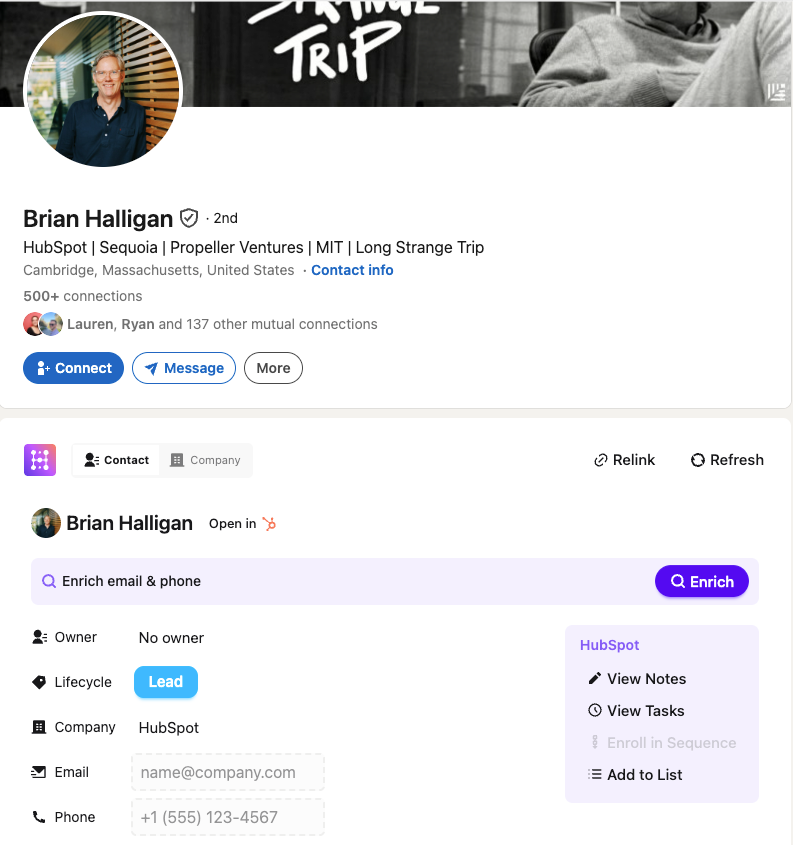
CRMs are valuable, but logging into your CRM breaks your prospecting flow and takes up valuable time.
Not so with Hublead. Hublead allows you to view and manage CRM data straight from LinkedIn. You can view and create tasks, enroll leads in sequences, create notes, and even update properties, all without leaving LinkedIn.
Trigger HubSpot or Salesforce workflows from LinkedIn
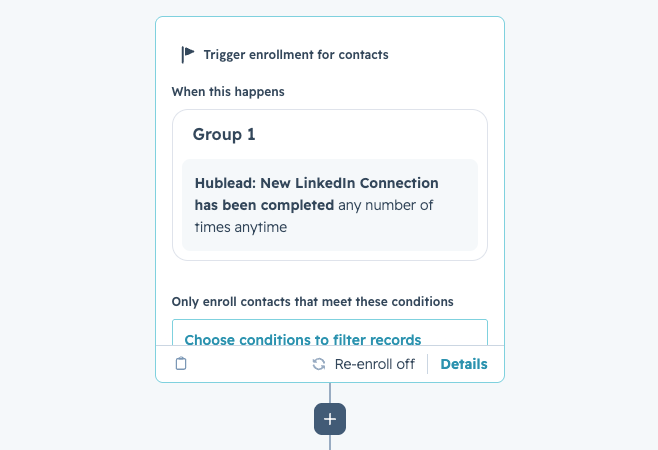
Match your CRM’s automation power with LinkedIn thanks to the triggers Hublead syncs. Whether you want to run an email sequence after a prospect accepts your connection request, or create follow-up tasks when a prospect messages you back, you can do it.
Closely offers a ton of automation power, but Hublead + your CRM rivals it.
See how trigger automations work →
Deduplication that keeps your CRM clean
Tons of sales tools sync data to their CRM, but they create duplicate records, turning your CRM into a ball of yarn with no end in sight.
Hublead's deduplication is built for HubSpot's and Salesforce's data model. It matches across LinkedIn URL, email, name, and company before creating a new record. When a rep adds someone on LinkedIn, it matches that record to any existing contact in HubSpot or Salesforce. The same goes for Account records too.
Bulk enrich any CRM list
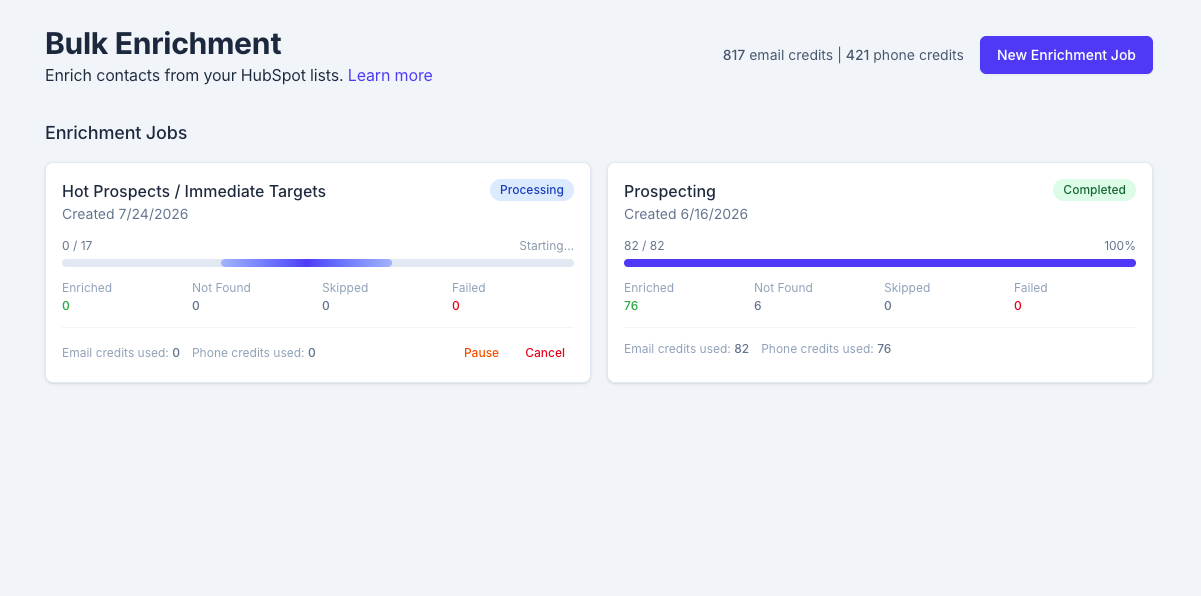
If you’re going to run outbound at scale inside HubSpot or Salesforce, you need accurate data, lots of it.
Closely offers enrichment, but only in its $127/month tier and higher. Hublead lets you enrich leads in every tier and can even bulk-enrich any HubSpot and Salesforce list in seconds. Select a list, click enrich, and get emails and phone numbers for the entire list in one click: no extra tools or messy exports needed.
Pipeline reporting that answers questions
Sales cycles are getting longer, and sales reps are responsible for more channels than ever, so accurate CRM reporting is a must.
Hublead guarantees every data point from LinkedIn syncs straight back to your CRM. You can view all of your reps’ activity, track funnel reports for prospects on LinkedIn, and see how LinkedIn influences your pipeline.

Ready to fix your outbound process?
Closely vs Hublead, side by side
Hublead vs Closely pricing
Pricing is where Hublead and Closely differ most.
Closely starts at $49/month for one LinkedIn account and scales up based on the number of LinkedIn accounts and enrichment credits you need. The base plan doesn’t offer enrichment, but for $205/month, you can connect five LinkedIn accounts and enrich 1,250 emails or 250 phone numbers. That’s an either-or, not a both-and.
In contrast, Hublead offers a free trial, starts at $32/user/month, and includes 600 enrichment credits, scaling up to 24,000 enrichment credits in its highest $112/user/month tier.
With Closely, you are paying for a sending and enrichment engine. With Hublead, you are paying for clean LinkedIn data inside HubSpot or Salesforce.
Hublead vs Closely: How to choose between them
The decision between Hublead and Closely won’t be based on features alone. It should come down to which tool fits your use case best. Here’s a quick breakdown to help you make the right decision for your team:
Try Hublead for free today
If you’re looking for a tool that can automatically log every LinkedIn touchpoint to your CRM and save you over two hours each week from manual data entry, there is no better tool than Hublead.
Sign up for Hublead today for free with no commitment to begin syncing LinkedIn/Sales Navigator data with HubSpot or Salesforce. It only takes under five minutes to set up.
Ready to fix your outbound process?
Frequently asked questions
Does Closely integrate with HubSpot and Salesforce?
Yes, Closely integrates with HubSpot, Salesforce, and Pipedrive.
What is the real difference between Closely and Hublead?
Closely is an outbound automation tool that offers CRM sync and enrichment, while Hublead is a lead sync and enrichment tool that leans on your CRM’s existing automation features. One is an outbound machine; the other is an outbound data source that powers your outbound motion.
Will Closely get my LinkedIn account restricted?
It can, which is why Closely runs warm-up, dedicated residential proxies, and smart limits.
Does Hublead automate LinkedIn outreach?
No. Hublead never sends invites or messages for you. You do the outreach by hand on LinkedIn, and Hublead writes it to the HubSpot or Salesforce timeline and triggers workflows off it. That is the design, and it is why there is no account risk.
Does Hublead work with Sales Navigator?
Yes. Hublead works on free LinkedIn, Premium, and Sales Navigator.
Which should a HubSpot or Salesforce team pick?
If you want LinkedIn activity in HubSpot with a clean record and no sender to manage, pick Hublead. If you want the CRM to launch automated LinkedIn and email outreach at volume and you will own the account risk, pick Closely. If you are not on HubSpot or Salesforce at all, Closely is your option of the two.