PhantomBuster vs Hublead: LinkedIn to CRM
PhantomBuster is a scraping platform you manage with hours, slots, and credits. Hublead logs LinkedIn to HubSpot or Salesforce on its own. Here's which fits in 2026.
One’s an autonomous LinkedIn outbound platform; the other tightly integrates LinkedIn with HubSpot and Salesforce’s powerful automation features.
Which one is right for your sales team in 2026? And which scales best? We’ll answer those questions and more in this complete breakdown of PhantomBuster and Hublead.
What PhantomBuster does well
PhantomBuster’s tagline reads “Run our automations 24/7 and find unique intent data that you can’t get anywhere else.”
Sounds impressive at first, but what does it really mean?
Like HeyReach, PhantomBuster is a LinkedIn lead workflow automation tool. You can queue connection requests, messages, lead enrichment, and CRM syncs through PhantomBuster’s workflow features (called, what else, Phantoms).
These Phantoms are made up of Slots, and that’s where things get tricky.
Each action, or Slot, uses up credit from your account. That’s fine for simple actions, like firing off a DM, but multistep actions (like sending a DM, enriching a lead, and syncing your CRM) can take up multiple slots. PhantomBuster also charges for “execution time,” meaning the time that it takes to run your Phantoms.
We’ll cover pricing later, but for now, know that each plan allows a certain number of actions per automation and an hour limit to run your automations. PhantomBuster is undoubtedly a powerful automation tool, but for sophisticated sales motions, you may hit a ceiling early and have to bump up a tier or two.
Why look for an alternative to PhantomBuster?
Cost is a big one; it’s also incredibly easy to hit your limit before needing to upgrade to the next tier.
Here’s the other thing most HubSpot and Salesforce users miss out on: PhantomBuster’s CRM integrations only fire when a Phantom finishes a run, not when your sales reps are engaging with prospects outside of an automation.
It’s one thing for a Phantom to run a daily LinkedIn enrichment to update static activity. But what about a fully-fledged conversation a rep has with a prospect? If that doesn’t make its way to your CRM, then you’re missing out on critical data that could inform your team’s next steps with a deal or give credit where it is due to a sales rep.
You may be thinking, is there a better solution? A tool that syncs every connection request, DM, and InMail back to HubSpot and Salesforce while leveraging the best of their automation capabilities?
Why 8,000+ sales teams trust Hublead to sync LinkedIn to HubSpot and Salesforce
Hublead is a Chrome extension that syncs LinkedIn data and triggers to HubSpot and Salesforce.
That means no tab switching or manual copy-and-paste: you can import contacts, sync messages, and even sync connection requests. You can also access and edit CRM data on LinkedIn, like contact properties, tasks, and notes.
That’s less time fussing with tools and more time selling.
PhantomBuster is a great outbound automation tool, but if you use HubSpot or Salesforce, you already have two great automation tools built directly into your CRM. You don’t exactly need another piece of software to run workflows and sequences. The issue is triggering them from LinkedIn. That’s where Hublead can help. Hublead lets you use that full automation power on LinkedIn. Enroll contacts directly into sequences from LinkedIn, or kickstart workflows to run your entire outbound motion on autopilot. No extra tools required.
That’s why sales HubSpot and Salesforce customers everywhere trust Hublead to sync their data to their CRM.
Update HubSpot or Salesforce without ever leaving LinkedIn
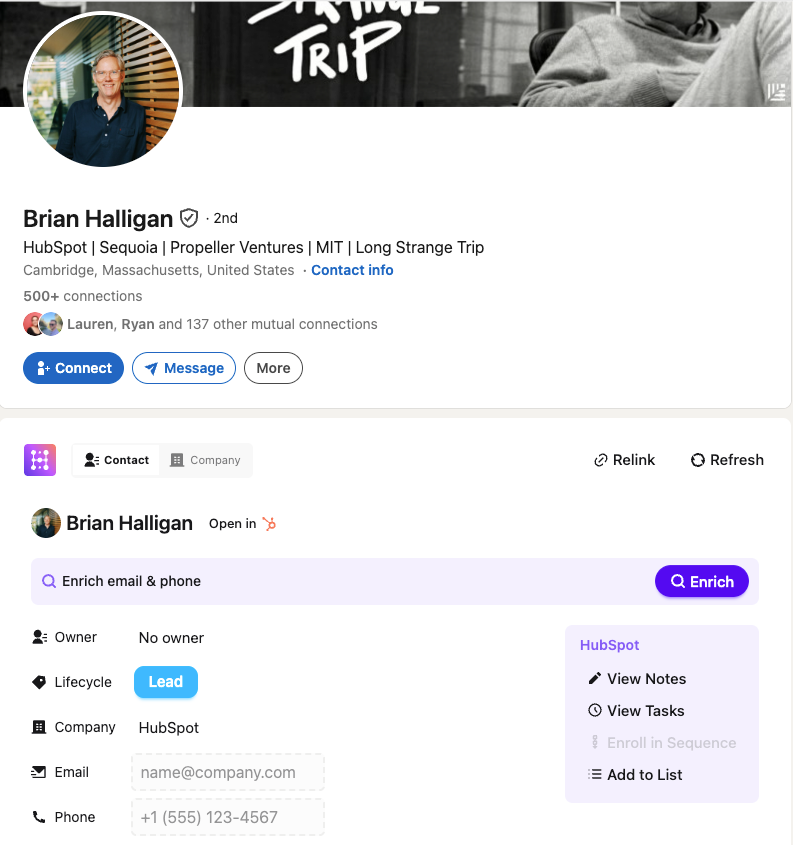
CRMs are valuable, but logging into your CRM breaks your prospecting flow and takes up valuable time.
Not so with Hublead. Hublead allows you to view and manage CRM data straight from LinkedIn. You can view and create tasks, enroll leads in sequences, create notes, and even update properties all without leaving LinkedIn.
Trigger HubSpot or Salesforce workflows from LinkedIn
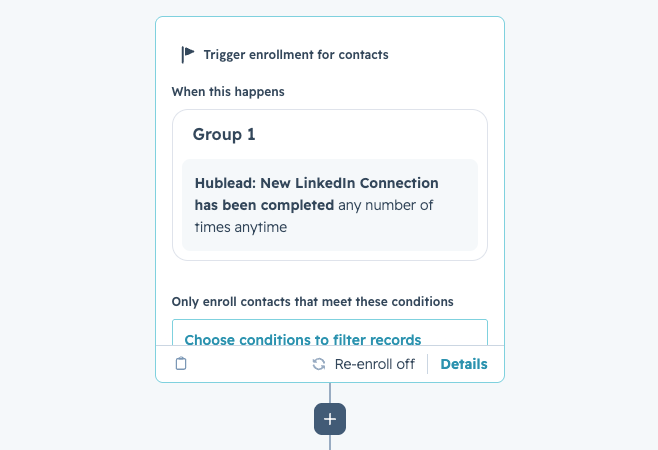
Match your CRM’s automation power with LinkedIn thanks to the triggers Hublead syncs.
The moment a prospect accepts your connection request, you can create tasks, enroll the contact in a sequence, update their lifecycle stage, and more without lifting a finger.
PhantomBuster offers a ton of automation power, but Hublead + your CRM rivals it.
See how trigger automations work →
Deduplication that actually works for HubSpot and Salesforce
Tons of sales tools sync data to their CRM, but they create duplicate records, turning your CRM into a ball of yarn with no end in sight.
Hublead's deduplication is built for HubSpot and Salesforce's data model. It matches across LinkedIn URL, email, name, and company before creating a new record. When a rep adds someone on LinkedIn, it matches that record to any existing contact in HubSpot or Salesforce. The same goes for Account records too.
Bulk enrich any CRM list
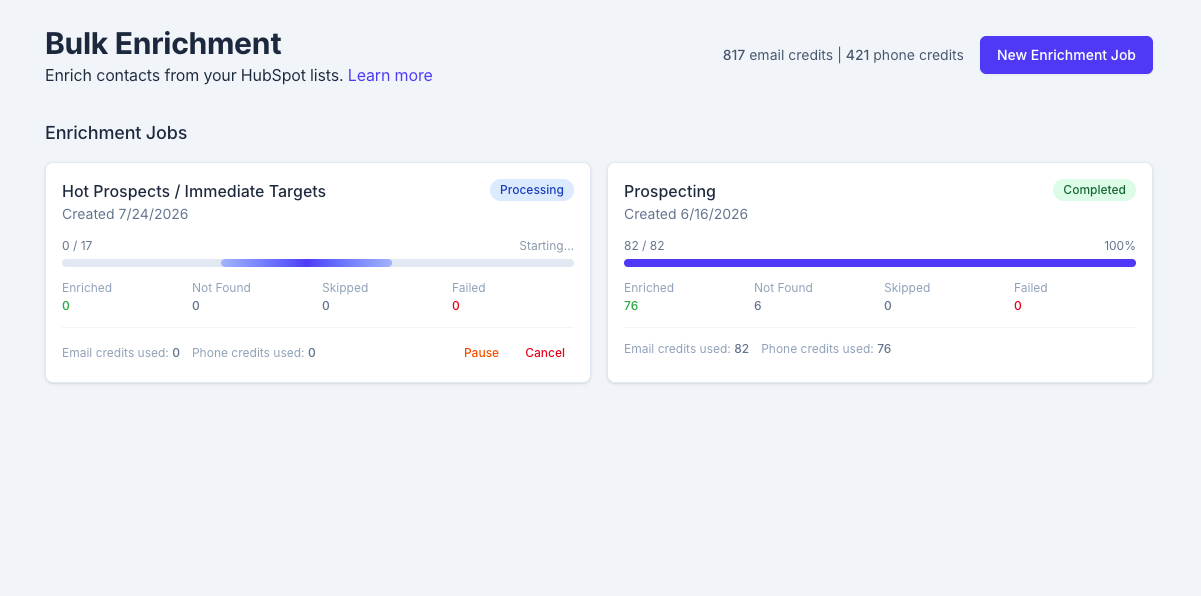
If you’re going to run outbound at scale inside HubSpot or Salesforce, you need accurate data – lots of it.
Hublead lets you bulk enrich any HubSpot and Salesforce list in seconds. Select a list, click enrich, and get emails and phone numbers for the entire list in one click: no extra tools or messy exports needed.
Pipeline reporting that answers questions
PhantomBuster lets rep activity fall through the cracks, which leaves managers wondering which reps are most active on LinkedIn, which conversations turn to pipeline, and what the conversion rate really is.
Hublead answers those questions and more. You can view all of your reps’ activity, track funnel reports for prospects on LinkedIn, and see how LinkedIn influences your pipeline.

Ready to fix your outbound process?
PhantomBuster vs Hublead, side by side
Hublead vs PhantomBuster pricing
Price is probably the biggest difference between these two tools.
PhantomBuster starts at $69/month for 20 execution hours, 5 Phantom slots, and 500 email credits. That scales to their “Team” plan, which costs $439/month and includes 300 execution hours, 50 slots, and 10,000 emails. If you’re running a simple “send a connection request and DM” two-step flow, the starter tier is probably fine, but the minute you want to add enrichment, follow-up DMs, or a CRM sync, then you will be maxed out.
Comparatively, Hublead is free to try and starts at $32/month/seat. That gives you access to Hublead’s CRM sync, lead enrichment, and the ability to trigger automations in your CRM based on LinkedIn activity.
If you’re already paying for HubSpot or Salesforce, you have a powerful automation platform baked into your CRM. Hublead connects it to LinkedIn, so you don't have to buy another expensive sales tool.
Hublead vs PhantomBuster: How to choose between them
The decision between Hublead and PhantomBuster won’t be based on features alone. Really, it should come down to which tool is best for which use case. Here’s a quick breakdown to help you make the right decision for your team:
Ready to fix your outbound process?
Frequently asked questions
Does PhantomBuster sync LinkedIn messages to HubSpot or Salesforce in real time?
No. The integration fires when a Phantom run finishes, not in real time as prospects respond to your DMs.
Is Hublead a PhantomBuster alternative?
For the in-CRM logging job, yes. If you want LinkedIn messages, invites, and profile visits in HubSpot or Salesforce automatically, Hublead replaces the PhantomBuster setup. PhantomBuster offers other features like automated workflows and lead scraping that Hublead doesn’t.
Do PhantomBuster credits and hours roll over?
No. Unused execution hours, email credits, and AI credits expire every month. If you use 5 of 20 Starter hours one month, the other 15 are gone.
Does Hublead run unattended scraping like PhantomBuster?
No. Hublead logs the LinkedIn activity you actually do in your browser. It does not run bots in the background, and it isn't built for autonomous scraping jobs.
Which should a HubSpot or Salesforce rep choose?
If you spend your day scraping data and building lead lists, PhantomBuster is probably a good move. But if you spend your day selling on LinkedIn and keeping HubSpot or Salesforce current without copy-and-paste, Hublead is the best choice.
Which CRMs does Hublead sync to?
Hublead works for both HubSpot and Salesforce. You can import leads with one click, enrich them with accurate contact information, and sync messages and InMails straight to your CRM.