
HubSpot AI Tools: The 2026 Guide (Breeze, Copilot, Agents)
15+ HubSpot AI tools compared: Breeze, Copilot, and Agents. What each one does, what it costs, and which are worth turning on. Updated for 2026.
 Bastien PaulSeptember 6, 20264 min read
The short answer
HubSpot's AI is called Breeze: an assistant (Copilot) that writes and summarizes records, agents for content, prospecting, customer service and data, and enrichment with buyer intent. On top sit tools for content writing, lead scoring, forecasting and chatbots.
HubSpot's AI is branded Breeze, and it comes in three layers. Breeze Assistant (the assistant formerly called Copilot) handles chat and drafting inside the CRM. AI agents such as Customer Agent are built in Agent Builder and run from Agent Hub. The third layer is the AI features built into the Smart CRM and each hub. If you want third-party AI that connects to HubSpot, go to which AI tools integrate with HubSpot.
Key Takeaways
- HubSpot AI integrates marketing, sales, and customer service tools, enhancing operational efficiency and customer engagement.
- Key features like the AI Content Writer, the AI Chatbot, and predictive analytics enable businesses to streamline content creation and develop personalized marketing strategies.
- Real-time analytics and reporting provided by HubSpot AI support data-driven decision-making, improving overall marketing performance and customer experiences.
What is HubSpot AI?
HubSpot AI is an all-in-one AI suite designed to enhance marketing, sales, and customer service by automating tasks, optimizing workflows, and generating data-driven insights to can streamline content creation, refine strategies, and improve customer interactions.
By integrating AI-powered automation across departments, HubSpot AI helps you simplify complex tasks, personalize experiences, and drive smarter decisions, all essential for staying competitive.
Key Benefits of HubSpot AI
Here are some of the key benefits you can expect when leveraging HubSpot AI capabilities:
- Boosts efficiency by automating repetitive tasks, allowing teams to focus on strategic initiatives.
- Enhances marketing and sales performance with AI-driven insights and automation.
- Improves customer satisfaction by analyzing feedback and delivering consistent, personalized interactions.
- Ensures unified brand messaging across multiple channels.
By using AI-driven solutions you will be able to scale growth, optimize decision-making, and elevate customer engagement, leading to long-term success.
HubSpot Breeze AI: The New AI Platform
In 2024, HubSpot rebranded and expanded its AI capabilities under Breeze AI, a unified platform that brings together all AI-powered features across the HubSpot ecosystem. Breeze AI includes:
• Breeze Copilot: An AI assistant available throughout HubSpot that helps you write content, research contacts, summarize records, and get instant answers about your data.
• Breeze Agents: Specialized AI agents for content creation, social media, prospecting, and customer service that work autonomously on your behalf.
• Breeze Intelligence: Data enrichment and buyer intent tools that automatically fill in missing contact information and identify high-intent prospects.
For a deeper dive into Breeze AI specifically, check out our complete Breeze AI guide. Below, we cover all HubSpot AI tools including the new Breeze features.
Which AI tools integrate with HubSpot?
Start with what HubSpot already ships, then add outside tools only for the gap. The table maps each need to the native Breeze option and to how an outside tool connects.
| Need | Native Breeze option | How outside tools connect |
|---|---|---|
| Content and social posts | AI social media post generator in Marketing Hub | Look for an app in the HubSpot App Marketplace |
| Customer support | Customer Agent | Marketplace apps such as Zetra Chat, which turns your docs and help center into an AI agent that hands off to your team |
| Sales assistant | Breeze Assistant, included with every HubSpot subscription | HubSpot connectors for Claude and Gemini, listed in the Marketplace |
| Custom agents | Agent Builder, managed in Agent Hub | Agents listed in the Marketplace |
| Outside AI apps | None, this is the Marketplace's job | Installed from the HubSpot App Marketplace |
| LinkedIn and Sales Navigator data into HubSpot | None | Hublead Chrome extension, a sync tool (not an AI tool), plans on the pricing page |
Before you install a Marketplace app, check that it syncs both ways, so the data it creates comes back into HubSpot records.
AI Tools for Marketing Teams
AI-powered marketing tools are revolutionizing content creation, personalization, and campaign management. HubSpot’s suite of AI marketing tools can help your teams generate high-quality content and create more engaging marketing campaigns with just a few clicks.
1. HubSpot AI Content Writer
Creating high-quality marketing emails, social posts and landing pages takes time. HubSpot Content Assistant speeds up the creation of marketing content by generating engaging, personalized texts in just a few clicks, just for you.
Key Features:
- Optimize website pages using AI-driven conversion insights.
- AI-generated blog ideas, blog post topics, and full articles.
- Social media posts that align with your brand voice.
- Marketing emails tailored to different audience segments.
- A subject line generator for improved open rates.
2. HubSpot AI for Social Media Management
Social media is an essential part of any successful marketing strategy, but managing it effectively can be time-consuming. That's why HubSpot's AI tools can help by automating content creation and scheduling, enabling you to stay engaged with your audiences effortlessly.
Key Features:
- Generate social posts based on trending topics and customer data.
- Automate posting schedules for maximum engagement.
- Analyze social media performance and optimize future content.
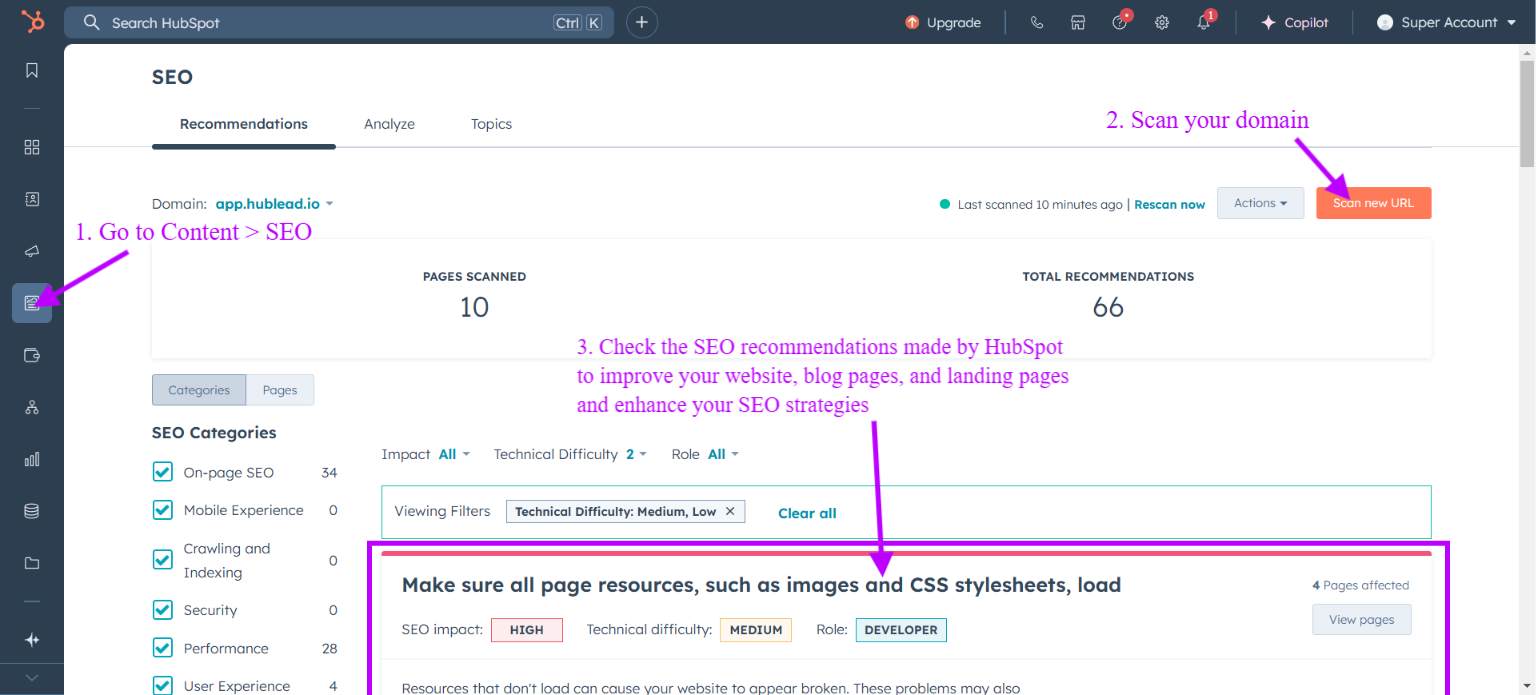
3. HubSpot AI-Powered SEO Optimization
With HubSpot AI, you can boost your website rankings by leveraging AI-powered SEO optimization, ensuring that your web pages, landing pages, and blog posts rank higher in search engines and attract the right audience.
Key Features:
- AI-powered keyword research to identify high-ranking terms.
- SEO insights for refining blog post topics and marketing campaigns.
- AI-generated meta descriptions that increase click-through rates.
Free guide
Get the HubSpot Outbound Handbook
Run an effective outbound campaign that keeps your pipeline full.
AI Tools for Sales Teams
In addition to enhancing your marketing efforts, HubSpot AI equips your sales teams with automated lead scoring, sales forecasting, and follow-ups, making the sales process more efficient.
1. HubSpot AI-Based Lead Scoring
Not all leads are equal, and identifying the most valuable ones can be challenging. HubSpot AI tools simplify this process for you by leveraging predictive analytics and historical data, helping your sales team prioritize high-intent prospects and focus on the leads most likely to convert.

Key Features:
- Lead scoring based on user behavior, email engagement, and website activity.
- AI-powered forecasting to predict revenue trends.
- Buyer intent tracking to identify the best prospects for follow-up.
Tip: I would recommend using the Prospecting Tool in addition to HubSpot’s Lead Scoring Feature to track high-intent website visitors more effectively.
2. HubSpot AI-Generated Sales Emails
Crafting compelling marketing and sales emails can be challenging. HubSpot’s AI content writer streamlines this process by generating personalized subject lines, email content, and follow-ups based on CRM data.
Key Features:
- Generates email content optimized for conversion and engagement.
- Provides subject line generator suggestions to increase open rates.
- Uses historical data to predict optimal send times.
Tip: Emails are useless if they land in spam. Set up DKIM authentication in HubSpot to increase deliverability and maintain sender credibility.
What AI CRM features does HubSpot include?
HubSpot's Smart CRM page names these AI features, beyond lead scoring and sales emails above:
- Data Agent: ask about a customer, contact or prospect and it searches CRM records, calls, emails, documents and the web, so you walk into a call with full context.
- Self-Cleaning CRM: surfaces key points on records and fixes data issues automatically, so you spend less time correcting fields.
- Automatic Duplicate Detection: finds and combines duplicate records, so two reps stop working the same lead.
- Breeze Assistant: a conversational companion for go-to-market teams, for questions about your CRM data.
- AI Prospecting Agent: identifies and engages high-value leads.
AI Tools for Customer Service
HubSpot AI tools also help you enhance your customer service processes by automating ticketing, chatbot responses, and CRM data updates, allowing your team to deliver faster, more efficient support and ultimately boosting customer satisfaction.
1. HubSpot AI Chatbots
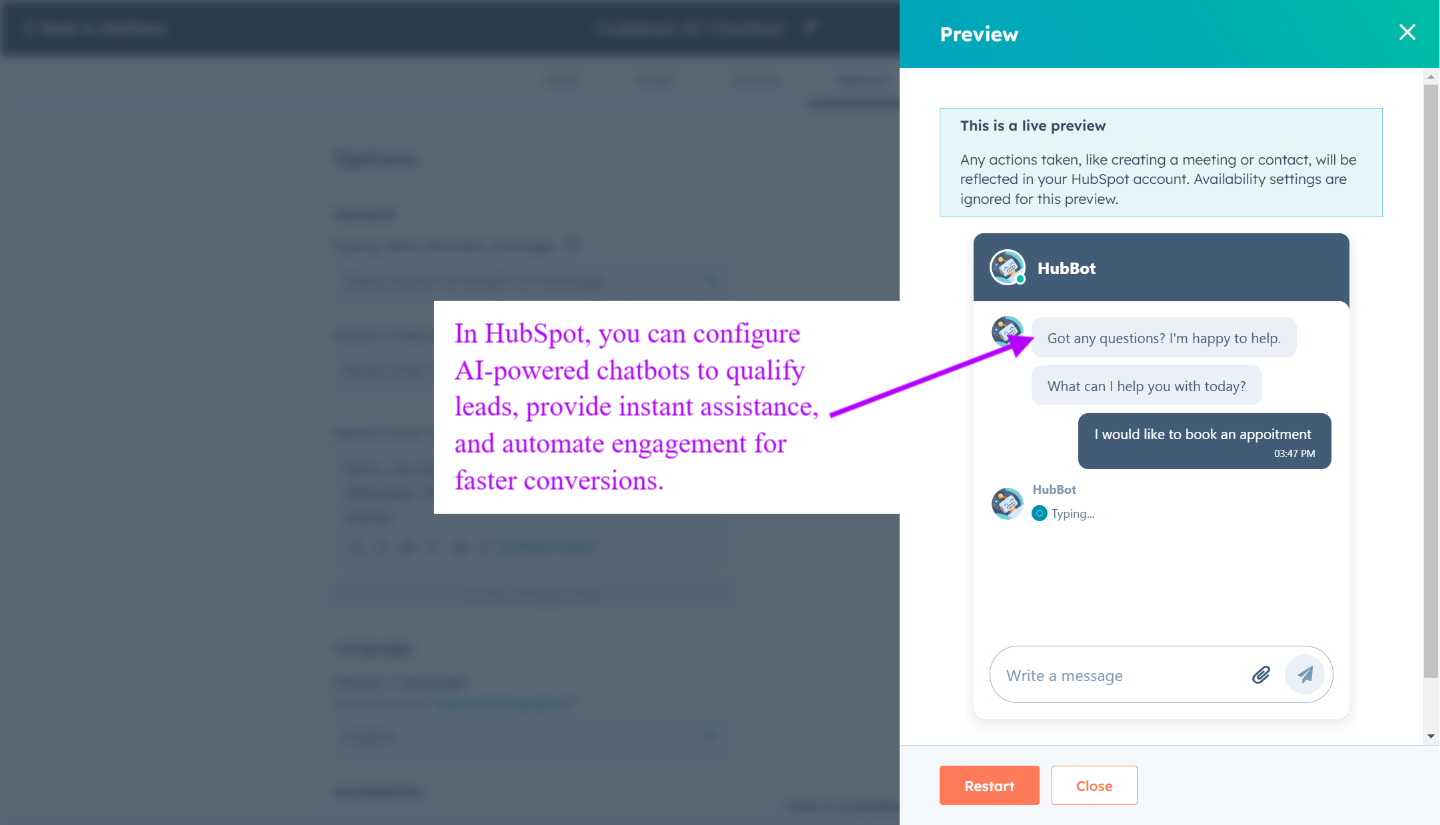
HubSpot's AI chatbot for support is now called Customer Agent. With customer expectations at an all-time high, providing fast and efficient support is crucial. AI assistants like HubSpot’s AI chatbot ensure your customers receive instant, accurate responses around the clock helping you improve engagement and streamline customer service operations.
Key Features:
- Pull information from knowledge base articles to answer common questions.
- Schedule sales meetings directly from chat interactions.
- Improve customer satisfaction by providing fast, accurate responses.
2. HubSpot AI Email Assistant
HubSpot’s AI email assistant enhances customer service efficiency by automating responses, reducing manual workload, and ensuring quick, accurate replies helping you maintain a seamless and professional communication experience.
Key Features:
- Automates customer replies based on past interactions, providing instant and relevant responses.
- Helps customer service teams manage high email volumes by prioritizing and categorizing inquiries.
- Reduces response times, improving customer satisfaction and engagement.
How do you use AI in HubSpot for customer support?
Use Customer Agent. It is an AI support agent that answers customer questions, takes actions in your CRM and hands off to your team. It works across chat, email, voice and messaging apps, and it is trained on your own business content: knowledge base, website, CRM data and past conversations. You can also upload files such as PDFs and company documents.
When a question is too complex, it escalates to a human rep and passes along the conversation context. HubSpot's page gives no numbered setup guide, but it mentions testing before launch and rolling out gradually, which gives this order:
- Give it your content: knowledge base, website and documents.
- Test it before launch.
- Roll it out gradually, then widen the scope.
Customer Agent needs a Professional or Enterprise subscription and runs on HubSpot Credits. HubSpot lists $0.50 per resolution for messaging and $0.50 per minute for voice. A resolution counts when the agent helps and the conversation is not handed to a human rep within 72 hours.
Real-Time Analytics & AI Insights
HubSpot's AI assistant also helps you streamline reporting by providing real-time insights, enabling you to make data-driven decisions that enhance your marketing, sales, and customer engagement strategies.
1. AI-Generated Reports
HubSpot’s AI-powered reporting tools streamline data analysis, helping you make informed decisions with minimal effort. You might ask yourself how it is possible? Well, because you can:
- Quickly create custom reports and dashboards with AI-powered data analysis eliminating manual data compilation.
- Track key performance indicators (KPIs) across sales, marketing, and customer service to measure effectiveness and drive strategic improvements.
- Enhance decision-making with predictive analytics, allowing teams to refine strategies and boost overall performance.
Tip: Precise reports only work with clean data. Regularly audit and clean your HubSpot CRM to prevent outdated or duplicate records from affecting automation accuracy.
2. AI Insights for Smarter Decision-Making
HubSpot’s AI-driven insights provide you with the data they need to make smarter, more strategic decisions in real time. You might wonder how? Well, because the AI assistant helps you:
- Predict customer behavior and adapt marketing strategies proactively to maximize engagement and conversions.
- Optimize lead generation by analyzing buyer intent signals to target high-value prospects more effectively..
- Identify new growth opportunities by analyzing historical data and spotting emerging trends.
Recommendation: For better lead management, we recommend integrating HubSpot with the LinkedIn Sales Navigator to enrich CRM data.
HubSpot's Named Breeze AI Agents
HubSpot groups its AI under Breeze. You build custom agents in Agent Builder and manage every agent in Agent Hub, HubSpot's central home for building and managing AI agents. HubSpot's own agents are listed below. For the full Breeze breakdown, see our Breeze AI guide.
| Agent | What it does |
|---|---|
| Prospecting Agent | Researches accounts, finds contacts and drafts tailored outreach |
| Customer Agent | Answers customer questions and resolves support tickets on its own |
| Data Agent | Surfaces customer insights from your CRM, calls and documents |
| Content Agent | Listed under marketing agents |
| Campaign Agent and Nurture Agent | Listed under marketing agents |
| Revenue Agent | Invoice follow-up and payment reminders |
Breeze also powers Breeze Assistant (HubSpot's in-app AI helper, previously called Breeze Copilot) and Breeze Intelligence for data enrichment.
Predictive Lead Scoring and AI Sales Forecasting
Beyond generating content, HubSpot's AI reads your historical pipeline to score leads and forecast revenue. Predictive lead scoring ranks contacts by their likelihood to close using patterns from past deals, so reps spend time on the highest-intent prospects. AI-powered sales forecasting projects pipeline outcomes from deal stage, velocity, and engagement, giving sales managers an earlier, more reliable read on the quarter.
HubSpot Breeze AI: The Next Evolution

While HubSpot AI tools have been evolving for years, HubSpot Breeze AI introduces the next level of AI-driven automation.
Key Features:
- Breeze Assistant: AI-powered task automation for marketing and sales.
- Breeze Intelligence: Real-time data enrichment and buyer intent tracking.
- Breeze Agents: AI-powered workflows for content creation and CRM management.
Final Thoughts: Is HubSpot AI Right for You?
If you are trying to scale your business, HubSpot AI provides a powerful, all-in-one solution to enhance marketing, sales, and customer service with intelligent automation and data-driven insights.
Ready to take your business to the next level? Activate HubSpot’s AI tools today and start driving productivity, engagement, and conversions effortlessly!
Free guide
Get the HubSpot Outbound Handbook
Run an effective outbound campaign that keeps your pipeline full.
Before you go further
Does HubSpot have AI tools?
Absolutely! HubSpot AI offers a suite of intelligent tools integrated across its platform to optimize marketing, sales, and customer service. By leveraging AI and Smart CRM data, businesses can automate workflows, personalize customer experiences, and improve overall efficiency.
Is HubSpot Copilot free?
Copilot is now called Breeze Assistant, and HubSpot states it is included with every HubSpot subscription at no additional cost. There is no separate fee for it. Agents are different: Customer Agent, for example, needs a Professional or Enterprise subscription and runs on HubSpot Credits.
Does HubSpot use OpenAI?
Yes, HubSpot integrates OpenAI to enhance its AI-powered features. When using AI assistants, HubSpot logs and stores prompts, generated content, and usage data while sharing prompts with OpenAI for content moderation and improvement.
Does HubSpot have chatbots?
Yes, HubSpot provides AI-powered chatbots that help automate conversations with website visitors. These bots can qualify leads, book meetings, and create support tickets, ensuring seamless customer interactions and improved engagement.
Keep reading on LinkedIn and HubSpot
 AI & Breeze
HubSpot Prospecting Agent: Setup Guide for Sales Teams
Set up the HubSpot Prospecting Agent in under 30 minutes: research prospects, draft emails, send follow-ups automatically. Includes configuration tips.
 AI & Breeze
Get The Most Out of HubSpot Breeze Enrichment
Optimize your data insights with HubSpot Breeze Enrichment. Discover practical strategies to enhance efficiency and drive better decision-making. Read more!
 AI & Breeze
HubSpot Smart Content: Overview and Examples
Learn to use HubSpot Smart Content for personalized marketing. Tailor your messages to engage your audience and improve results.
See your CRM on
every LinkedIn profile.
Install the extension, connect HubSpot or Salesforce, open a profile. You see right away whether the person is in your CRM.
Free to start, no card needed.